







Question: Please look at my code and correct my Average distance to start point calculation C++ #include #include #include #include #include #include using namespace std; int
Please look at my code and correct my "Average distance to start point" calculation C++
#include
#include
#include
#include
#include
#include
using namespace std;
int main( )
{
ifstream input;
ofstream output;
string filename;
string line1;
string line2;
string COMMAND;
double startx = 0.0,starty = 0.0,stopx = 0.0,stopy = 0.0;
double x1, y1, backx = 0.0, backy = 0.0;
double distance = 0.0;
double total = 0.0;
double distanceToStart = 0.0;
bool START = false;
bool STOP = false;
do{
cout
cin >> filename;
cout
cout
input.open(filename.c_str());
if (!input.is_open()){
cout
}
}
while(input.fail());
getline(input, line1);
getline(input, line2);
while(!START && input >> COMMAND >> x1 >> y1)
{
if(COMMAND == "START")
{
START = true;
startx = x1;
starty = y1;
backx = x1;
backy = y1;
}
}
while(!STOP && input >> COMMAND >> x1 >> y1)
{
total += sqrt((pow(backx - x1, 2)) + pow(backy - y1, 2));
backx = x1;
backy = y1;
if(COMMAND == "STOP")
{
STOP = true;
stopx = x1;
stopy = y1;
}
}
distance += sqrt(pow(startx - stopx, 2) + pow(starty-stopy, 2));
/eed to add current x and current y to diffrentiate the two distances
distanceToStart = sqrt(pow(startx - backx, 2) + pow(starty-backy, 2));
output.open("GPS.report");
cout
output
cout
output
cout
output
cout
output
cout
output
output.close();
input.close();
return 0;
}
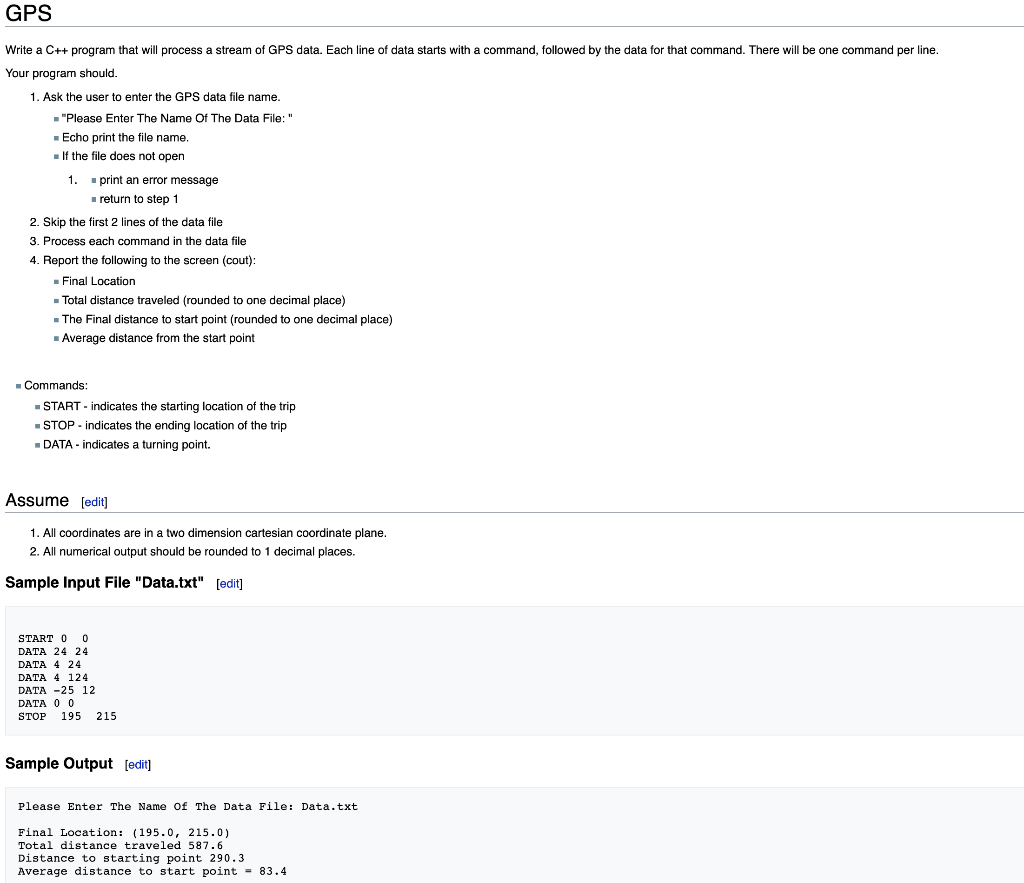
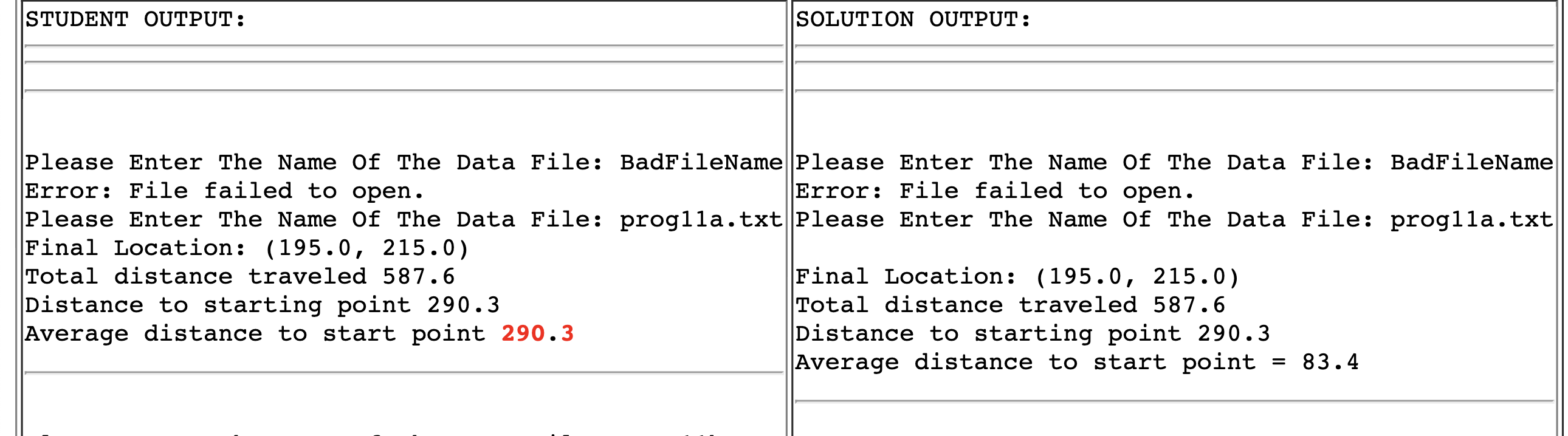
Write a C++ program that will process a stream of GPS data. Each line of data starts with a command, followed by the data for that command. There will be one command per line. Your program should. 1. Ask the user to enter the GPS data file name. " "Please Enter The Name Of The Data File: " - Echo print the file name. - If the file does not open 1. "print an error message - return to step 1 2. Skip the first 2 lines of the data file 3. Process each command in the data file 4. Report the following to the screen (cout): - Final Location - Total distance traveled (rounded to one decimal place) - The Final distance to start point (rounded to one decimal place) - Average distance from the start point - Commands: - START - indicates the starting location of the trip - STOP - indicates the ending location of the trip - DATA - indicates a turning point. Assume [edit] 1. All coordinates are in a two dimension cartesian coordinate plane. 2. All numerical output should be rounded to 1 decimal places. Sample Input File "Data.txt" [edit] START 00 DATA 2424 DATA 424 DATA 4124 DATA 2512 DATA 00 STOP 195215 Sample Output [edit] Please Enter The Name of The Data File: Data.txt Final Location: (195.0,215.0) Total distance traveled 587.6 Distance to starting point 290.3 Average distance to start point =83.4 STUDENT OUTPUT: SOLUTION OUTPUT: Please Enter The Name of The Data File: BadFileName Please Enter The Name Of The Data File: BadFileName Error: File failed to open. Error: File failed to open. Please Enter The Name Of The Data File: proglla.txt Please Enter The Name Of The Data File: proglla.txt Final Location: (195.0,215.0) Total distance traveled 587.6 Final Location: (195.0,215.0) Distance to starting point 290.3 Total distance traveled 587.6 Average distance to start point 290.3 Distance to starting point 290.3 Average distance to start point =83.4
Step by Step Solution
There are 3 Steps involved in it

Get step-by-step solutions from verified subject matter experts
 Study Help