







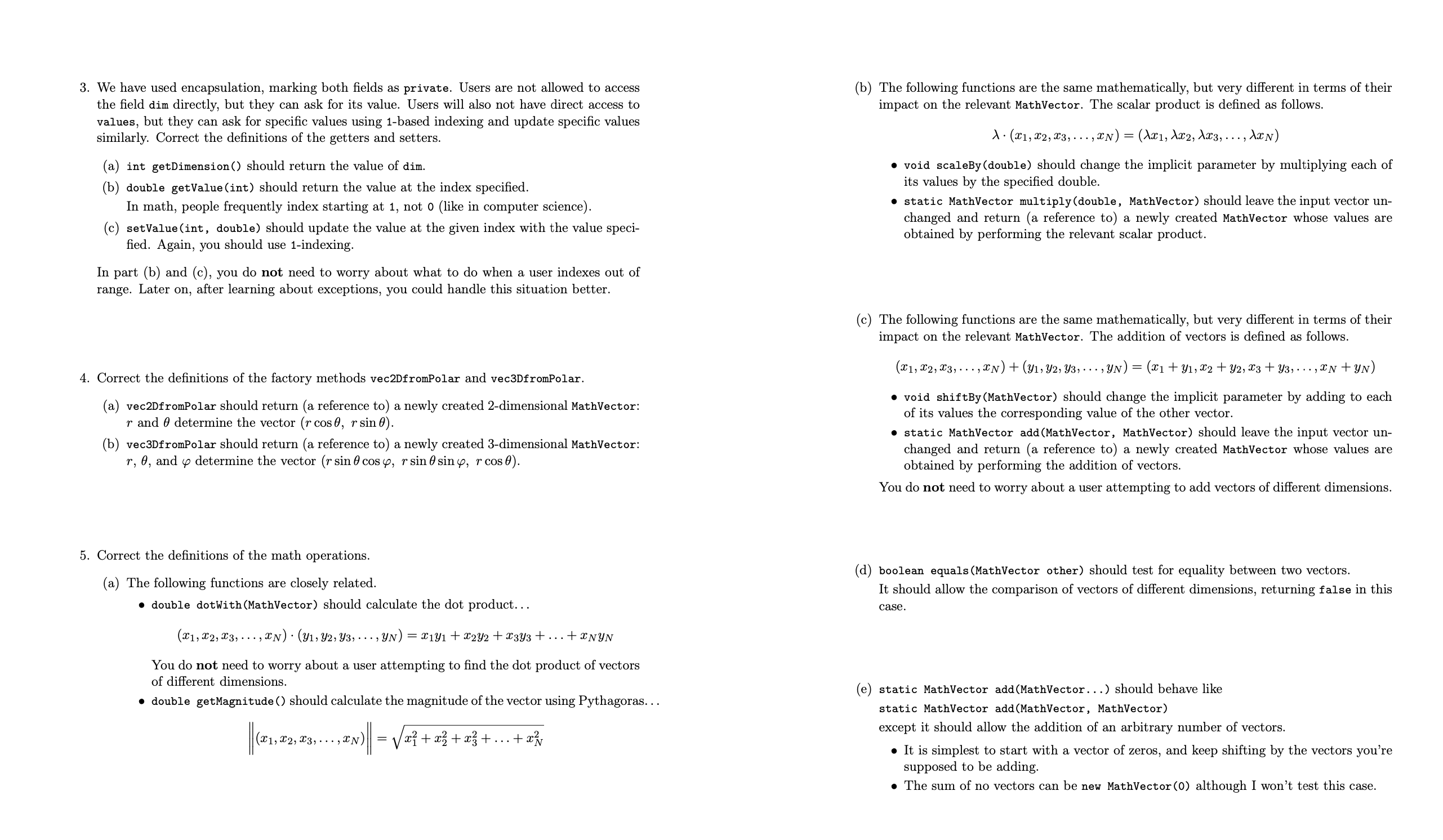
Question: Please make changes to the following java code following the instruciton of tasks posted with this question. Please make use of the resources, the code
Please make changes to the following java code following the instruciton of tasks posted with this question. Please make use of the resources, the code should not be too complicated. The code is correct if it runs with the test code below correctly. Thank you
The code to be edited:
class MathVector
final int dim;
final double values;
public MathVectorint N
dim N;
values new doubleN;
public MathVectordouble arr
dim arr.length;
values new doublearrlength;
public MathVectorMathVector v
dim ;
values null;
public static MathVector vecDfromPolardouble r double theta
return new MathVector;
public static MathVector vecDfromPolardouble r double theta, double phi
return new MathVector;
public int getDimension return ;
public double getValueint idx return ;
public void setValueint idx, double val
public double dotWithMathVector other return ;
public double getMagnitude return ;
public void scaleBydouble scalar
public static MathVector multiplydouble scalar, MathVector v
return new MathVector;
public void shiftByMathVector other
public static MathVector addMathVector v MathVector v
return new MathVector;
public static MathVector addMathVector vs
return new MathVector;
public boolean equalsMathVector other return false;
public String toString return ;
public void print
The code to be tested:
class HWTester
public static void mainString args
MathVector v new MathVector;
MathVector v new MathVector;
MathVector v new MathVectorv;
System.out.printlnvgetDimension vgetDimension;
System.out.printlnvgetValue;
System.out.print
;
vsetValue;
System.out.printlnvtoString;
System.out.printlnv;
vprint;
System.out.print
;
MathVector.vecDfromPolar Math.PI print;
close to Math.sqrt
MathVector.vecDfromPolar Math.PI Math.PI print;
close to Math.sqrt Math.sqrt
System.out.print
;
MathVector v new MathVector;
MathVector w new MathVector;
final MathVector e new MathVector;
final MathVector e new MathVector;
final MathVector e new MathVector;
final MathVector e new MathVector;
System.out.printlnvdotWithe;
System.out.printlnvdotWithe;
System.out.printlnwdotWithw;
System.out.printlnwgetMagnitude;
System.out.print
;
System.out.printlnMathVectormultiply w;
wprint; w unchanged by line before
wscaleBy;
wprint; w changed by line before
System.out.print
;
System.out.printlnMathVectoraddv w;
vprint; v unchanged by line before
wprint; w unchanged by line before
System.out.print
;
vshiftByw;
vprint; v changed by line before
wprint; w unchanged by line before
System.out.print
;
MathVector linearCombination MathVector.add
MathVector.multiply e MathVector.multiply e
MathVector.multiply e MathVector.multiply e
;
linearCombination.print;
System.out.print
;
System.out.printlneequalse; true
System.out.printlneequalse; true
System.out.printlneequalse; true
System.out.printlnnew MathVectorequalsnew MathVector; true
System.out.printlnvequalsv; true
System.out.printlnwequalsw; true
System.out.printlnwequalsnew MathVectWe have
Step by Step Solution
There are 3 Steps involved in it
1 Expert Approved Answer
Step: 1 Unlock

Question Has Been Solved by an Expert!
Get step-by-step solutions from verified subject matter experts
Step: 2 Unlock
Step: 3 Unlock
 Study Help