







Question: ****PLEASE MAKE SURE THIS CODE RUNS IN NETBEANS JAVA SE**** Write a program that animates the bubble sort algorithm. Create an array that consists of
****PLEASE MAKE SURE THIS CODE RUNS IN NETBEANS JAVA SE****
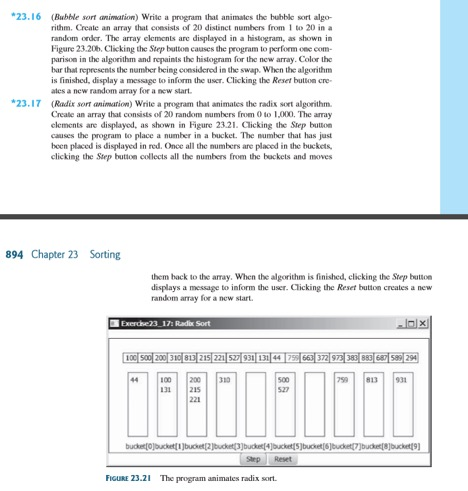
Write a program that animates the bubble sort algorithm. Create an array that consists of 20 distinct numbers from 1 to 20 in a random order. The array elements are displayed as shown Figure 23.20b. Clicking the Step button causes the program to perform one comparison in the algorithm and repaints the histogram for the new array. Color the bar that represents the number being considered in the swap. When the algorithm is finished, display a message to inform the user. Clicking the Reset bullion creates a new random array for a new start. (Radix sort animation) Write a program that animates the radix sort algorithm. Create an array that consists of 20 random numbers from 0 to 1,000. The array elements are displayed, as shown in Figure 23.21. Clicking the Step button causes the program to place a number in a bucket. The number that has just been placed is displayed in red. Once all the numbers are placed in the buckets. clicking the Step button collects all the numbers from the buckets and moves them back to the array. When the algorithm is finished, clicking the Step button displays a message to inform the user. Clicking the Reset button creates a new random array for a new start. Write a program that animates the bubble sort algorithm. Create an array that consists of 20 distinct numbers from 1 to 20 in a random order. The array elements are displayed as shown Figure 23.20b. Clicking the Step button causes the program to perform one comparison in the algorithm and repaints the histogram for the new array. Color the bar that represents the number being considered in the swap. When the algorithm is finished, display a message to inform the user. Clicking the Reset bullion creates a new random array for a new start. (Radix sort animation) Write a program that animates the radix sort algorithm. Create an array that consists of 20 random numbers from 0 to 1,000. The array elements are displayed, as shown in Figure 23.21. Clicking the Step button causes the program to place a number in a bucket. The number that has just been placed is displayed in red. Once all the numbers are placed in the buckets. clicking the Step button collects all the numbers from the buckets and moves them back to the array. When the algorithm is finished, clicking the Step button displays a message to inform the user. Clicking the Reset button creates a new random array for a new start
Step by Step Solution
There are 3 Steps involved in it

Get step-by-step solutions from verified subject matter experts
 Study Help