







Question: please make the hand writing clear . Assignment Tasks: Create a python program that prints the following menu. 1. Insert kew Record 2. Detete Record
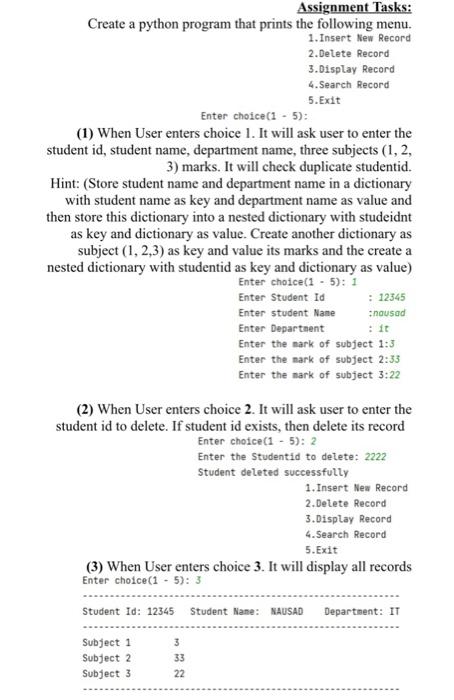
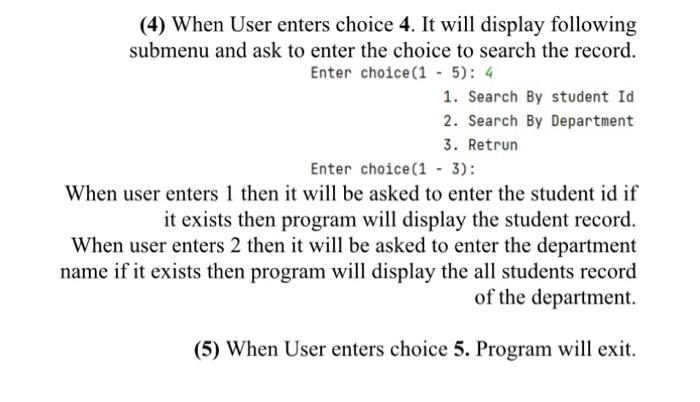
Assignment Tasks: Create a python program that prints the following menu. 1. Insert kew Record 2. Detete Record 3. Display Record 4. Search Record 5. Exit Enter choice (1 - 5): (1) When User enters choice 1. It will ask user to enter the student id, student name, department name, three subjects ( 1,2 , 3) marks. It will check duplicate studentid. Hint: (Store student name and department name in a dictionary with student name as key and department name as value and then store this dictionary into a nested dictionary with studeidnt as key and dictionary as value. Create another dictionary as subject (1,2,3) as key and value its marks and the create a nested dictionary with studentid as key and dictionary as value) Enter choice (15):1 Enter Student Id : 12345 Enter student Nane ;nousad Enter Departnent : it Enter the nark of subject 1:3 Enter the nark of subject 2:33 Enter the nark of subject 3:22 (2) When User enters choice 2. It will ask user to enter the student id to delete. If student id exists, then delete its record Enter choice (15):2 Enter the Studentid to detete: 2222 Student deleted successfully 1. Insert Nea Record 2. Detete Record 3.Display Record 4. Search Record 5. Exit (3) When User enters choice 3. It will display all records (4) When User enters choice 4. It will display following submenu and ask to enter the choice to search the record. Enter choice(1 - 5): 4 1. Search By student Id 2. Search By Department 3. Retrun Enter choice(1 - 3): When user enters 1 then it will be asked to enter the student id if it exists then program will display the student record. When user enters 2 then it will be asked to enter the department name if it exists then program will display the all students record of the department. (5) When User enters choice 5. Program will exit
Step by Step Solution
There are 3 Steps involved in it

Get step-by-step solutions from verified subject matter experts
 Study Help