







Question: Please modify my C program so it prints out the desired output correctly.( Do not just copy and paste my code as the answer, I
Please modify my C program so it prints out the desired output correctly.( Do not just copy and paste my code as the answer, I will downvote. The code needs to successfully output the desired output. )
Here are the program directions:
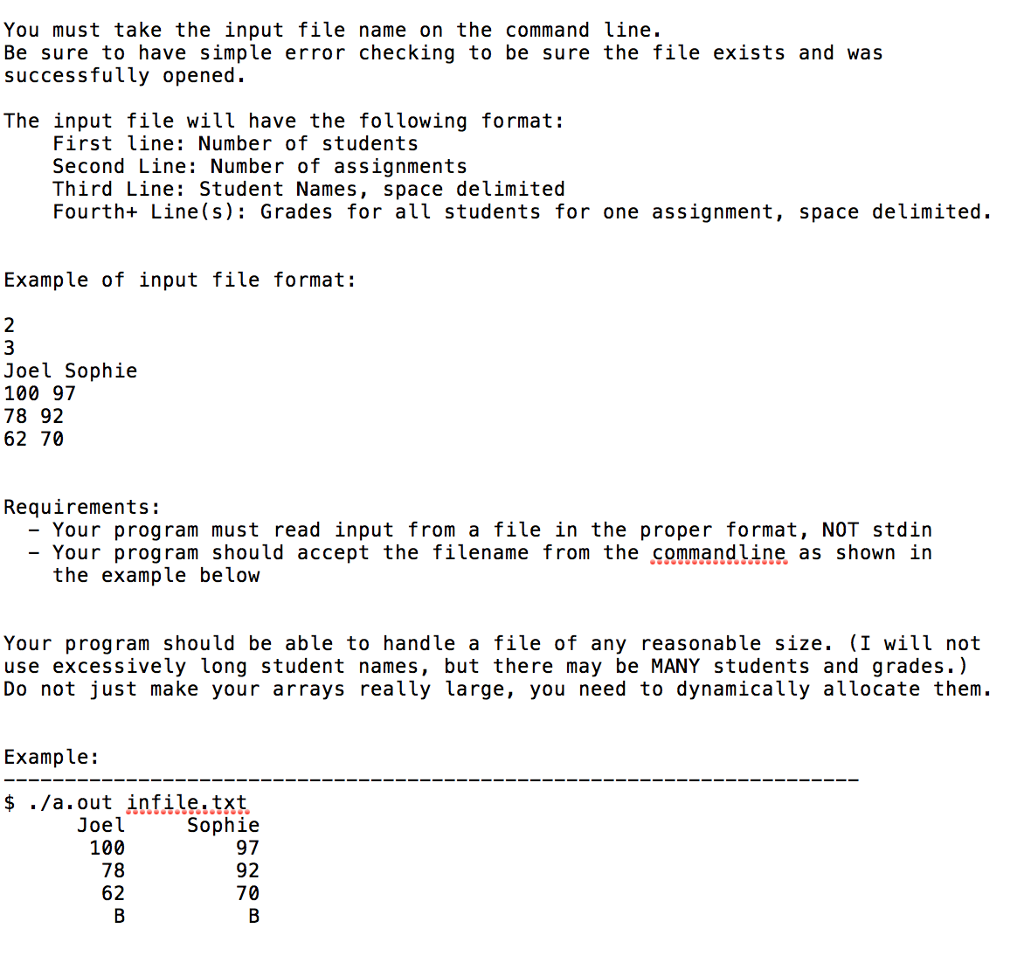 Here is my program source code:
#include
return 0; }// End of main function
// Function to display final grade of all the students void printFinalGrades(int COLS, char Fgrades[]) { int i = 0; // Loops till number of students for (i = 0; i = 90) // Assign grade as 'A' Fgrades[i] = 'A'; // Otherwise checks if average is greater than or equals to 80 else if (avg >= 80) // Assign grade as 'B' Fgrades[i] = 'B'; // Otherwise checks if average is greater than or equals to 70 else if (avg >= 70) // Assign grade as 'C' Fgrades[i] = 'C'; // Otherwise checks if average is greater than or equals to 60 else if (avg >= 60) // Assign grade as 'D' Fgrades[i] = 'D'; // Otherwise less than 60 else // Assign grade as 'F' Fgrades[i] = 'F'; }// End of for loop }// End of function // Function to display student names void printStudents(int COLS, char students[COLS][20]) { int i = 0; int numA = COLS; // Loops till number of columns for (i = 0; i You must take the input file name on the command line Be sure to have simple error checking to be sure the file exists and was successfully opened. The input file will have the following format: First line: Number of students Second Line: Number of assignments Third Line: Student Names, space delimited Fourth+ Line(s) Grades for all students for one assignment, space delimited. Example of input file format: 2 3 Joel Sophie 100 97 78 92 62 70 Requirements: - Your program must read input from a file in the proper format, NOT stdin - Your program should accept the filename from the commandline as shown in the example below Your program should be able to handle a file of any reasonable size. (I will not use excessively long student names, but there may be MANY students and grades.) Do not just make your arrays really large, you need to dynamically allocate them. Example: $ ./a.out infile.txt Joel 100 78 62 Sophie 97 92 70
Step by Step Solution
There are 3 Steps involved in it

Get step-by-step solutions from verified subject matter experts
 Study Help