







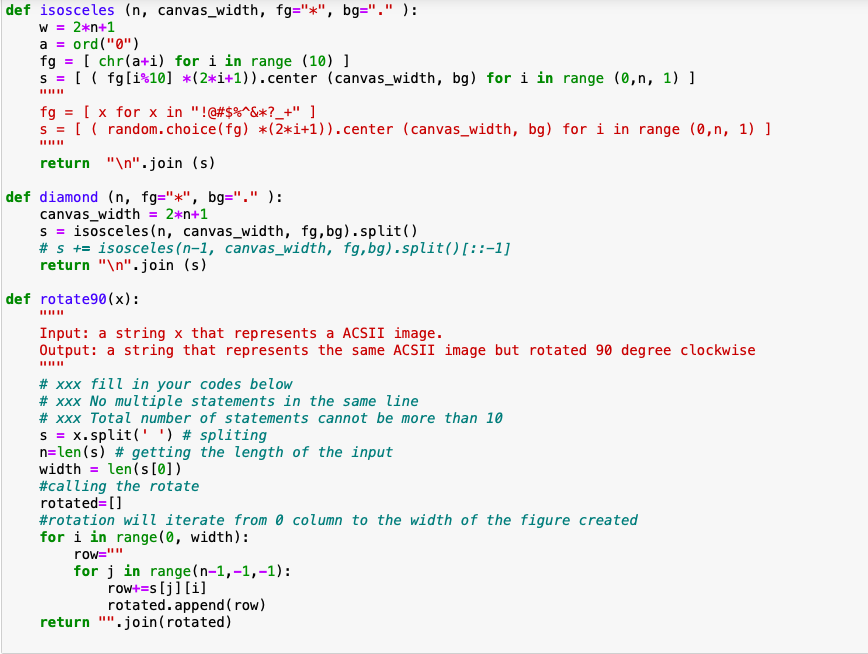
Question: Please modify the code so that the output will print as the expected out put Output resulted from above : Expected Output a = def
Please modify the code so that the output will print as the expected out put
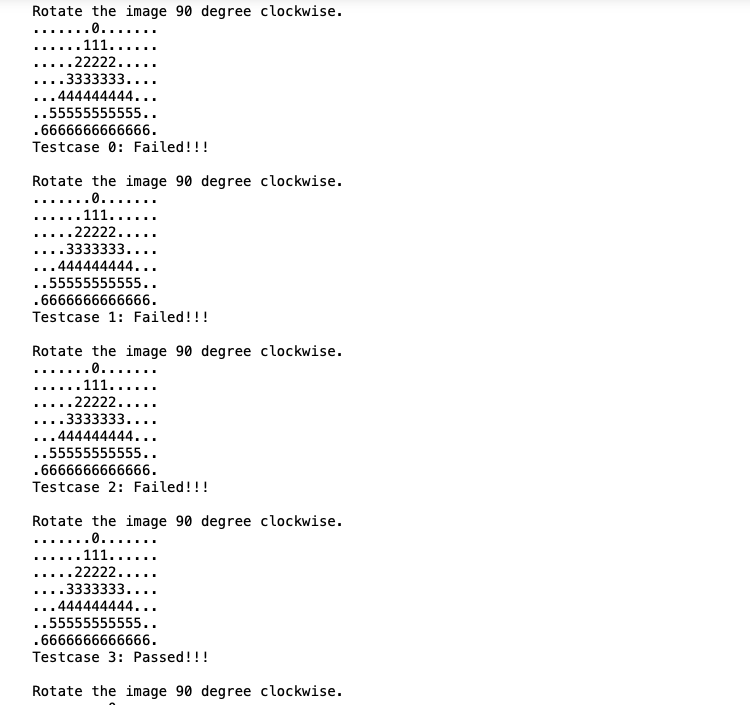
Output resulted from above :
Expected Output
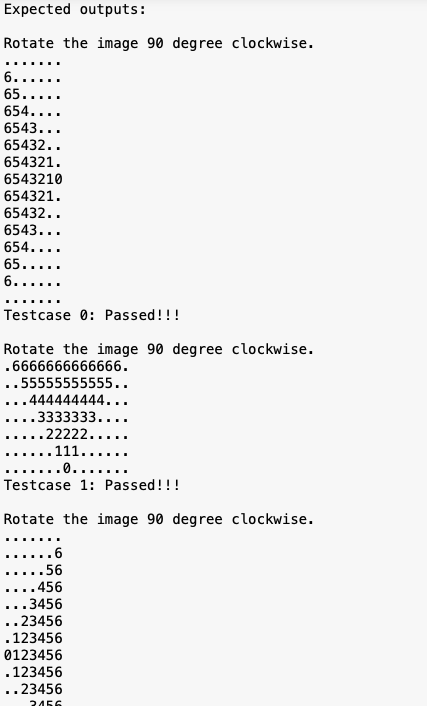
a = def isosceles (n, canvas_width, fg="*", bg="," ): W = 2*n+1 ord("") fg = [ chr(a+i) for i in range (10) ] s = [ ( fg[i:10] *(2*1+1)).center (canvas_width, bg) for i in range (0,n, 1) ] fg = [ x for x in "!@#$%^&*?_+" ] s = [ ( random.choice(fg) *(3*i+1)).center (canvas_width, bg) for i in range (0,n, 1) ] return " ".join (s) def diamond (n, fg="*", bg="," ): canvas_width = 2*n+1 s = isosceles(n, canvas_width, fg, bg).split() # $ += isosceles(n-1, canvas_width, fg, bg).split() [::-1] return " ". join (s) def rotate90(x): S = Input: a string x that represents a ACSII image. Output: a string that represents the same ACSII image but rotated 90 degree clockwise # xxx fill in your codes below # Xxx No multiple statements in the same line # Xxx Total number of statements cannot be more than 10 X.split(' ') # spliting n=len(s) # getting the length of the input width = len(s[0]) #calling the rotate rotated=[] #rotation will iterate from a column to the width of the figure created for i in range(0, width): row="" for j in range(n-1,-1,-1): row+=s [j][i] rotated.append(row) return ".join(rotated) Rotate the image 90 degree clockwise. .0....... ...... 111...... ..22222..... ..3333333.... ...444444444... ..55555555555.. .6666666666666. Testcase 0: Failed!!! Rotate the image 90 degree clockwise. ...0....... . 111.. ...22222.. ..3333333 ...444444444... ..55555555555.. .6666666666666. Testcase 1: Failed!!! Rotate the image 90 degree clockwise. ...0... .. 111. ...22222. ...3333333.... ...444444444... ..55555555555.. .6666666666666. Testcase 2: Failed!!! Rotate the image 90 degree clockwise. ....0........ ... 111.. ....22222.. .3333333... ..444444444... ..55555555555.. .6666666666666. Testcase 3: Passed!!! Rotate the image 90 degree clockwise. Expected outputs: Rotate the image 90 degree clockwise. 6...... 65..... 654.... 6543... 65432.. 654321. 6543210 654321. 65432.. 6543... 654.... 65..... 6... Testcase 0: Passed!!! ... Rotate the image 90 degree clockwise. .6666666666666. ...55555555555.. .444444444... 3333333.. ...22222. ... 111... .......0.. Testcase 1: Passed!!! Rotate the image 90 degree clockwise. ......6 .....56 ....456 ...3456 ...23456 .123456 0123456 .123456 ..23456 2466
Step by Step Solution
There are 3 Steps involved in it

Get step-by-step solutions from verified subject matter experts
 Study Help