







Question: Please only answer Question 2 (PHP pages design 50%), Question 1 was answered (HTML, CSS) in a previous post. Problem 1. Web page design using
Please only answer Question 2 (PHP pages design 50%), Question 1 was answered (HTML, CSS) in a previous post.
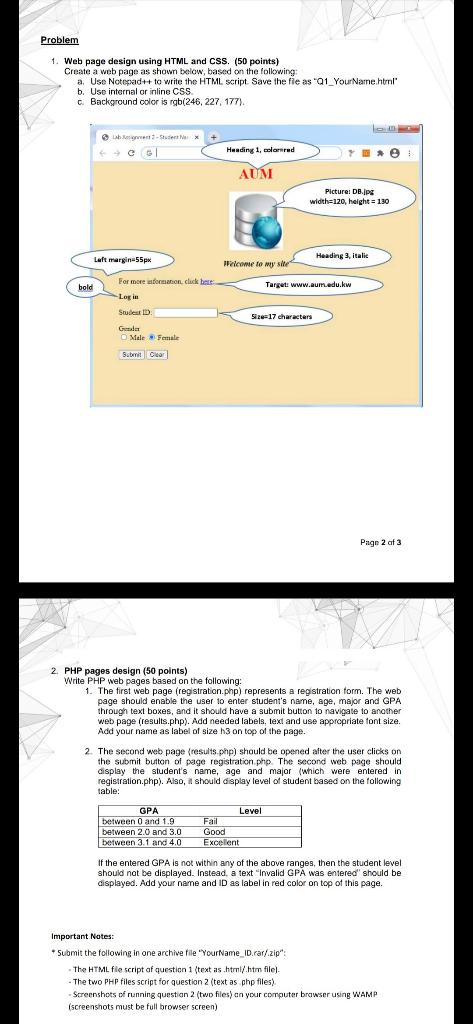
Problem 1. Web page design using HTML and CSS. (50 points) Create a web page as shown below, based on the following a. Use Notepad++ to write the HTML script. Save the fie as 01_Your Name.html" b. Use internal or inline CSS c Background color is rgb(246, 227, 177). * Huading I, colored AUM Picture: DB.jpg width=120, height = 130 Heading 3. Itali Luft margin-55px Pelcome to my site For more on click bete: bold Target www.mum.edu.kw Log in Size17 characters Studes Grala | Male Female Submit oor Page 2 of 3 2. PHP pages design (50 points) Write PHP web pages based on the following: 1. The first web page (registration.php) represents a registration form. The web page should enable the user to enter student's name, age, major and GPA through text boxes, and it should have a submit button to navigate to another web page (results.php). Add needed labels, text and use appropriate font size. Add your name as label of size 93 on top of the page. 2. The second web page results.php) should be opened after the user clicks on the submit button of page registration php. The second web page should display the student's name, age and major (which were entered in registration.php). Also, it should display level of student based on the following table: GPA between 0 and 1.9 between 2.0 and 3.0 between 3.1 and 4.0 Level Fail Good Excellent If the entered GPA is not within any of the above ranges, then the student level should not be displayed. Instead, a text "Invalid GPA was entered should be displayed. Add your name and ID as label in red color on top of this page. Important Notes: *Submit the following in one archive file "Yourtame_ID.rar/.zip": The HTML fle script of question 1 (text as.html.htm file). - The two PHP files script for question 2 (text as php files) Screenshots of running question 2 (two files) on your computer browser using WAMP (screenshots must be full browser screen)
Step by Step Solution
There are 3 Steps involved in it

Get step-by-step solutions from verified subject matter experts
 Study Help