







Question: please only use phyton and has to work on coderunner -the last three functions are listed below: Part 2: The Final Program [10 marks] Complete
please only use phyton and has to work on coderunner
-the last three functions are listed below:
![three functions are listed below: Part 2: The Final Program [10 marks]](https://dsd5zvtm8ll6.cloudfront.net/si.experts.images/questions/2024/10/670fd58e788c4_958670fd58e6a2e5.jpg)
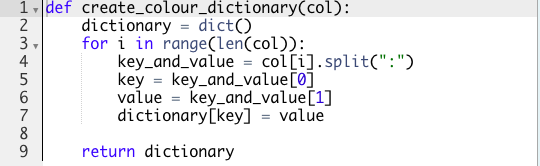
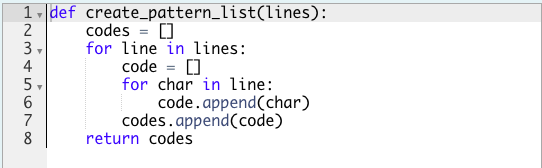
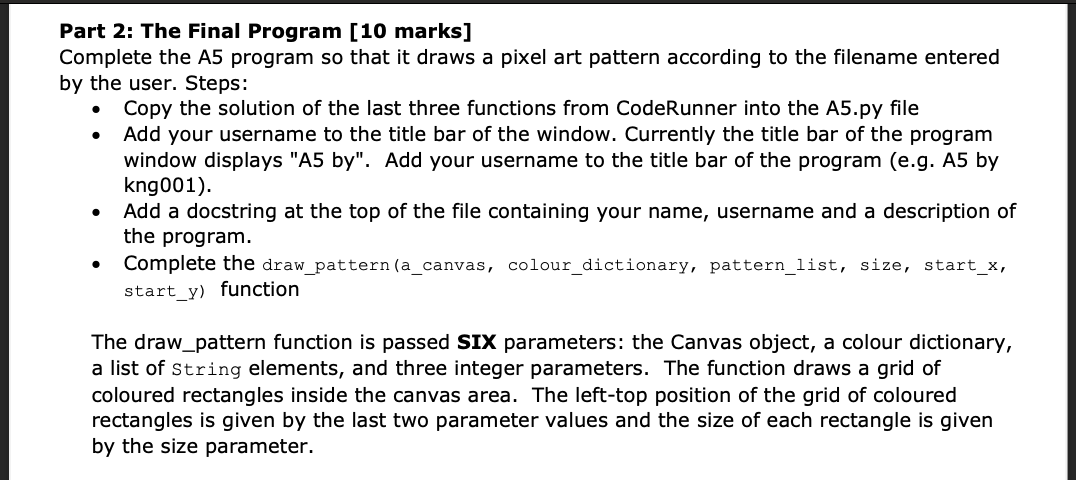
Part 2: The Final Program [10 marks] Complete the A5 program so that it draws a pixel art pattern according to the filename entered by the user. Steps: 0 Copy the solution of the last three functions from CodeRunner into the A5.py le . Add your username to the title bar of the window. Currently the title bar of the program window displays "A5 by". Add your username to the title bar of the program (e.g. A5 by kngOOl). Add a docstring at the top of the le containing your name, username and a description of the program. 0 Complete the draw_pattern(a_canvas, colour_dictionary, pattern_list, size, start_x, Start_y) function The draw_pattem function is passed SIX parameters: the Canvas object, a colour dictionary, a list of String elements, and three integer parameters. The function draws a grid of coloured rectangles inside the canvas area. The left-top position of the grid of coloured rectangles is given by the last two parameter values and the size of each rectangle is given by the size parameter. def get_lines_from_file(filename) : lines = f = open(filename) for line in f: for word in line. strip(). split(): Lines . append(word. strip()) f. close() return linesdef create_colour_dictionary(col) : dictionary = dict() for i in range(len(col)): key_and_value = col[i] . split(":"> LO OO -JOUTAWNY key = key_and_value[0] value = key_and_value[1] dictionary [key ] = value return dictionarydef create_pattern_list(lines) : codes = T for line in lines: code = for char in line: code . append(char) codes . append(code) return codes
Step by Step Solution
There are 3 Steps involved in it

Get step-by-step solutions from verified subject matter experts
 Study Help