







Question: ##PLEASE, PLEASE AND PLEASE! I NEED A RAPTOR FLOWCHART! NOT A C + + CODE## Create a Raptor program that allows a user to enter
##PLEASE, PLEASE AND PLEASE! I NEED A RAPTOR FLOWCHART! NOT A C CODE##
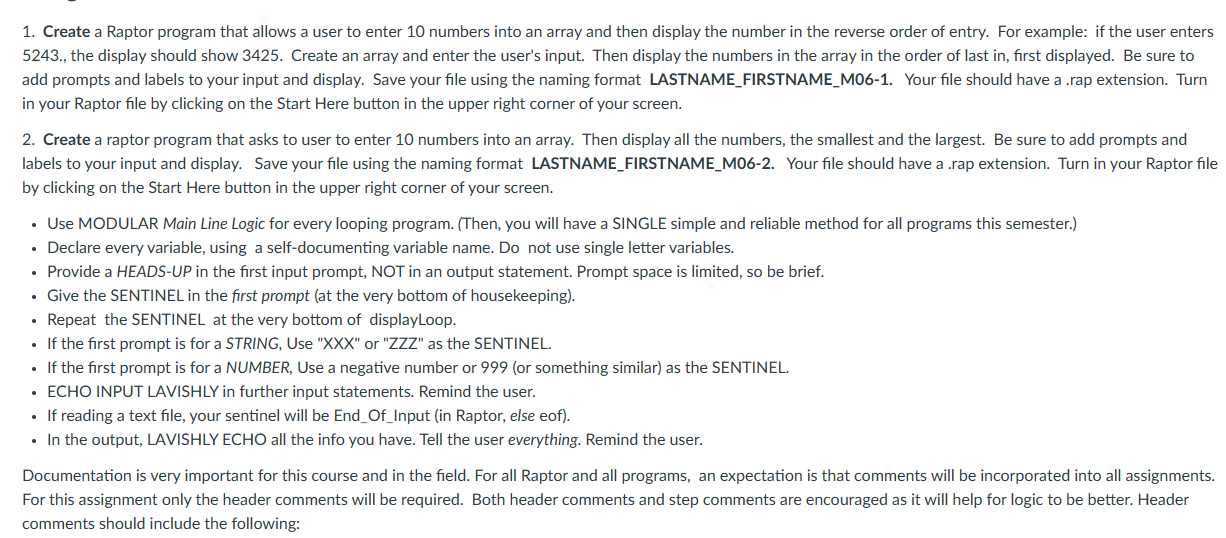
Create a Raptor program that allows a user to enter numbers into an array and then display the number in the reverse order of entry. For example: if the user enters
the display should show Create an array and enter the user's input. Then display the numbers in the array in the order of last in first displayed. Be sure to
add prompts and labels to your input and display. Save your file using the naming format LASTNAMEFIRSTNAMEM Your file should have a rap extension. Turn
in your Raptor file by clicking on the Start Here button in the upper right corner of your screen.
Create a raptor program that asks to user to enter numbers into an array. Then display all the numbers, the smallest and the largest. Be sure to add prompts and
labels to your input and display. Save your file using the naming format LASTNAMEFIRSTNAMEM Your file should have a rap extension. Turn in your Raptor file
by clicking on the Start Here button in the upper right corner of your screen.
Use MODULAR Main Line Logic for every looping program. Then you will have a SINGLE simple and reliable method for all programs this semester.
Declare every variable, using a selfdocumenting variable name. Do not use single letter variables.
Provide a HEADSUP in the first input prompt, NOT in an output statement. Prompt space is limited so be brief.
Give the SENTINEL in the first prompt at the very bottom of housekeeping
Repeat the SENTINEL at the very bottom of displayLoop.
If the first prompt is for a STRING, Use XXX or ZZZ as the SENTINEL.
If the first prompt is for a NUMBER, Use a negative number or or something similar as the SENTINEL.
ECHO INPUT LAVISHLY in further input statements. Remind the user.
If reading a text file, your sentinel will be EndOfInput in Raptor, else eof
In the output, LAVISHLY ECHO all the info you have. Tell the user everything. Remind the user.
Documentation is very important for this course and in the field. For all Raptor and all programs, an expectation is that comments will be incorporated into all assignments.
For this assignment only the header comments will be required. Both header comments and step comments are encouraged as it will help for logic to be better. Header
comments should include the following:
Step by Step Solution
There are 3 Steps involved in it
1 Expert Approved Answer
Step: 1 Unlock

Question Has Been Solved by an Expert!
Get step-by-step solutions from verified subject matter experts
Step: 2 Unlock
Step: 3 Unlock
 Study Help