







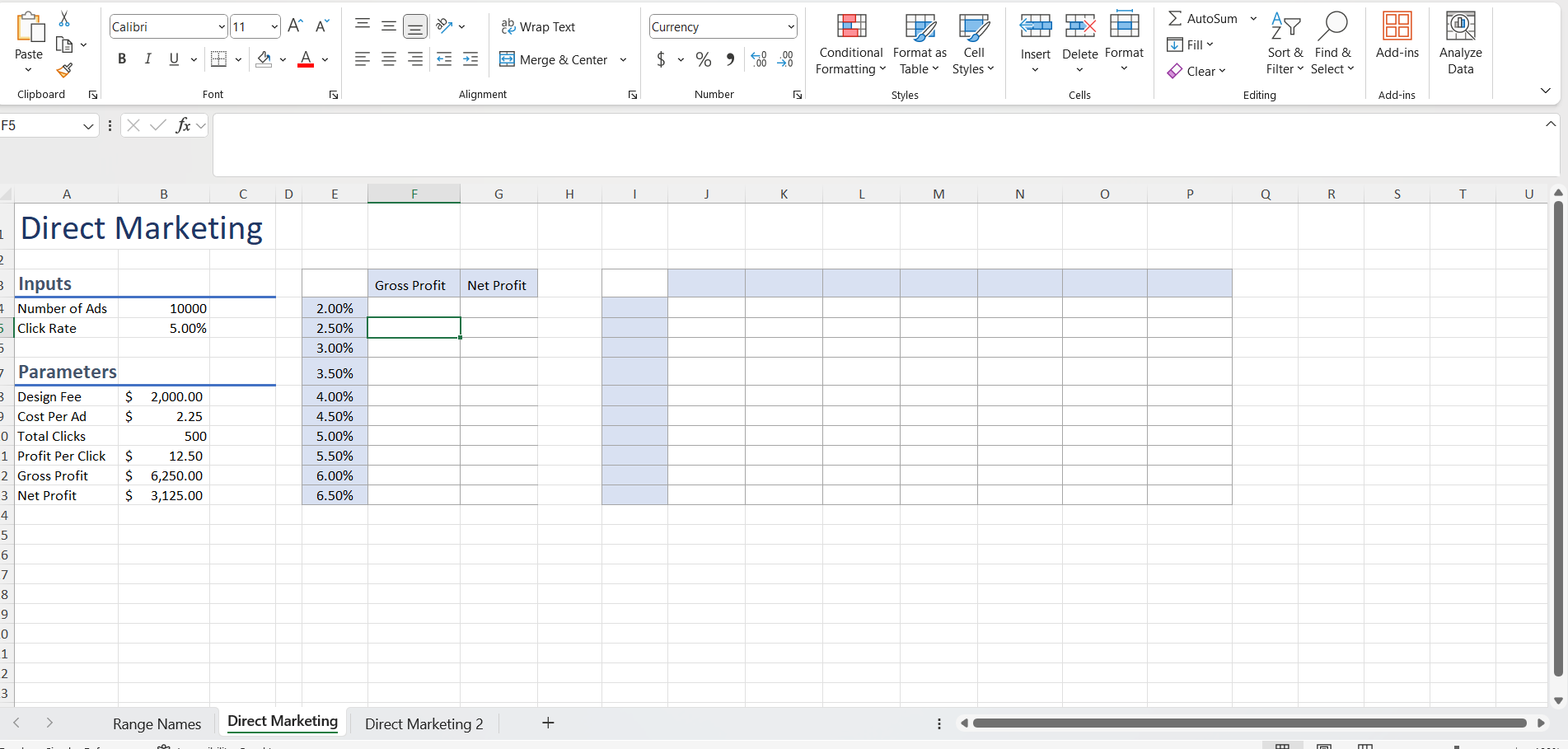
Question: PLEASE PLEASE HELP ME STEP BY STEP. 1 On the Direct Marketing worksheet, create appropriate range names for Design _ Fee ( cell B 8
PLEASE PLEASE HELP ME STEP BY STEP.
On the Direct Marketing worksheet, create appropriate range names for DesignFee cell B CostPerAd cell B TotalClicks cell B ProfitPerClick B and GrossProfit cell B
Note, the CostPerAd is charged with each click by a potential customer.
Edit the existing name range DesignFee to DesignFee to reflect the current year.
Use the newly created range names to create a formula to calculate Gross Profit cell B and Net Profit cell B
Create a new worksheet named Range Names, paste the newly created range name information in cell A and resize the columns as needed for proper display.
Mac users, use the Insert menu to insert a new worksheet and paste the range names.
On the Direct Marketing worksheet, use Goal Seek to determine the optimal click rate in order to earn a $ net profit.
Starting in cell E Complete the series of substitution values ranging from to at increments of vertically down column E
Enter references to the Gross Profit and Net Profit in the correct location for a onevariable data table.
Complete the onevariable data table, and then format the results with Accounting Number Format with two decimal places.
Apply custom number formats to display Gross Profit in cell F and Net Profit in cell G
Copy the response rate substitution values from the onevariable data table, and then paste the values starting in cell I
Type in cell J Complete the series of substitution values from to at increments.
Enter the reference to net profit formula in the correct location for a twovariable data table.
Complete the twovariable data table and format the results with Accounting Number Format with two decimal places.
Apply a custom number format to make the formula reference appear as Net Profit.
Make the Direct Marketing worksheet active. Create a scenario named Best Case, using Number of Ads and Click Rate. Enter these values for the scenario: and
Create a second scenario named Worst Case, using the same changing cells. Enter these values for the scenario: and
Create a third scenario named Most Likely, using the same changing cells. Enter these values for the scenario: and
Generate a scenario summary report using Gross Profit and Net Income.
Return to the Direct Marketing worksheet. Load the Solver addin if it is not already loaded. Launch Solver and set the objective to calculate a net profit of $
Use Number of Ads and Click Rate B:B as changing variable cells.
Set a constraint to ensure Number of Ads purchased is less than or equal to
Set a constraint to ensure Click Rate is less than or equal to Mac users should enter the value in decimal form. Example
Solve the problem. Generate the Answer Report.
Create a footer on all worksheets with your name on the left side, the sheet name code in the center, and the file name code on the right side.
Step by Step Solution
There are 3 Steps involved in it
1 Expert Approved Answer
Step: 1 Unlock

Question Has Been Solved by an Expert!
Get step-by-step solutions from verified subject matter experts
Step: 2 Unlock
Step: 3 Unlock
 Study Help