







Question: please post a screen shot of your code to better understand it. 4 Practice of using fprintf command to create formated results 4. Part 1
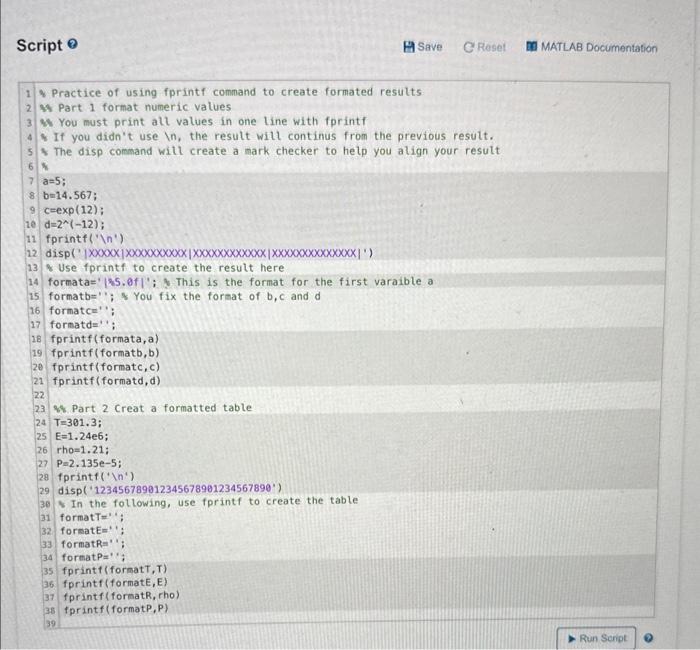
4 Practice of using fprintf command to create formated results 4. Part 1 format numeric values Mh You must print alt values in one line with fprintf * If you didn't use in, the result will continus from the previous result. * The disp command witl create a mark checker to help you align your result a=5; b=14.567; c=exp(12); d=2(12); fprintf(' (n) Use fprintf to create the result here formata=' 2.5.0f; 3 This is the format for the first varaible a formatb= "; s You fix the format of b,c and d formatce"; formatd="'; fprintf(formata,a) fprintf (formatb, b) fprintf (formatc,c) fprintf(formatd, d) 8. Part 2 Creat a formatted table T=301.3; E=1.24e6; rho=1.21; P=2.135e5; fprintf( 1 4) disp('123456789012345678901234567890') In the following, use fprintf to create the table formatT=" ; forsatE=:'; formatR = " : format P=; fprintf (formatT,T) fprintf (formatE, E) fprintf (formatR, rho) fprintf (formatP,P)
Step by Step Solution
There are 3 Steps involved in it

Get step-by-step solutions from verified subject matter experts
 Study Help