



Question: Please post answer in MARIE Download the MARIE simulator from http://computerscience.jbpub.com/ecoa/2e/student_resources.cfm. From the .zip file copy the MarieSim.jar file to another directory (like the Desktop).
Please post answer in MARIE
Download the MARIE simulator from http://computerscience.jbpub.com/ecoa/2e/student_resources.cfm.
From the .zip file copy the MarieSim.jar file to another directory (like the Desktop).
Run Marie.jar (This can be done on any system with the Java Runtime Environment).
Click on File, then Edit. This will bring up the MARIE editor. Type in the code from below. Do not include the Hex Addresses, but do include the comments. Click on File and Save As to save your Assembly file (.mas)
In the Editor, click on Assemble and then Assemble Current File. Fix any errors in the error list. If there are no errors, the assembler will create a MARIE executable file (.mex). Back in the simulator, click File and Load. Select the newly created .mex file. This loads your assembled program. You can now click Run and Run. You can see if the program ran correctly by examining the memory at the locations X and Y (in this program that is locations 109 and 10A).
If your program did not run correctly, you can debug it by Stepping through the program.
Once it works, modify it so that instead of hard coding X and Y in the program, Input a number (call it X) using the Input instruction. Store the result of doubling X in Y and then Output Y. This means you only have to call Subr once.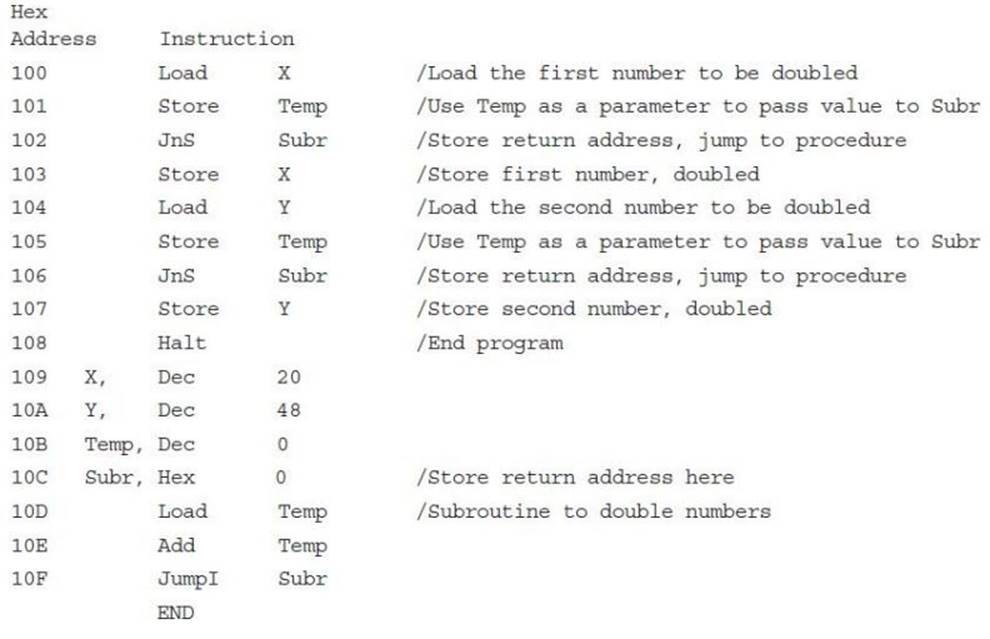
Hex Address Instruction X, Y, 100 101 102 103 104 105 106 107 108 109 10A 10B Temp, Dec 10C Subr, Hex 10D 10E 10F Load Store JnS Store Load Store JnS Store Halt Dec Dec Load Add Jump I END X Temp Subr X Y Temp Subr Y 20 48 0 Temp Temp Subr /Load the first number to be doubled /Use Temp as a parameter to pass value to Subr /Store return address, jump to procedure /Store first number, doubled /Load the second number to be doubled /Use Temp as a parameter to pass value to Subr /Store return address, jump to procedure /Store second number, doubled /End program /Store return address here /Subroutine to double numbers.
Step by Step Solution
3.37 Rating (169 Votes )
There are 3 Steps involved in it
Question Input taking input Store X store input in X Store Temp ... View full answer

Get step-by-step solutions from verified subject matter experts