







Question: please post Excel screenshots on steps * PROJECT STEPS 1. Pranjali Kashyap is a financial analyst at Mount Moreland Hospital in Baltimore, Maryland. She is
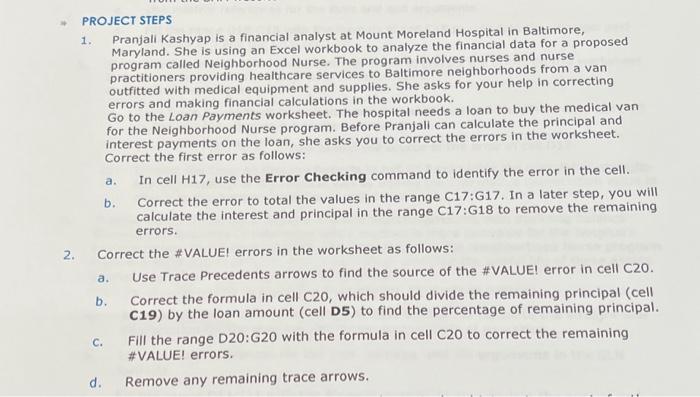
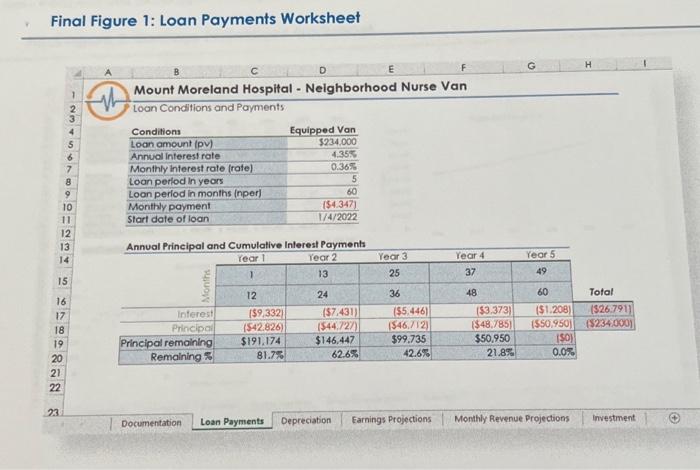
* PROJECT STEPS 1. Pranjali Kashyap is a financial analyst at Mount Moreland Hospital in Baltimore, Maryland. She is using an Excel workbook to analyze the financial data for a proposed program called Neighborhood Nurse. The program involves nurses and nurse practitioners providing healthcare services to Baltimore neighborhoods from a van outfitted with medical equipment and supplies. She asks for your help in correcting errors and making financial calculations in the workbook. Go to the Loan Payments worksheet. The hospital needs a loan to buy the medical van for the Neighborhood Nurse program. Before Pranjall can calculate the principal and interest payments on the loan, she asks you to correct the errors in the worksheet. Correct the first error as follows: a. In cell H17, use the Error Checking command to identify the error in the cell. b. Correct the error to total the values in the range C17:G17. In a later step, you will calculate the interest and principal in the range C17:G18 to remove the remaining errors. 2. Correct the \#VALUEI errors in the worksheet as follows: a. Use Trace Precedents arrows to find the source of the \#VALUEI error in cell C20. b. Correct the formula in cell C2O, which should divide the remaining principal (cell C19) by the loan amount (cell D5) to find the percentage of remaining principal. c. Fill the range D20:G20 with the formula in cell C20 to correct the remaining \#VALUE! errors. d. Remove any remaining trace arrows. Final Figure 1: Loan Payments Worksheet A B C D E Mount Moreland Hospital - Neighborhood Nurse Van Loan Conditions and Payments \begin{tabular}{lr} \hline Conditions & Equipped Van \\ \hline Loan amount (pv) & $234.000 \\ \hline Annual interest rote & 4.35% \\ \hline Monthly interest rate (rate) & 0.36% \\ \hline Loan perlod in years & 5 \\ \hline Loan period in months (nper) & 60 \\ \hline Monthly payment & {[$4.347)} \\ \hline Start date of loan & 1/4/2022 \\ \hline \end{tabular} Annual Principal and Cumulative Interest Payments 23. Documentation Loan Payments Depreciation Earnings Projections Monthly Revenue Projections investiment
Step by Step Solution
There are 3 Steps involved in it

Get step-by-step solutions from verified subject matter experts
 Study Help