







Question: Please program in C# Form Create a single form for your application. This form will have the following controls Name textbox. Social Security Number masked
Please program in C#
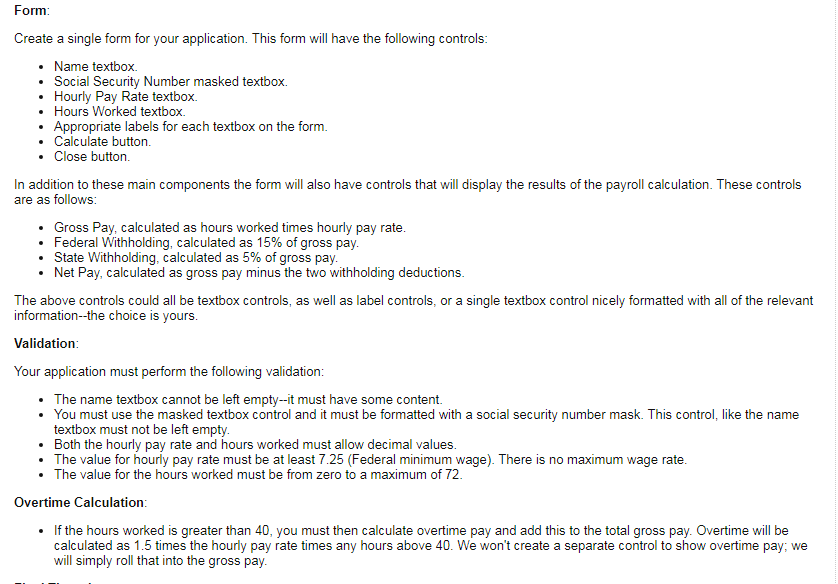
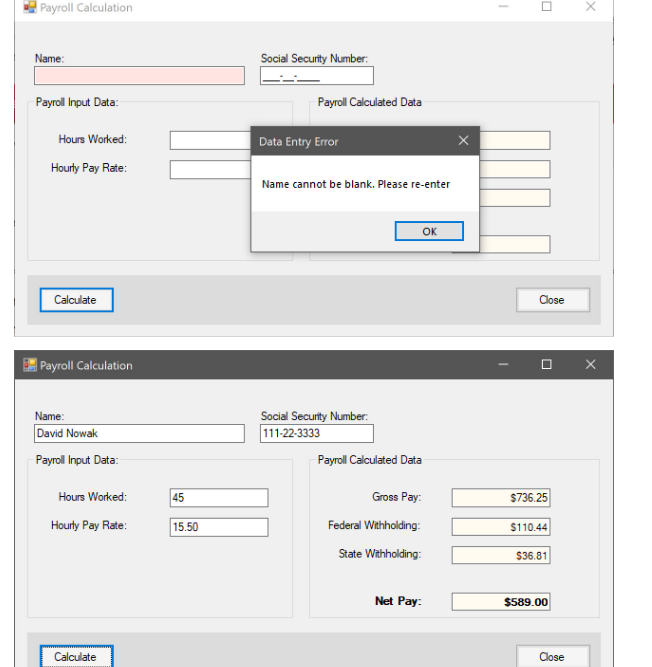
Form Create a single form for your application. This form will have the following controls Name textbox. Social Security Number masked textbox. Hourly Pay Rate textbox. Hours Worked textbox. Appropriate labels for each textbox on the form Calculate button . Close button In addition to these main components the form will also have controls that will display the results of the payroll calculation. These controls are as follows Gross Pay, calculated as hours worked times hourly pay rate Federal Withholding, calculated as 15% of gross pay State Withholding, calculated as 5% of gross pay . Net Pay, calculated as gross pay minus the two withholding deductions The above controls could all be textbox controls, as well as label controls, or a single textbox control nicely formatted with all of the relevant information--the choice is yours Validatiorn Your application must perform the following validation: .The name textbox cannot be left empty--it must have some content. . You must use the masked textbox control and it must be formatted with a social security number mask. This control, like the name textbox must not be left empty Both the hourly pay rate and hours worked must allow decimal values . The value for hourly pay rate must be at least 7.25 (Federal minimum wage). There is no maximum wage rate . The value for the hours worked must be from zero to a maximum of 72 Overtime Calculation . If the hours worked is greater than 40, you must then calculate overtime pay and add this to the total gross pay. Overtime will be calculated as 1.5 times the hourly pay rate times any hours above 40. We won't create a separate control to show overtime pay; we will simply roll that into the gross pay
Step by Step Solution
There are 3 Steps involved in it

Get step-by-step solutions from verified subject matter experts
 Study Help