







Question: Please program it in c++ and use seek and tell Display menu below 1. Reserve Seats 2. Exit Please enter option: User input validation If
- Please program it in c++ and use seek and tell
- Display menu below
1. Reserve Seats
2. Exit
Please enter option:
- User input validation
- If user does not input 1 or 2, display error message Please enter option 1 or 2
- If user inputs is 1 to reserve seats
- Display the current seating availability
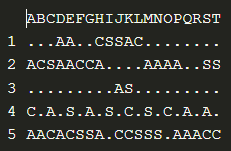
- Display heading ABCDEFGHIJKLMNOPQRSTUVWXYZ
- Read the first row from the file loop until end of file
- For each row, display the row number, and seat letter. If the value of the seat letter is A, C, or S display as a #, otherwise display as . for 26 columns
- Prompt to enter row number
- Validate entered row:
- Display the current seating availability
If the input row number is not an existing row number in the file display error
message
- Prompt to enter starting seat
- Validate entered starting seat in the file for the input row number:
If the value of the input starting seat letter is a ., the seat is available.
Else
Recommendation starting seat = if column M (middle seat) equals to ..
Otherwise check the next column from column M until found the available
seat (value equals .)
-
- Prompt to enter number of adult, child, and senior tickets
- If the input for the numbers of tickets is not an integer or less than 0, display error message Please enter the valid number on tickets
- Calculate the total number of tickets entered by the user.
- Total tickets = adultTickets + childTickets + seniorTickets
- Validate available seats in the file for the total number of tickets:
- For the input row number and starting seat/recommended seat, is a . and if have enough open seats in the column for the total tickets, then the seat(s) is available.
- If seat is unavailable:
- Recommend seats for >1 tickets: if column M equals to . And the following seat are open, the seat is available until it meets the total number of tickets. Otherwise check the next column from column M until found the total number of seats needed (value equals .)
- If the best recommendation seat are found display the starting and ending seats letters, and prompt the user the option to accept (Y) or decline (N).
- If input value is Y (user accept the recommendation seats) proceed to confirm reservation (#4 below). Otherwise back to main menu.
- Recommend seats for 1 ticket: if column M equals to . And seat is open, then the seat is available. Otherwise check the next column from column M until found available seat (value equals .)
- If the best recommendation seat are found display the seat letter and prompt the user the option to accept (Y) or decline (N).
- If input value is Y (user accept the recommendation seat) proceed to confirm reservation (#4 below). Otherwise back to main menu.
- If recommendation seat(s) is/are unavailable, prompt the message Seat is unavailable and Recommendation seat is unavailable
- Recommend seats for >1 tickets: if column M equals to . And the following seat are open, the seat is available until it meets the total number of tickets. Otherwise check the next column from column M until found the total number of seats needed (value equals .)
- Prompt to enter number of adult, child, and senior tickets
- Confirm Reservation
- Calculate the total sales = totaladultTicket*10.00 + totalchildTicket*5.00 + totalseniorTicket*7.50
- Reserve ticket and update the file for reserve seats. The value in the file will be updated as A for adult, C for child, S for senior.
- Prompt the final information below:
Adult Tickets:
Child Tickets:
Senior Tickets:
Total Tickets:
Total Sales:
- Return to main menu. Prompt message Reservation is confirmed.
Step by Step Solution
There are 3 Steps involved in it
1 Expert Approved Answer
Step: 1 Unlock

Question Has Been Solved by an Expert!
Get step-by-step solutions from verified subject matter experts
Step: 2 Unlock
Step: 3 Unlock
 Study Help