







Question: Please provide an excel link via google doc if possible. Use the VLOOKUP function. Design a spreadsheet to calculate the class's grades. Consider the following
Please provide an excel link via google doc if possible.
Use the VLOOKUP function.
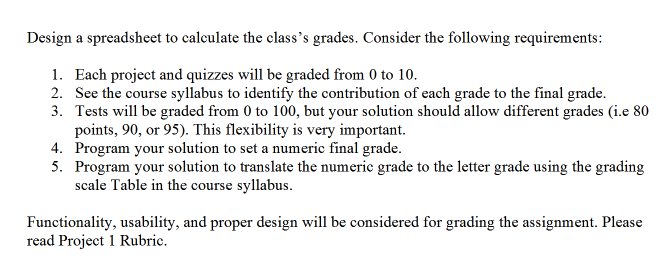
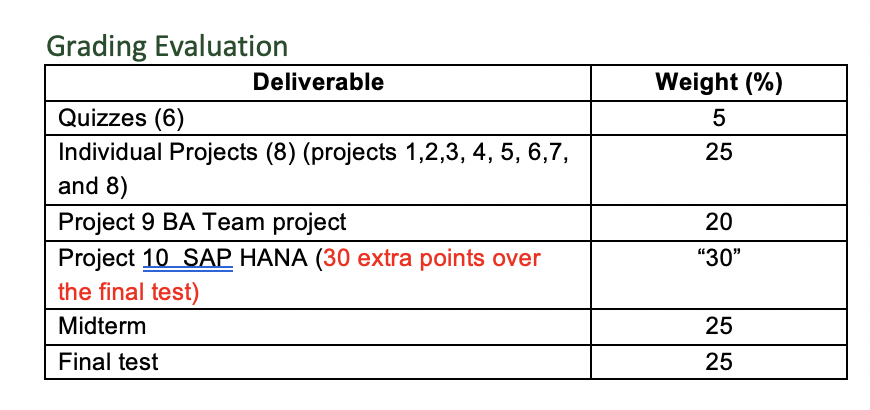
Design a spreadsheet to calculate the class's grades. Consider the following requirements: 1. Each project and quizzes will be graded from 0 to 10. 2. See the course syllabus to identify the contribution of each grade to the final grade. 3. Tests will be graded from 0 to 100, but your solution should allow different grades (i.e 80 points, 90, or 95). This flexibility is very important. 4. Program your solution to set a numeric final grade. 5. Program your solution to translate the numeric grade to the letter grade using the grading scale Table in the course syllabus. Functionality, usability, and proper design will be considered for grading the assignment. Please read Project 1 Rubric. Weight (%) 25 Grading Evaluation Deliverable Quizzes (6) Individual Projects (8) (projects 1,2,3,4,5,6,7, and 8) Project 9 BA Team project Project 10 SAP HANA (30 extra points over the final test) Midterm Final test 20 "30" 25 25 Design a spreadsheet to calculate the class's grades. Consider the following requirements: 1. Each project and quizzes will be graded from 0 to 10. 2. See the course syllabus to identify the contribution of each grade to the final grade. 3. Tests will be graded from 0 to 100, but your solution should allow different grades (i.e 80 points, 90, or 95). This flexibility is very important. 4. Program your solution to set a numeric final grade. 5. Program your solution to translate the numeric grade to the letter grade using the grading scale Table in the course syllabus. Functionality, usability, and proper design will be considered for grading the assignment. Please read Project 1 Rubric. Weight (%) 25 Grading Evaluation Deliverable Quizzes (6) Individual Projects (8) (projects 1,2,3,4,5,6,7, and 8) Project 9 BA Team project Project 10 SAP HANA (30 extra points over the final test) Midterm Final test 20 "30" 25 25
Step by Step Solution
There are 3 Steps involved in it

Get step-by-step solutions from verified subject matter experts
 Study Help