



Question: PLEASE PROVIDE EXPLANATIONS! tHANKS! Background: Bev's Boutique is a small, local business that sells hand-made products in-store only (no online sales). The database they use
PLEASE PROVIDE EXPLANATIONS! tHANKS!
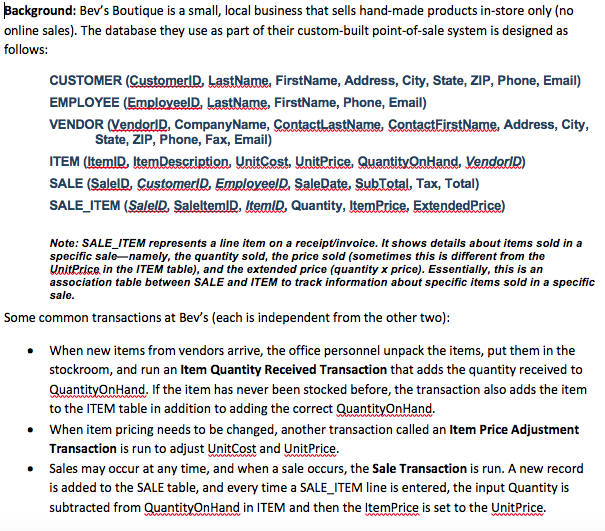
Background: Bev's Boutique is a small, local business that sells hand-made products in-store only (no online sales). The database they use as part of their custom-built point-of-sale system is designed as follows: CUSTOMER (CustomerlD, LastName, FirstName, Address, City, State, ZIP, Phone, Email) EMPLOYEE (EmployeelD, LastName, FirstName, Phone, Email) VENDOR MendorD, CompanyName, ContactlastName, ContactFirstName, Address, City, State, ZIP, Phone, Fax, Email) ITEM (ItemD, ItemDescription, UnitCost, UnitPrice, QuantitOnHand, VendodD) SALE (SalelD, CustomerlD, EmployeelD SaleDate. SubTotal, Tax, Total) SALE_ITEM (SalelD, SaleltemlD, ltemlD, Quantity, ltemPrice, ExtnedPrice) Note: SALE-ITEM represents a line item on a receipt/invoice. It shows details about items sold in a specific sale-namely, the quantity sold, the price sold (sometimes this is different from the UnitPrice in the ITEM table), and the extended price (quantity x price). Essentially, this is an association table between SALE and ITEM to track information about specific items sold in a specific sale. Some common transactions at Bev's (each is independent from the other two) When new items from vendors arrive, the office personnel unpack the items, put them in the stockroom, and run an Item Quantity Received Transaction that adds the quantity received to OuantityOnHand, If the item has never been stocked before, the transaction also adds the item to the ITEM table in addition to adding the correct QuantityOnHand When item pricing needs to be changed, another transaction called an Item Price Adjustment Transaction is run to adjust Unitcost and UnitPrice Sales may occur at any time, and when a sale occurs, the Sale Transaction is run. A new record is added to the SALE table, and every time a SALE_ITEM line is entered, the input Quantity is subtracted from Quanti . . . nHand in ITEM and then the ItemPrice is set to the UnitPrice Background: Bev's Boutique is a small, local business that sells hand-made products in-store only (no online sales). The database they use as part of their custom-built point-of-sale system is designed as follows: CUSTOMER (CustomerlD, LastName, FirstName, Address, City, State, ZIP, Phone, Email) EMPLOYEE (EmployeelD, LastName, FirstName, Phone, Email) VENDOR MendorD, CompanyName, ContactlastName, ContactFirstName, Address, City, State, ZIP, Phone, Fax, Email) ITEM (ItemD, ItemDescription, UnitCost, UnitPrice, QuantitOnHand, VendodD) SALE (SalelD, CustomerlD, EmployeelD SaleDate. SubTotal, Tax, Total) SALE_ITEM (SalelD, SaleltemlD, ltemlD, Quantity, ltemPrice, ExtnedPrice) Note: SALE-ITEM represents a line item on a receipt/invoice. It shows details about items sold in a specific sale-namely, the quantity sold, the price sold (sometimes this is different from the UnitPrice in the ITEM table), and the extended price (quantity x price). Essentially, this is an association table between SALE and ITEM to track information about specific items sold in a specific sale. Some common transactions at Bev's (each is independent from the other two) When new items from vendors arrive, the office personnel unpack the items, put them in the stockroom, and run an Item Quantity Received Transaction that adds the quantity received to OuantityOnHand, If the item has never been stocked before, the transaction also adds the item to the ITEM table in addition to adding the correct QuantityOnHand When item pricing needs to be changed, another transaction called an Item Price Adjustment Transaction is run to adjust Unitcost and UnitPrice Sales may occur at any time, and when a sale occurs, the Sale Transaction is run. A new record is added to the SALE table, and every time a SALE_ITEM line is entered, the input Quantity is subtracted from Quanti . . . nHand in ITEM and then the ItemPrice is set to the UnitPrice
Step by Step Solution
There are 3 Steps involved in it

Get step-by-step solutions from verified subject matter experts