







Question: Please provide the screenshot of the output. JAVA PROGRAMMING: Also please provide the screenshot of output. Write a Java Program that encodes words. Use two
Please provide the screenshot of the output.
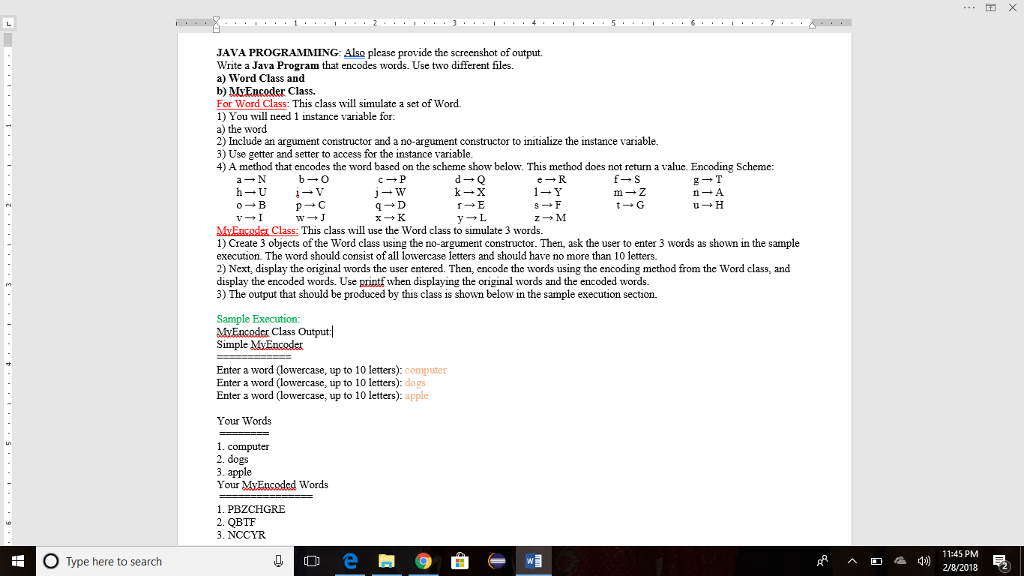
JAVA PROGRAMMING: Also please provide the screenshot of output. Write a Java Program that encodes words. Use two different files. a) Word Class and b) MxEncoder Class. For Word Class: This class will simulate a set of Word. 1) You will need 1 instance variable for. a) the word 2) Include an argument constructor and a no-argument constructor to initialize the instance variable. 3) Use getter and setter to access for the instance variable 4) A method that encodes the word based on the scheme show below. This method does not return a value. Encoding Scheme: MvEncader Class: This class will use the Word class to simulate 3 words. 1) Create 3 objects of the Word class using the no-argument constructor. Then, ask the user to enter 3 words as shown in the sample execution. The word should consist ofall lowercase letters and should have no more than 10 letters. 2) Next, display the original words the user entered. Then, encode the words using the encoding method from the Word class, and display the encoded words. Use printf when displaying the original words and the encoded words. 3) The output that should be produced by this class is shown below in the sample execution section. Sample Execution: MyEncoder Class Output Simple MvEncoder Enter a word (lowercase, up to 10 letters): computer Enter a word (lowercase, up to 10 letters): do Enter a word lowercase, up to 10 letters): apple gs Your Words 1. computer 2. dogs 3. apple Your MvEcoded Words 1. PBZCHGRE 2. QBTF 3. NCCYR O Type here to search 11:45 PM 2/8/2018 2
Step by Step Solution
There are 3 Steps involved in it

Get step-by-step solutions from verified subject matter experts
 Study Help