







Question: **Please Read the requirements** I need help revising a program I wrote: 1) **There is an Error on: transactions.add(new Trans(Trans.TRANSTYPE[0],amount,balance)); } 2)**There is an Error
**Please Read the requirements**
I need help revising a program I wrote:
1) **There is an Error on:
transactions.add(new Trans(Trans.TRANSTYPE[0],amount,balance)); }
2)**There is an Error on:
z.opened = new Date(opened);
3)**There is an Error on:
BankAccountDriver.Java
BankAccount s1 = new BankAccount(10, rohan", 500);"
____________________________________
Bankaccount.java
*/
import java.util.ArrayList;
public class BankAccount
{
private static double INT_RATE = 10.0;
//This is used to Storee Account Number
private int accountNo;
// This is used to Store Account Holder's Name
private String accountName;
// This is used to stores balance of the account
private double balance;
// Store OverDraft Limit
private double overdraftLimit;
// This is used to store the date that the account was opened on
private Date opened;
// Store a list of Transactions
private ArrayList transactions;
// ******* MEMBER METHODS *******
//constructor
public BankAccount()
{
accountNo = 0;
accountName = "Empty";
balance = 0.0;
overdraftLimit = 0;
opened = new Date();
transactions = new ArrayList();
transactions.add(new Trans(Trans.TRANSTYPE[4],0.0,0.0));
}
// This is called COPY CONSTRUCTOR
public BankAccount(BankAccount p)
{
accountNo = p.accNo;
accountName = p.accName;
balance = p.balance;
overdraftLimit = p.odLimit;
opened = new Date(p.opened);
transactions = new ArrayList(p.transactions);
}
/
// CONSTRUCTOR with 3 arguments
public BankAccount(int no1, String namehere, double bal1)
{
accountNo = no1;
accountName = namehere;
balance = bal1;
overdraftLimit = 0;
opened = new Date();
transactions = new ArrayList();
transactions.add(new Trans(Trans.TRANSTYPE[4],bal1,bal1));
}
// we have created a clone method here
public Object clone()
{
BankAccount z = new BankAccount();
z.accountNo = accountNo;
z.acccountName = accountName;
z.balance = balance;
z.overdraftLimit = overdraftLimit;
z.opened = new Date(opened);
z.transactions = new ArrayList(transactions);
return z;
}
// This is done to compare the onject passed with equals method
public boolean equals(Object other)
{
return accountNo == ((BankAccount)other).accountNo;
}
// toString() method - ALWAYS takes the form public String toString()
// Returns a string representation of the object
public String toString()
{
return accountNo+": "+accountName+": "+balance;
}
// These are the various accessor functions:
public void setAccountName(String name)
{
accountName = name;
}
public void setOverdraftLimit(double newLimit)
{
overdraftLimit = newLimit;
}
public double getBalance()
{
return balance;
}
public String getAccountName()
{
return accountName;
}
public int getAccountNo()
{
return accountNo;
}
// STATIC METHODS are declared once and used between all Objects
// created from this class file.
public static void setINT_RATE(double newIR)
{
INT_RATE = newIR;
}
public static double getINT_RATE()
{
return INT_RATE;
}
// UTILITY METHODS
// To deposit amount into bank->PRECONDITION amount must be positive
public void deposit(double amount)
{
balance = balance + amount;
transactions.add(new Trans(Trans.TRANSTYPE[0],amount,balance));
}
//Tow withdraw money from bank-> Withdraw with error checking
public boolean withdraw(double amount)
{
boolean valid = false;
if (checkWithdraw(amount))
{
balance = balance - amount;
valid = true;
transactions.add(new Trans(Trans.TRANSTYPE[1],-amount,balance));
}
return valid;
}
// Adds interest to the account
public void addInterest()
{
double interest = 0;
interest = balance*(INT_RATE/100);
deposit(interest);
}
// This method is used to check whether the user has sufficient funds
// to be able to withdraw the amount specified
private boolean checkWithdraw(double amount)
{
boolean valid = true;
if((balance-amount)
{
valid = false;
}
return valid;
}
// method to create a String representation of all the
// transactions on the account.
public String createfinalStatement()
{
// create a temporary string to hold the whole statement
String state = "";
// create a reference (pointer) to a Trans object
// called temp
Trans temp;
// loop through all transaction objects in our specific
// BankAccount object.
for(int i=0; i
{
temp = (Trans)transactions.get(i);
state = state+" "+temp.toString();
}
return state;
}
// This is the main method for testing
public class BankAccountDriver{
public static void main (String [] args)
{
// This basically used create a new BankAccount object called s1
BankAccount s1 = new BankAccount(10, rohan", 500);
// This is used to checkwhether it was created correctly
System.out.println(s1);
// display a blank lines
System.out.println();
// This is done to perform some transactions on the account
s1.deposit(700);
s1.withdraw(202);
s1withdraw(200);
s1.addInterest();
s1.withdraw(100);
// This is to display a statement to the screen
System.out.println(sg.createfinalStatement());
}
}
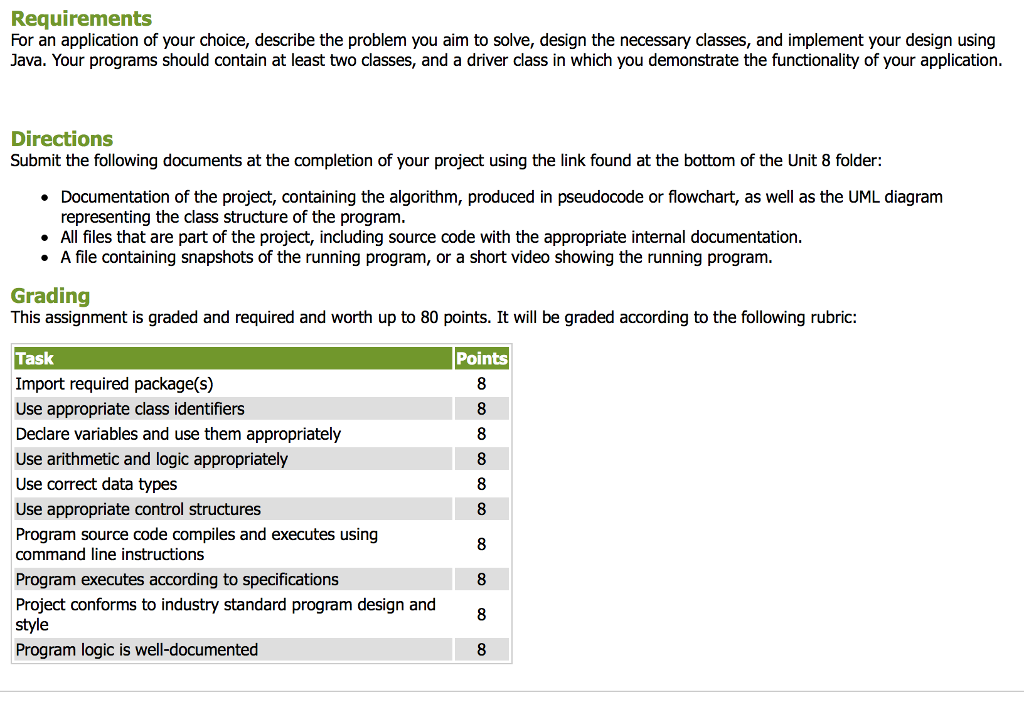
Requirements For an application of your choice, describe the problem you aim to solve, design the necessary classes, and implement your design using Java. Your programs should contain at least two classes, and a driver class in which you demonstrate the functionality of your application. Directions Submit the following documents at the completion of your project using the link found at the bottom of the Unit 8 folder: Documentation of the project, containing the algorithm, produced in pseudocode or flowchart, as well as the UML diagram representing the class structure of the program. All files that are part of the project, including source code with the appropriate internal documentation. A file containing snapshots of the running program, or a short video showing the running program. Grading This assignment is graded and required and worth up to 80 points. It will be graded according to the following rubric: Task Points Import required package(s) Use appropriate class identifiers Declare variables and use them appropriately Use arithmetic and logic appropriately Use correct data types Use appropriate control structures Program source code compiles and executes using command line instructions Program executes according to specifications Project conforms to industry standard program design and style Program logic is well-documented
Step by Step Solution
There are 3 Steps involved in it

Get step-by-step solutions from verified subject matter experts
 Study Help