







Question: Please respond to all questions using the following website: https://phet.colorado.edu/sims/html/forces-and-motion-basics/latest/forces-and-motion-basics en.html 15. Click on the orange reset button, then check all boxes in the green
Please respond to all questions using the following website: https://phet.colorado.edu/sims/html/forces-and-motion-basics/latest/forces-and-motion-basics en.html
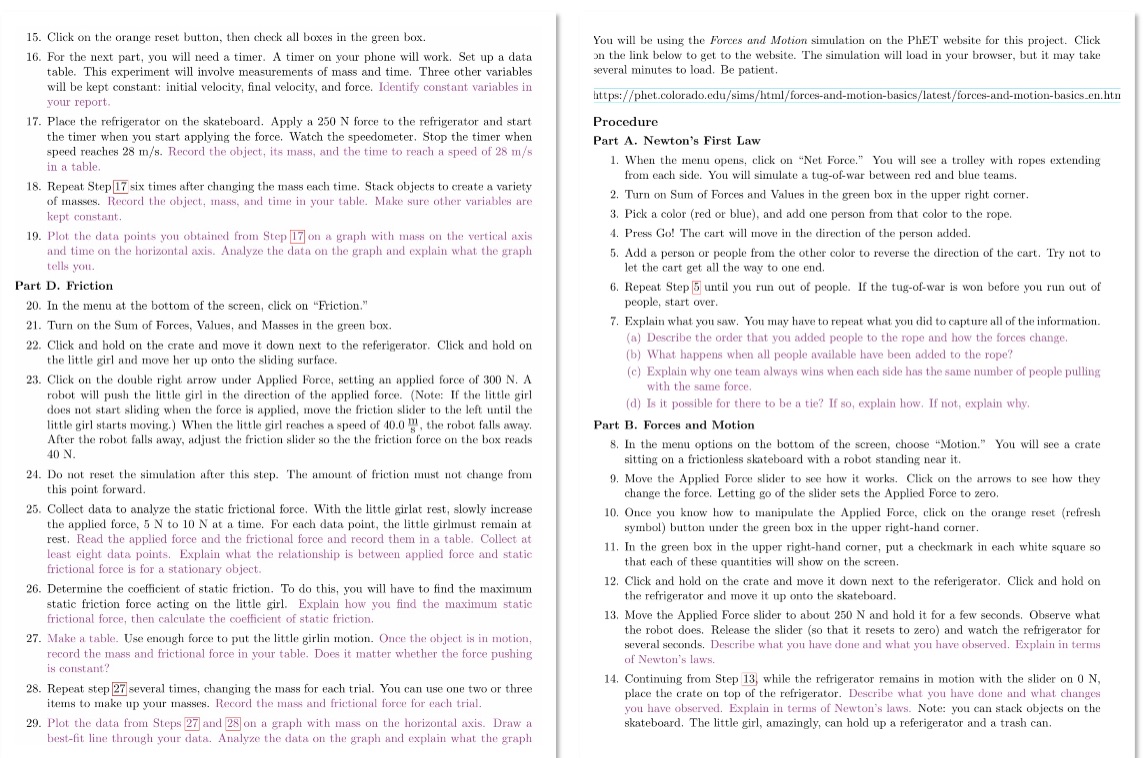
15. Click on the orange reset button, then check all boxes in the green box. You will be using the Forces and Motion simulation on the PhET website for this project. Click 16. For the next part, you will need a timer. A timer on your phone will work. Set up a data on the link below to get to the website. The simulation will load in your browser, but it may take table. This experiment will involve measurements of mass and time. Three other variables several minutes to load. Be patient. will be kept constant: initial velocity, final velocity, and force. Identify constant variables in your report. https://phet.colorado.edu/sims/html/forces-and-motion-basics/latest/forces-and-motion-basics.en.htm 17. Place the refrigerator on the skateboard. Apply a 250 N force to the refrigerator and start Procedure the timer when you start applying the force. Watch the speedometer. Stop the timer when Part A. Newton's First Law speed reaches 28 m/s. Record the object, its mass, and the time to reach a speed of 28 m/s in a table. 1. When the menu opens, click on "Net Force." You will see a trolley with ropes extending from each side. You will simulate a tug-of-war between red and blue teams. 18. Repeat Step 17 six times after changing the mass each time. Stack objects to create a variety of masses. Record the object, mass, and time in your table. Make sure other variables are 2. Turn on Sum of Forces and Values in the green box in the upper right corner. kept constant. 3. Pick a color (red or blue), and add one person from that color to the rope. 19. Plot the data points you obtained from Step 17 on a graph with mass on the vertical axis 4. Press Go! The cart will move in the direction of the person added. and time on the horizontal axis. Analyze the data on the graph and explain what the graph 5. Add a person or people from the other color to reverse the direction of the cart. Try not to tells you. let the cart get all the way to one end. Part D. Friction 6. Repeat Step 5 until you run out of people. If the tug-of-war is won before you run out of 20. In the menu at the bottom of the screen, click on "Friction." people, start over. 21. Turn on the Sum of Forces, Values, and Masses in the green box. 7. Explain what you saw. You may have to repeat what you did to capture all of the information. 22. Click and hold on the crate and move it down next to the referigerator. Click and hold on (a) Describe the order that you added people to the rope and how the forces change, the little girl and move her up onto the sliding surface. (b) What happens when all people available have been added to the rope? 23. Click on the double right arrow under Applied Force, setting an applied force of 300 N. A (c) Explain why one team always wins when each side has the same number of people pulling robot will push the little girl in the direction of the applied force. (Note: If the little girl with the same force. does not start sliding when the force is applied, move the friction slider to the left until the (d) Is it possible for there to be a tie? If so, explain how. If not, explain why. little girl starts moving. ) When the little girl reaches a speed of 10.0 9, the robot falls away. Part B. Forces and Motion After the robot falls away, adjust the friction slider so the the friction force on the box reads 8. In the menu options on the bottom of the screen, choose "Motion." You will see a crate 10 N. sitting on a frictionless skateboard with a robot standing near it. 24. Do not reset the simulation after this step. The amount of friction must not change from 9. Move the Applied Force slider to see how it works. Click on the arrows to see how they this point forward. change the force. Letting go of the slider sets the Applied Force to zero. 25. Collect data to analyze the static frictional force, With the little girlat rest, slowly increase 10. Once you know how to manipulate the Applied Force, click on the orange reset (refresh the applied force, 5 N to 10 N at a time. For each data point, the little girlmust remain at symbol) button under the green box in the upper right-hand corner. rest. Read the applied force and the frictional force and record them in a table. Collect at least eight data points. Explain what the relationship is between applied force and static 11, In the green box in the upper right-hand corner, put a checkmark in each white square so frictional force is for a stationary object. that each of these quantities will show on the screen. 26. Determine the coefficient of static friction. To do this, you will have to find the maximum 12. Click and hold on the crate and move it down next to the referigerator. Click and hold on static friction force acting on the little girl. Explain how you find the maximum static the refrigerator and move it up onto the skateboard. frictional force, then calculate the coefficient of static friction. 13. Move the Applied Force slider to about 250 N and hold it for a few seconds. Observe what 27. Make a table. Use enough force to put the little girlin motion. Once the object is in motion, the robot does. Release the slider (so that it resets to zero) and watch the refrigerator for several seconds. Describe what you have done and what you have observed. Explain in terms record the mass and frictional force in your table. Does it matter whether the force pushing of Newton's laws. s constant? 14. Continuing from Step 13, while the refrigerator remains in motion with the slider on 0 N, 28. Repeat step 27 several times, changing the mass for each trial. You can use one two or three place the crate on top of the refrigerator. Describe what you have done and what changes items to make up your masses. Record the mass and frictional force for each trial. you have observed. Explain in terms of Newton's laws. Note: you can stack objects on the 29. Plot the data from Steps 27 and 28 on a graph with mass on the horizontal axis. Draw a skateboard. The little girl, amazingly, can hold up a referigerator and a trash can. best-fit line through your data. Analyze the data on the graph and explain what the graph
Step by Step Solution
There are 3 Steps involved in it

Get step-by-step solutions from verified subject matter experts
 Study Help