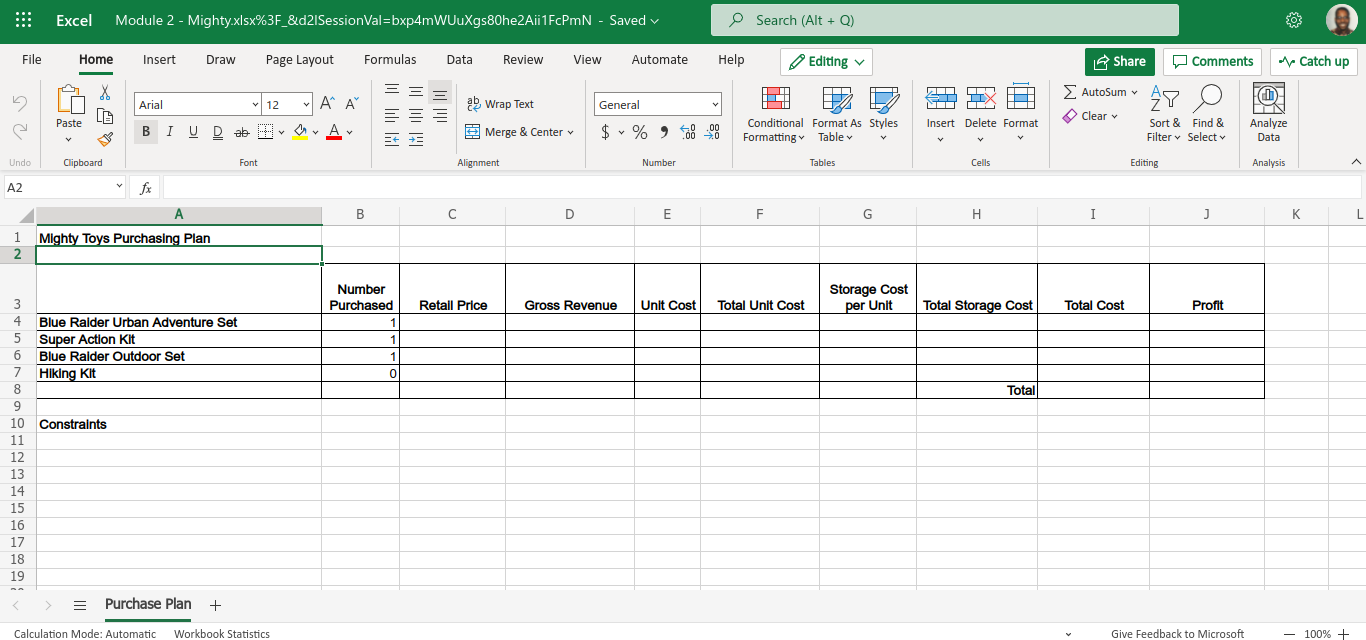
Question: Please set up a separate excel document identical to the one below to assist me with this question. To complete, you should just have to

Please set up a separate excel document identical to the one below to assist me with this question.

To complete, you should just have to follow along with the directions below. The workbook in reference is the one pictured on the third photo below. It only contains one worksheet.
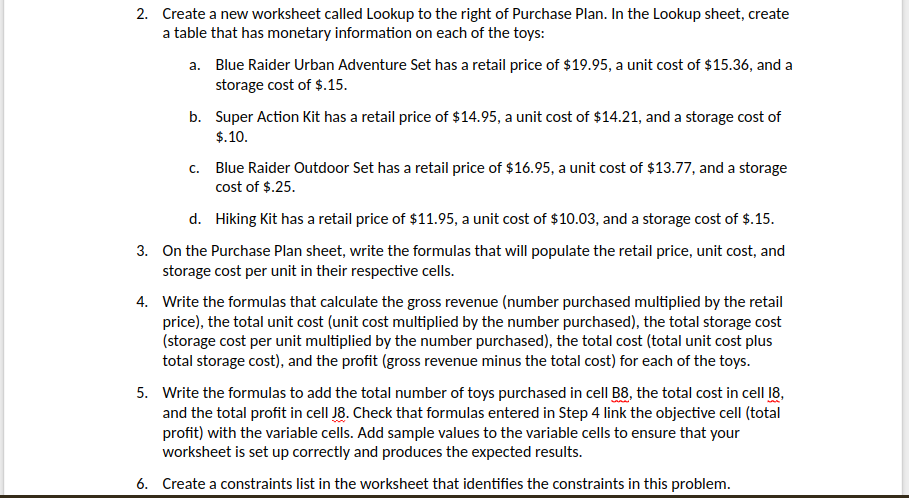

Please set up a separate excel document identicalPlease set up a separate excel document identicalPlease set up a separate excel document identical
2. Create a new worksheet called Lookup to the right of Purchase Plan. In the Lookup sheet. create a table that has monetary information on each of the toys: a. Blue Raider Urban Adventure Set has a retail price of $19.95, a unit cost of $15.36, and a storage cost of $.15. b. Super Action Kit has a retail price of $14.95, a unit cost of $14.21, and a storage cost of $.10. c. Blue Raider Outdoor Set has a retail price of $15.95. a unit cost of $13.77. and a storage cost of 5.25. d. Hiking Kit has a retail price of $11.95, a unit cost of $10.03, and a storage cost of $.15. 3. On the Purchase Plan sheet, write the formulas that will populate the retail price. unit cost. and storage cost per unit in their respective cells. 4. Write the formulas that calculate the gross revenue [number purchased multiplied by the retail price}, the total unit cost {unit cost multiplied by the number purchased]. the total storage cost {storage cost per unit multiplied by the number purchased]. the total cost {total unit cost plus total storage cost}, and the prot {gross revenue minus the total cost} for each of the toys. 5. Write the formulas to add the total number of toys purchased in cell g. the total cost in cell, and the total prot in cell Ag. Check that formulas entered in Step 4 link the objective cell {total prot} with the variable cells. Add sample values to the variable cells to ensure that your worksheet is set up correctly and produces the expected results. 6. Create a constraints list in the worksheet that identies the constraints in this problem. 6. Create a constraints list in the worksheet that identifies the constraints in this problem. 7. Format all monetary fields as currency with two decimal places. 8. Use Solver to determine the best way to purchase the Mighty Toys sets and kits and maximize the profit. 9. Produce an answer report of your final solution. Use the answer report to recommend additional changes that might maximize the total profit. Place your recommendations in a cell on the answer report worksheet. 10. Save and close the MightyToys.xIsx workbook.Excel Module 2 - Mighty.xlsx%3F_&d21SessionVal=bxp4mWUuXgs80he2Aii1FcPmN - Saved v Search (Alt + Q) File Home Insert Draw Page Layout Formulas Data Review View Automate Help Editing v Share Comments Catch up = AutoSum AY O Arial 12 A" A D Wrap Text General Clear 141 1141 10 Conditional Format As Styles Insert Delete Format Sort & Find & Analyze Paste IUDab YAv Merge & Center $ + % 9 08 Formatting Table v Filter v Select v Data Alignment Number Tables Cells Editing Analysis Undo Clipboard Font A2 fx A B C D E F G H I J K Mighty Toys Purchasing Plan Number Storage Cost Purchased Retail Price Gross Revenue Unit Cost Total Unit Cost per Unit Total Storage Cost Total Cost Profit Blue Raider Urban Adventure Set 1 NOUAW Super Action Kit Blue Raider Outdoor Set Hiking Kit Total 8 9 10 Constraints 11 12 13 14 15 16 17 18 19 > = Purchase Plan + Give Feedback to Microsoft 100% + Calculation Mode: Automatic Workbook Statistics

Step by Step Solution

There are 3 Steps involved in it

1 Expert Approved Answer
Step: 1 Unlock blur-text-image

Question Has Been Solved by an Expert!

Get step-by-step solutions from verified subject matter experts

Step: 2 Unlock
Step: 3 Unlock

Students Have Also Explored These Related Accounting Questions!