







Question: please share the screenshot of the code in MATLAB Problem 1 An engineer is examining the rotation of a satellite in outer space. In a
please share the screenshot of the code in MATLAB
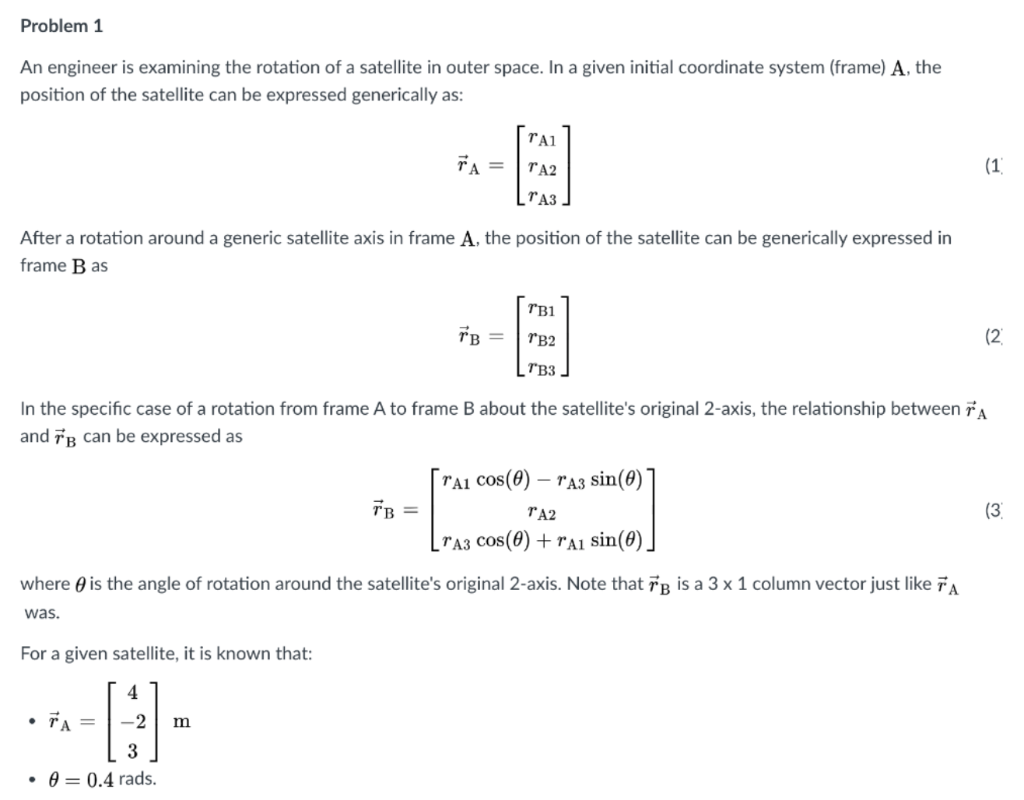
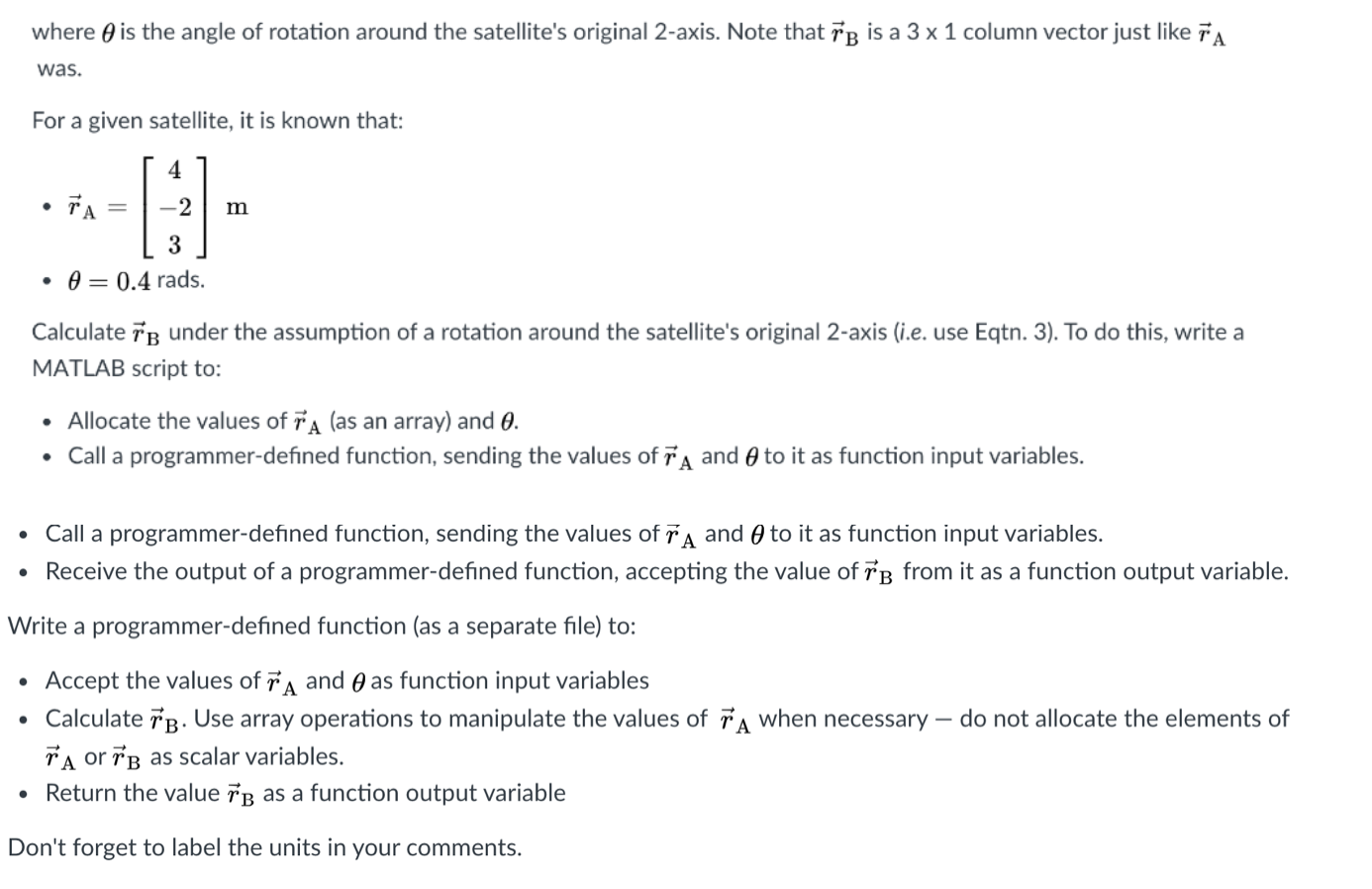
Problem 1 An engineer is examining the rotation of a satellite in outer space. In a given initial coordinate system (frame) A, the position of the satellite can be expressed generically as: TAI TA = - TA2 (1 TA3 After a rotation around a generic satellite axis in frame A, the position of the satellite can be generically expressed in frame Bas TB1 PB = TB2 (2 1 B3 In the specific case of a rotation from frame A to frame B about the satellite's original 2-axis, the relationship between FA and FB can be expressed as TB = [rai cos(O) rA3 sin(0) TA2 Lr A3 cos(0) + rau sin(0) (3 where is the angle of rotation around the satellite's original 2-axis. Note that is is a 3 x 1 column vector just like TA was. For a given satellite, it is known that: m 4 PA -2 3 A = 0.4 rads. where 0 is the angle of rotation around the satellite's original 2-axis. Note that is is a 3 x 1 column vector just like FA was. For a given satellite, it is known that: 4 m TA 2 3 0= 0.4 rads. Calculate 7B under the assumption of a rotation around the satellite's original 2-axis (i.e. use Eqtn. 3). To do this, write a MATLAB script to: Allocate the values of FA (as an array) and 0. Call a programmer-defined function, sending the values of FA and 6 to it as function input variables. Call a programmer-defined function, sending the values of r A and 0 to it as function input variables. Receive the output of a programmer-defined function, accepting the value of s from it as a function output variable. Write a programmer-defined function (as a separate file) to: Accept the values of FA and as function input variables Calculate FB. Use array operations to manipulate the values of FA when necessary do not allocate the elements of A or TB as scalar variables. Return the value FB as a function output variable Don't forget to label the units in your comments. Problem 1 An engineer is examining the rotation of a satellite in outer space. In a given initial coordinate system (frame) A, the position of the satellite can be expressed generically as: TAI TA = - TA2 (1 TA3 After a rotation around a generic satellite axis in frame A, the position of the satellite can be generically expressed in frame Bas TB1 PB = TB2 (2 1 B3 In the specific case of a rotation from frame A to frame B about the satellite's original 2-axis, the relationship between FA and FB can be expressed as TB = [rai cos(O) rA3 sin(0) TA2 Lr A3 cos(0) + rau sin(0) (3 where is the angle of rotation around the satellite's original 2-axis. Note that is is a 3 x 1 column vector just like TA was. For a given satellite, it is known that: m 4 PA -2 3 A = 0.4 rads. where 0 is the angle of rotation around the satellite's original 2-axis. Note that is is a 3 x 1 column vector just like FA was. For a given satellite, it is known that: 4 m TA 2 3 0= 0.4 rads. Calculate 7B under the assumption of a rotation around the satellite's original 2-axis (i.e. use Eqtn. 3). To do this, write a MATLAB script to: Allocate the values of FA (as an array) and 0. Call a programmer-defined function, sending the values of FA and 6 to it as function input variables. Call a programmer-defined function, sending the values of r A and 0 to it as function input variables. Receive the output of a programmer-defined function, accepting the value of s from it as a function output variable. Write a programmer-defined function (as a separate file) to: Accept the values of FA and as function input variables Calculate FB. Use array operations to manipulate the values of FA when necessary do not allocate the elements of A or TB as scalar variables. Return the value FB as a function output variable Don't forget to label the units in your comments
Step by Step Solution
There are 3 Steps involved in it

Get step-by-step solutions from verified subject matter experts
 Study Help