



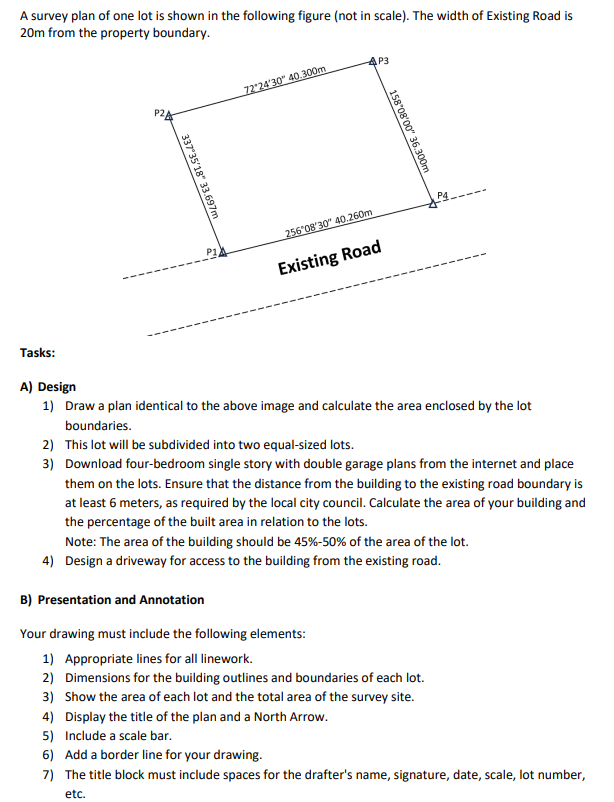
Question: Please show all steps used on auto cad to get answer A survey plan of one lot is shown in the following figure ( not
Please show all steps used on auto cad to get answer
A survey plan of one lot is shown in the following figure not in scale The width of Existing Road is
from the property boundary.
Tasks:
A Design
Draw a plan identical to the above image and calculate the area enclosed by the lot
boundaries.
This lot will be subdivided into two equalsized lots.
Download fourbedroom single story with double garage plans from the internet and place
them on the lots. Ensure that the distance from the building to the existing road boundary is
at least meters, as required by the local city council. Calculate the area of your building and
the percentage of the built area in relation to the lots.
Note: The area of the building should be of the area of the lot.
Design a driveway for access to the building from the existing road.
B Presentation and Annotation
Your drawing must include the following elements:
Appropriate lines for all linework.
Dimensions for the building outlines and boundaries of each lot.
Show the area of each lot and the total area of the survey site.
Display the title of the plan and a North Arrow.
Include a scale bar.
Add a border line for your drawing.
The title block must include spaces for the drafter's name, signature, date, scale, lot number,
etc.
Step by Step Solution
There are 3 Steps involved in it
1 Expert Approved Answer
Step: 1 Unlock

Question Has Been Solved by an Expert!
Get step-by-step solutions from verified subject matter experts
Step: 2 Unlock
Step: 3 Unlock