







Question: Please show all work QUESTION : Multiple Table Queries. (10 points each) Consider Supplier_Parts.accdb stored in the Blackboard folder. Create the queries returning the following
Please show all work
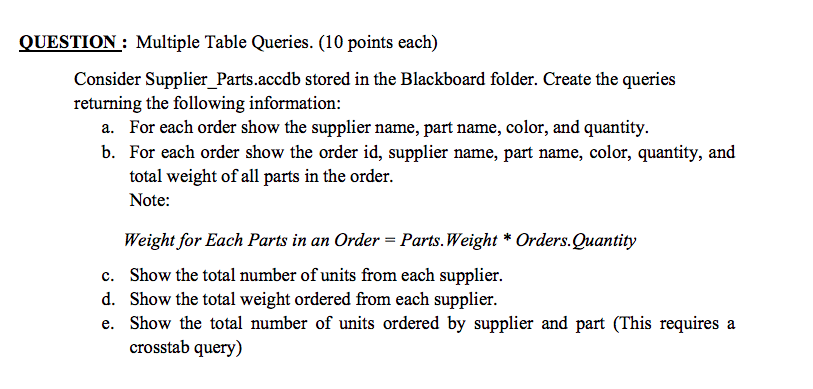
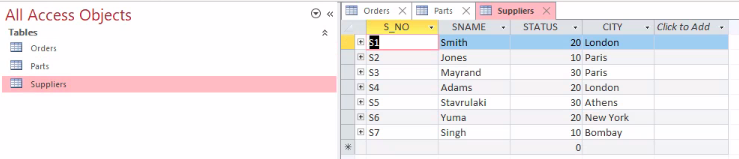
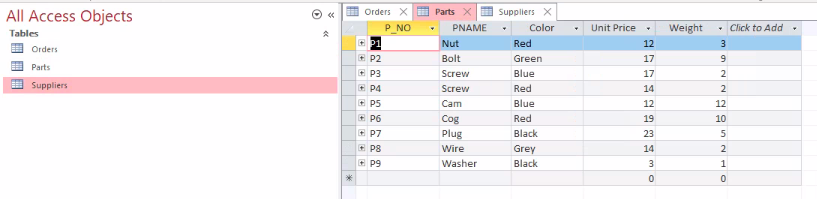
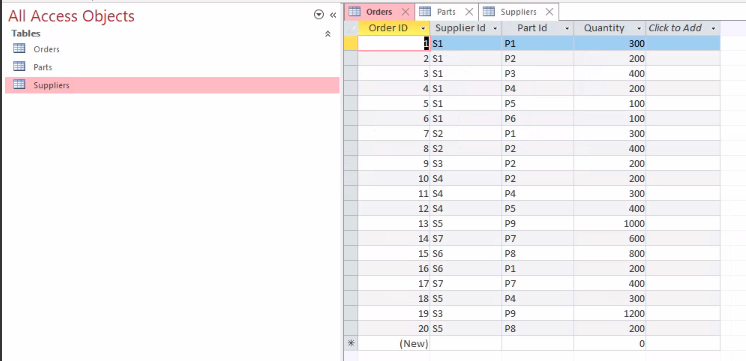
QUESTION : Multiple Table Queries. (10 points each) Consider Supplier_Parts.accdb stored in the Blackboard folder. Create the queries returning the following information: a. For each order show the supplier name, part name, color, and quantity. b. For each order show the order id, supplier name, part name, color, quantity, and total weight of all parts in the order. Note: Weight for Each Parts in an Order = Parts. Weight * Orders. Quantity c. Show the total number of units from each supplier. d. Show the total weight ordered from each supplier. e. Show the total number of units ordered by supplier and part (This requires a crosstab query) All Access Objects CITY Click to Add Tables Orders Orders X S NO 51 + S2 + S3 + S4 Parts Parts X Suppliers X SNAME STATUS Smith Jones Mayrand Adams Stavrulaki Yuma Singh Suppliers 20 London 10 Paris 30 Paris 20 London 30 Athens 20 New York 10 Bombay 0 + S5 + S6 + S7 * All Access Objects Unit Price Weight - Click to Add Tables Orders Nw 3 Parts Suppliers Orders X Parts X P NO PNAME + 1 Nut + P2 Bolt + P3 Screw + P4 Screw + PS Cam P6 Cog + P7 Plug +P8 Wire + P9 Washer Suppliers X Color Red Green Blue Red Blue Red Black Grey Black 12 17 17 14 12 19 23 14 2 12 ONU 5 5 3 0 All Access Objects Tables Orders Parts Suppliers ini Orders X Parts X Suppliers X Order ID Supplier ld. Part Id 1 S1 P1 2 S1 P2 3 S1 P3 4 S1 P4 5 S1 P5 6 S1 P6 7 S2 P1 8 S2 P2 9 S3 P2 10 S4 P2 11 S4 P4 12 S4 P5 13 S5 P9 14 S7 P7 15 S6 P8 16 S6 P1 17 S7 P7 18 S5 P4 19 S3 p9 20 SS PS (New) Quantity Click to Add 300 200 400 200 100 100 300 400 200 200 300 400 1000 600 800 200 400 300 1200 200 0
Step by Step Solution
There are 3 Steps involved in it

Get step-by-step solutions from verified subject matter experts
 Study Help