







Question: please show me step by step including output in python - Define a function called emphasise, which takes three arguments called header, message and width.
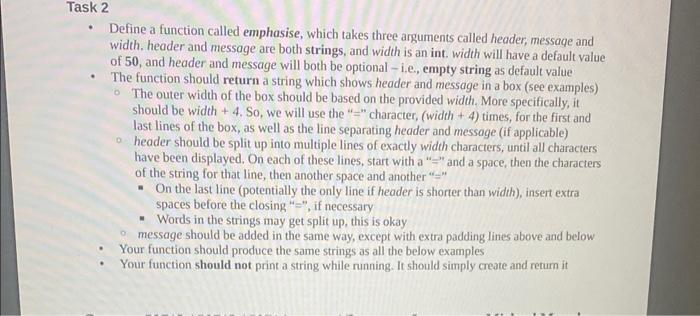
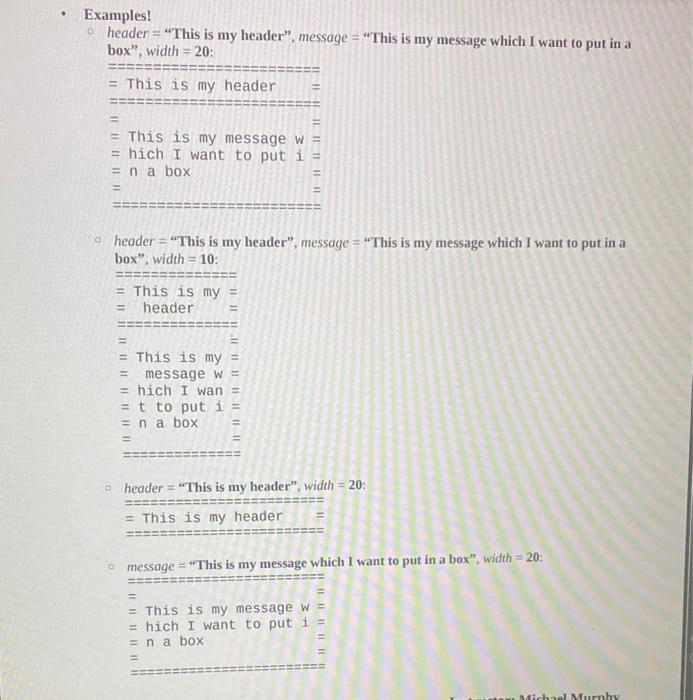
- Define a function called emphasise, which takes three arguments called header, message and width. header and message are both strings, and width is an int. width will have a default value of 50, and header and message will both be optional - i.e., empty string as default value - The function should return a string which shows header and message in a box (see examples) - The outer width of the box should be based on the provided width. More specifically, it should be width +4. So, we will use the "= " character, (width +4 ) times, for the first and last lines of the box, as well as the line separating header and message (if applicable) - header should be split up into multiple lines of exactly width characters, until all characters have been displayed. On each of these lines, start with a " " and a space, then the characters of the string for that line, then another space and another "=" - On the last line (potentially the only line if header is shorter than width), insert extra spaces before the closing "= ", if necessary - Words in the strings may get split up, this is okay - message should be added in the same way, except with extra padding lines above and below - Your function should produce the same strings as all the below examples - Your function should not print a string while running. It should simply create and return it Examples! header = "This is my header", message = "This is my message which I want to put in a box", width =20: header = "This is my header", message = "This is my message which I want to put in a box", width =10 : ="===-======:=Thisismy==header=="=-=="===-"====Thisismy==Thisismy==messagew==hichIwan==ttoputi==nabox== header = "This is my header", width =20 : = This is my header =
Step by Step Solution
There are 3 Steps involved in it

Get step-by-step solutions from verified subject matter experts
 Study Help