







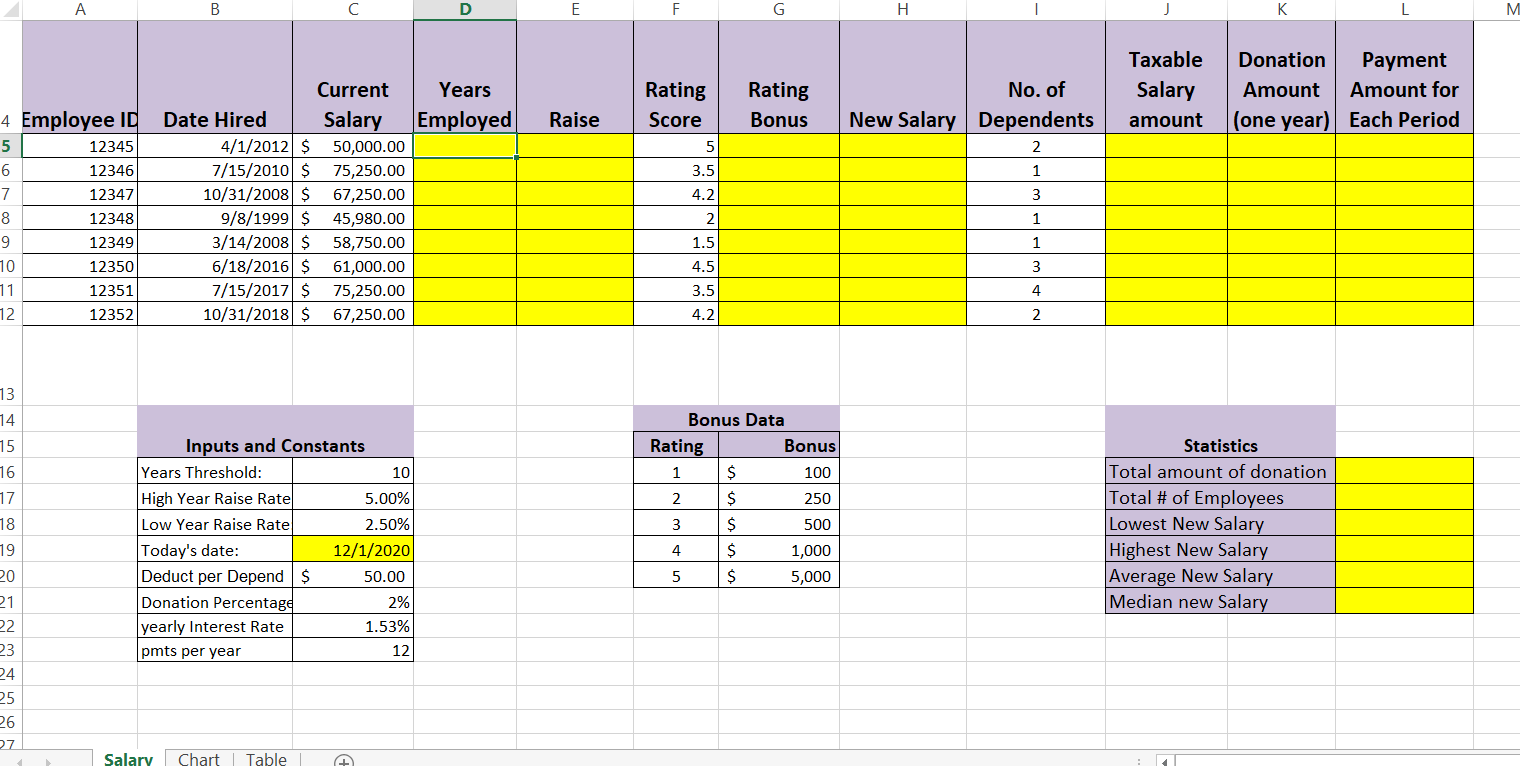
Question: PLEASE SHOW ME THE FORMULA B D E H M Years Employed Rating Bonus No. of New Salary Dependents Taxable Salary amount Donation Payment Amount
 PLEASE SHOW ME THE FORMULA
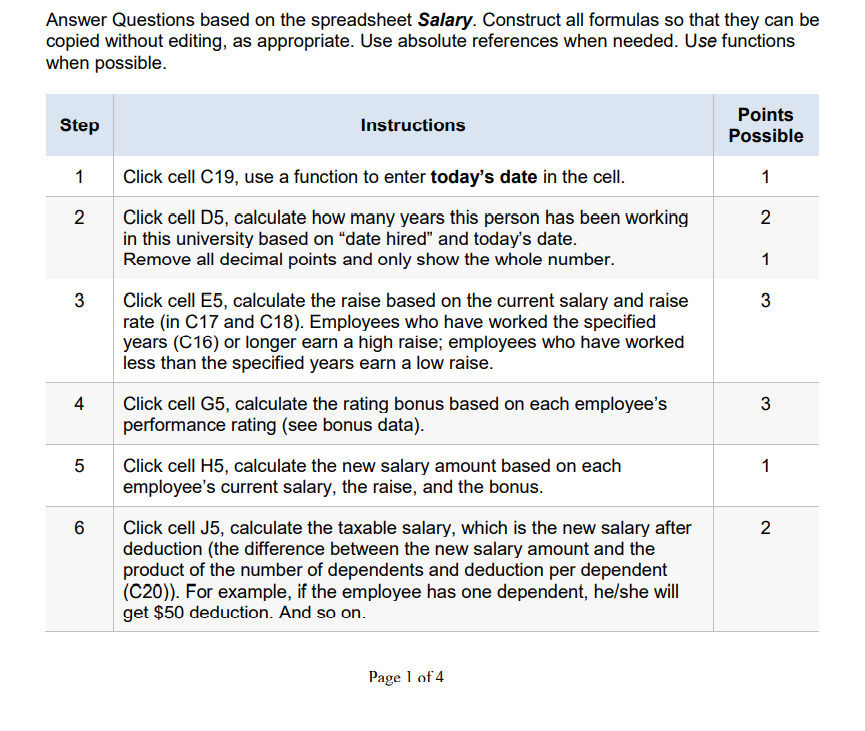
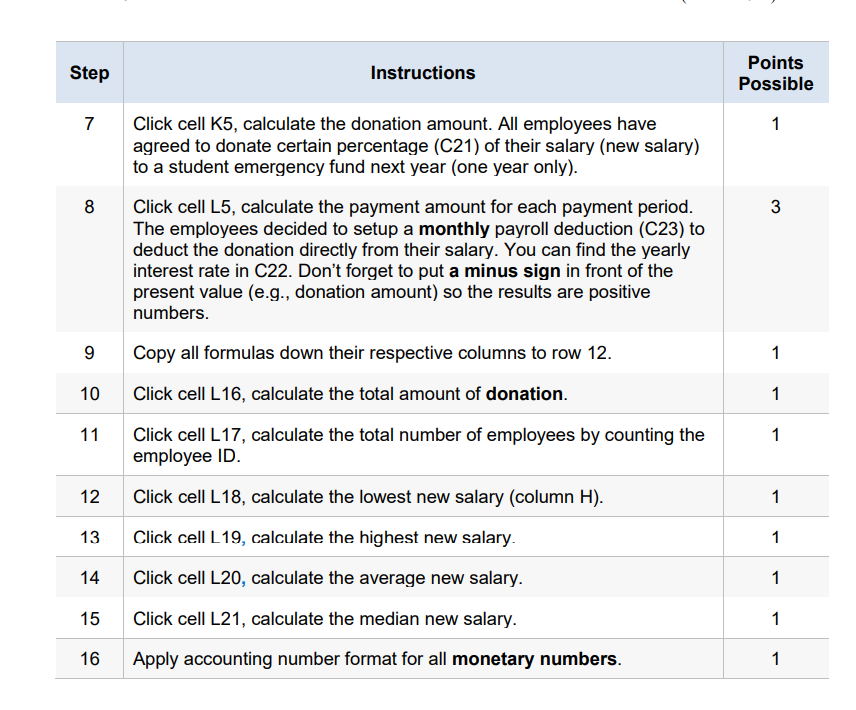
B D E H M Years Employed Rating Bonus No. of New Salary Dependents Taxable Salary amount Donation Payment Amount Amount for (one year) Each Period Raise 2 1 3 4 Employee ID 5 12345 6 12346 7 12347 8 12348 9 12349 10 12350 11 12351 12 12352 Current Date Hired Salary 4/1/2012 $ 50,000.00 7/15/2010 $ 75,250.00 10/31/2008 $ 67,250.00 9/8/1999 $ 45,980.00 3/14/2008 $ 58,750.00 6/18/2016 $ 61,000.00 7/15/2017 $ 75,250.00 10/31/2018 $ 67,250.00 Rating Score 5 3.5 4.2 2 1.5 4.5 3.5 4.2 1 1 3 4 2 13 74 15 16 17 18 19 20 Inputs and Constants Years Threshold: 10 High Year Raise Rate 5.00% Low Year Raise Rate 2.50% Today's date: 12/1/2020 Deduct per Depend $ 50.00 Donation Percentage 2% yearly Interest Rate 1.53% pmts per year 12 Bonus Data Rating Bonus 1 $ 100 2 $ 250 3 $ 500 4 $ 1,000 5 $ 5,000 Statistics Total amount of donation Total # of Employees Lowest New Salary Highest New Salary Average New Salary Median new Salary 21 22 23 24 25 26 27 7 Salary Chart Table + Answer Questions based on the spreadsheet Salary. Construct all formulas so that they can be copied without editing, as appropriate. Use absolute references when needed. Use functions when possible. Step Instructions Points Possible 1 1 2 2 1 3 Click cell C19, use a function to enter today's date in the cell. Click cell D5, calculate how many years this person has been working in this university based on "date hired and today's date. Remove all decimal points and only show the whole number. Click cell E5, calculate the raise based on the current salary and raise rate (in C17 and C18). Employees who have worked the specified years (C16) or longer earn a high raise; employees who have worked less than the specified years earn a low raise. Click cell G5, calculate the rating bonus based on each employee's performance rating (see bonus data). 3 3 4 3 5 1 Click cell H5, calculate the new salary amount based on each employee's current salary, the raise, and the bonus. 6 2. Click cell J5, calculate the taxable salary, which is the new salary after deduction (the difference between the new salary amount and the product of the number of dependents and deduction per dependent (C20)). For example, if the employee has one dependent, he/she will get $50 deduction. And so on. Page 1 of 4 Step Instructions Points Possible 7 1 8 3 Click cell K5, calculate the donation amount. All employees have agreed to donate certain percentage (C21) of their salary (new salary) to a student emergency fund next year (one year only). Click cell L5, calculate the payment amount for each payment period. The employees decided to setup a monthly payroll deduction (C23) to deduct the donation directly from their salary. You can find the yearly interest rate in C22. Don't forget to put a minus sign in front of the present value (e.g., donation amount) so the results are positive numbers. Copy all formulas down their respective columns to row 12. Click cell L16, calculate the total amount of donation. Click cell L17, calculate the total number of employees by counting the employee ID. 9 1 10 1 11 1 12 Click cell L18, calculate the lowest new salary (column H). 1 13 Click cell L19, calculate the highest new salary. 1 14 Click cell L20, calculate the average new salary. 1 15 Click cell L21, calculate the median new salary. 1 16 Apply accounting number format for all monetary numbers. 1 B D E H M Years Employed Rating Bonus No. of New Salary Dependents Taxable Salary amount Donation Payment Amount Amount for (one year) Each Period Raise 2 1 3 4 Employee ID 5 12345 6 12346 7 12347 8 12348 9 12349 10 12350 11 12351 12 12352 Current Date Hired Salary 4/1/2012 $ 50,000.00 7/15/2010 $ 75,250.00 10/31/2008 $ 67,250.00 9/8/1999 $ 45,980.00 3/14/2008 $ 58,750.00 6/18/2016 $ 61,000.00 7/15/2017 $ 75,250.00 10/31/2018 $ 67,250.00 Rating Score 5 3.5 4.2 2 1.5 4.5 3.5 4.2 1 1 3 4 2 13 74 15 16 17 18 19 20 Inputs and Constants Years Threshold: 10 High Year Raise Rate 5.00% Low Year Raise Rate 2.50% Today's date: 12/1/2020 Deduct per Depend $ 50.00 Donation Percentage 2% yearly Interest Rate 1.53% pmts per year 12 Bonus Data Rating Bonus 1 $ 100 2 $ 250 3 $ 500 4 $ 1,000 5 $ 5,000 Statistics Total amount of donation Total # of Employees Lowest New Salary Highest New Salary Average New Salary Median new Salary 21 22 23 24 25 26 27 7 Salary Chart Table + Answer Questions based on the spreadsheet Salary. Construct all formulas so that they can be copied without editing, as appropriate. Use absolute references when needed. Use functions when possible. Step Instructions Points Possible 1 1 2 2 1 3 Click cell C19, use a function to enter today's date in the cell. Click cell D5, calculate how many years this person has been working in this university based on "date hired and today's date. Remove all decimal points and only show the whole number. Click cell E5, calculate the raise based on the current salary and raise rate (in C17 and C18). Employees who have worked the specified years (C16) or longer earn a high raise; employees who have worked less than the specified years earn a low raise. Click cell G5, calculate the rating bonus based on each employee's performance rating (see bonus data). 3 3 4 3 5 1 Click cell H5, calculate the new salary amount based on each employee's current salary, the raise, and the bonus. 6 2. Click cell J5, calculate the taxable salary, which is the new salary after deduction (the difference between the new salary amount and the product of the number of dependents and deduction per dependent (C20)). For example, if the employee has one dependent, he/she will get $50 deduction. And so on. Page 1 of 4 Step Instructions Points Possible 7 1 8 3 Click cell K5, calculate the donation amount. All employees have agreed to donate certain percentage (C21) of their salary (new salary) to a student emergency fund next year (one year only). Click cell L5, calculate the payment amount for each payment period. The employees decided to setup a monthly payroll deduction (C23) to deduct the donation directly from their salary. You can find the yearly interest rate in C22. Don't forget to put a minus sign in front of the present value (e.g., donation amount) so the results are positive numbers. Copy all formulas down their respective columns to row 12. Click cell L16, calculate the total amount of donation. Click cell L17, calculate the total number of employees by counting the employee ID. 9 1 10 1 11 1 12 Click cell L18, calculate the lowest new salary (column H). 1 13 Click cell L19, calculate the highest new salary. 1 14 Click cell L20, calculate the average new salary. 1 15 Click cell L21, calculate the median new salary. 1 16 Apply accounting number format for all monetary numbers. 1
Step by Step Solution
There are 3 Steps involved in it

Get step-by-step solutions from verified subject matter experts
 Study Help