







Question: Please show step by step and the python code. You will create a popup window that contains the following: Text with your name A button
Please show step by step and the python code. You will create a popup window that contains the following:
Text with your name
A button that will output your major in the shell window
Another button that will close the window
Some suggestions:
Look up a list of monospaced fonts and try one. In the example below I used Consolas and sized
it to point, but other monospaced fonts are available. I also added a padding of pixels in
both the and directions, but this is not required.
Look at the lecture file that I put in eCampus. It already has most of what you need you just
need to add a second button.
The two buttons must have different names. Use the pack geometry method for each button.
To print out your major I recommend creating a function that has one Python command:
printing out your major. Define the function BEFORE you call it in your button. Again the
lecture file I loaded in eCampus will have most of what you need.
For the button to close the window, use the "destroy" option that we went over in class. See the
lecture file I loaded in eCampus
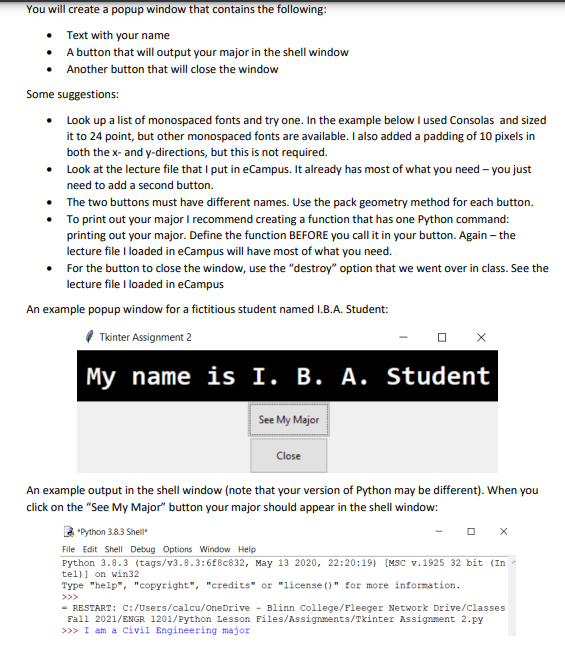
An example popup window for a fictitious student named I.BA Student:
Tkinter Assignment
An example output in the shell window note that your version of Python may be different When you
click on the "See My Major" button your major should appear in the shell window:
"Python Shell"
Step by Step Solution
There are 3 Steps involved in it
1 Expert Approved Answer
Step: 1 Unlock

Question Has Been Solved by an Expert!
Get step-by-step solutions from verified subject matter experts
Step: 2 Unlock
Step: 3 Unlock
 Study Help