







Question: Please show step by step in EXCEL. thanks Step Instructions Points Possible 18 In cell G36, using a logical function, determine whether the sales goal
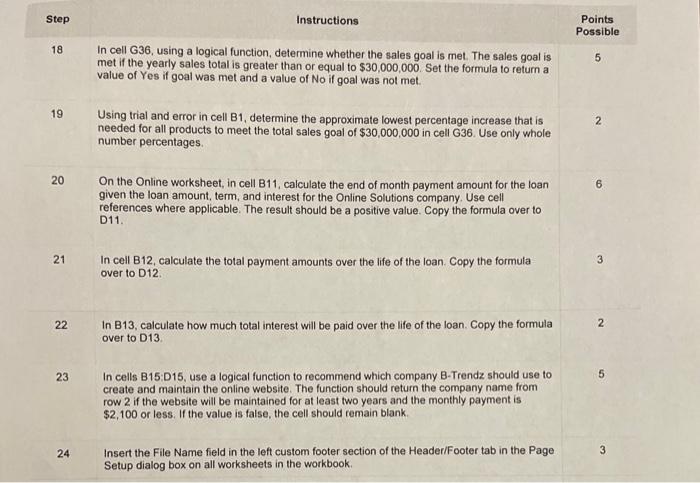
Step Instructions Points Possible 18 In cell G36, using a logical function, determine whether the sales goal is met. The sales goal is met if the yearly sales total is greater than or equal to $30,000,000. Set the formula to return a value of Yes if goal was met and a value of No if goal was not met. 19 Using trial and error in cell B1, determine the approximate lowest percentage increase that is 5 needed for all products to meet the total sales goal of $30,000,000 in cell G36. Use only whole number percentages. 20 On the Online worksheet, in cell B11, calculate the end of month payment amount for the loan 6 given the loan amount, term, and interest for the Online Solutions company. Use cell references where applicable. The result should be a positive value. Copy the formula over to D11. 21 In cell B12, calculate the total payment amounts over the life of the loan. Copy the formula 3 over to D12. 22 In B13, calculate how much total interest will be paid over the life of the loan. Copy the formula 2 over to D13. 23 In cells B15:D15, use a logical function to recommend which company B-Trendz should use to 5 create and maintain the online website. The function should return the company name from row 2 if the website will be maintained for at least two years and the monthly payment is $2,100 or less. If the value is false, the cell should remain blank. 24 Insert the File Name field in the left custom footer section of the Header/Footer tab in the Page 3 Setup dialog box on all worksheets in the workbook
Step by Step Solution
There are 3 Steps involved in it

Get step-by-step solutions from verified subject matter experts
 Study Help