



Question: Please show the equations. 1. Enter =The interest rate is in cell B34. Use the & function and the offset function to output the
Please show the equations.
1. Enter ="The interest rate is " in cell B34.
Use the "&" function and the offset function to output the following in cell D34.
The interest rate is 10%. (or whatever the value of the interest rate is).
The output in cell B34 should update based on the current value in cell C32.
You will need to use the OFFSET function to reference the interest rate. The row entry will be constant but the OFFSET function will need to use the output from C31.
2. Enter ="The number of years is " in cell B35.
Use the "&" function and the offset function to output the following in cell D35.
The number of years is 3. (or whatever the number of years is).
The output in cell B35 should update based on the current value in cell C31.
You will need to use the OFFSET function to reference the interest rate. The column entry will be constant but the OFFSET function will need to use the output from C32.
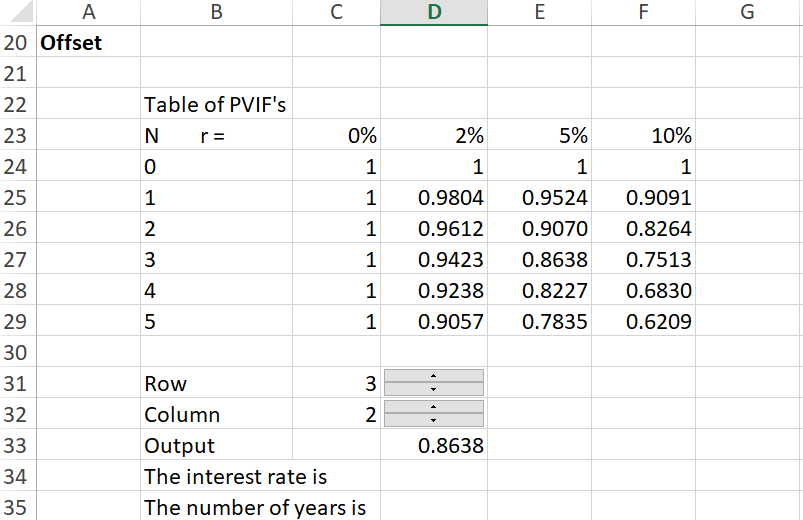
20 Offset 21 22 Table of PVIF's Nr= 23 24 0% 1 1 1 25 26 2% 1 0.9804 0.9612 0.9423 0.9238 0.9057 5% 1 0.9524 0.9070 0.8638 0.8227 0.7835 10% 1 0.9091 0.8264 0.7513 0.6830 0.6209 27 1 31 3 - 32 33 Row Column Output The interest rate is The number of years is 0.8638 34 35
Step by Step Solution
There are 3 Steps involved in it

Get step-by-step solutions from verified subject matter experts