







Question: please show the excel reference Problem #1: Problems 1 and 2 require the use of Excel's Solver add-in. This may not be immediately available on
please show the excel reference
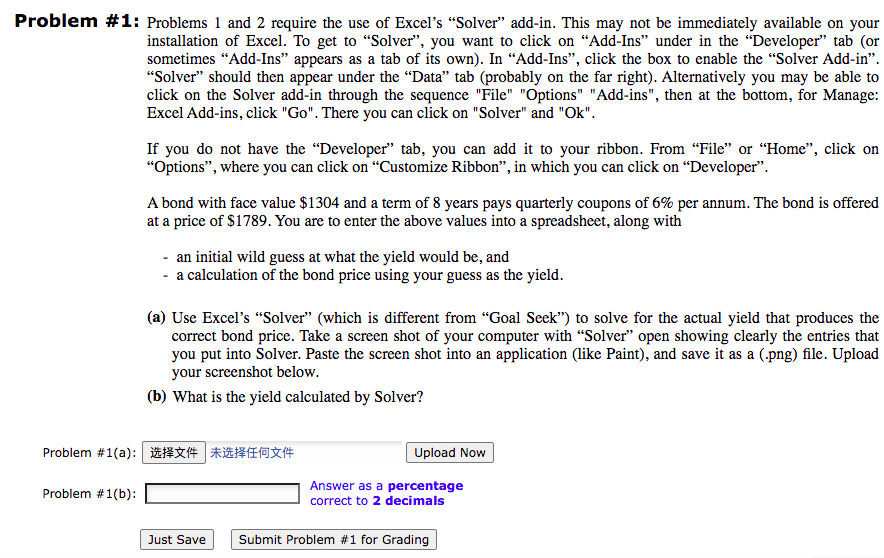
Problem #1: Problems 1 and 2 require the use of Excel's "Solver add-in. This may not be immediately available on your installation of Excel. To get to "Solver, you want to click on Add-Ins under in the Developer" tab (or sometimes "Add-Ins" appears as a tab of its own). In "Add-Ins, click the box to enable the "Solver Add-in. Solver" should then appear under the Data" tab (probably on the far right). Alternatively you may be able to click on the Solver add-in through the sequence "File" "Options" "Add-ins", then at the bottom, for Manage: Excel Add-ins, click "Go". There you can click on "Solver" and "Ok". If you do not have the "Developer tab, you can add it to your ribbon. From "File" or "Home", click on "Options, where you can click on Customize Ribbon, in which you can click on Developer. A bond with face value $1304 and a term of 8 years pays quarterly coupons of 6% per annum. The bond is offered at a price of $1789. You are to enter the above values into a spreadsheet, along with - an initial wild guess at what the yield would be, and - a calculation of the bond price using your guess as the yield. (a) Use Excel's "Solver" (which is different from "Goal Seek") to solve for the actual yield that produces the correct bond price. Take a screen shot of your computer with Solver" open showing clearly the entries that you put into Solver. Paste the screen shot into an application (like Paint), and save it as a (.png) file. Upload your screenshot below. (b) What is the yield calculated by Solver? Problem #1(a): 1434 *20*4# Upload Now Problem #1(b): Answer as a percentage correct to 2 decimals Just Save Submit Problem #1 for Grading
Step by Step Solution
There are 3 Steps involved in it

Get step-by-step solutions from verified subject matter experts
 Study Help