







Question: please show the formula while entering in the cell such as =If(E8>90,B8,0) FILE HOME INSERT PAGE LAYOUT FORMULAS DATA REVIEW VIEW Sign in Calibri -
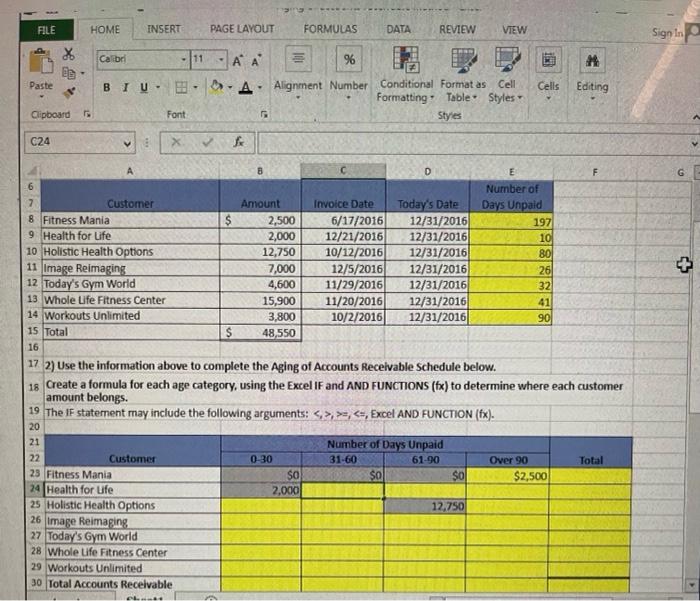
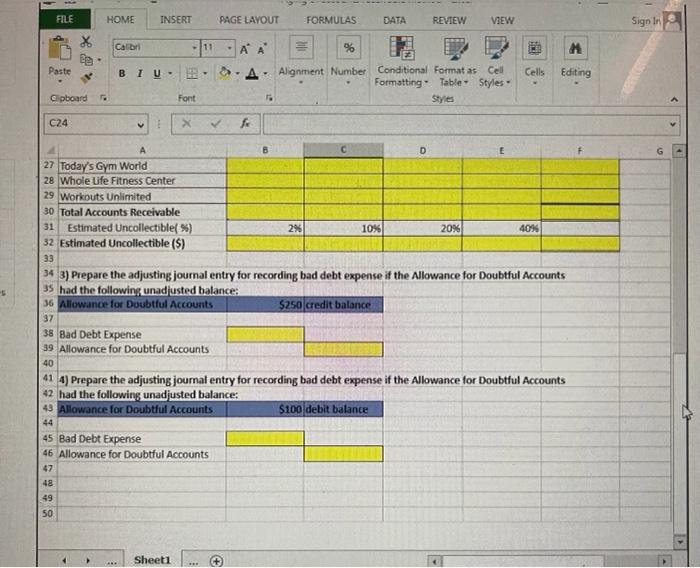
FILE HOME INSERT PAGE LAYOUT FORMULAS DATA REVIEW VIEW Sign in Calibri - 111 X BE A A 96 im M Paste BIU A Cells Editing Alignment Number Conditional Format as Cell Formatting Table Styles Styles Clipboard Font C24 X > L A B D G 6 Number of 7 Customer Amount Invoice Date Today's Date Days Unpaid 8 Fitness Mania 2,500 6/17/2016 12/31/2016 1971 9 Health for Life 2,000 12/21/2016 12/31/2016 10 10 Holistic Health Options 12,750 10/12/2016 12/31/2016 80 11 Image Reimaging 7,000 12/5/2016 12/31/2016 261 12 Today's Gym World 4,600 11/29/2016 12/31/2016 32 13 Whole Life Fitness Center 15,900 11/20/2016 12/31/2016 41 14 Workouts Unlimited 3,800 10/2/2016 12/31/2016 90 15 Total 48,550 16 17 2) Use the information above to complete the Aging of Accounts Receivable Schedule below. 18 Create a formula for each age category, using the Excel IF and AND FUNCTIONS (fx) to determine where each customer amount belongs. 19 The IF statement may include the following arguments: <.>.>,
Step by Step Solution
There are 3 Steps involved in it

Get step-by-step solutions from verified subject matter experts
 Study Help