







Question: Please show the Java code for this problem Problem 1 : TextCanvas 1 0 0 pts Implement a TextCanvas class in chapter 1 0 .
Please show the Java code for this problem
Problem : TextCanvas
pts
Implement a TextCanvas class in chaptercanvas package. The TextCanvas class should implement Canvas package as provided in the assignment.
package chaptercanvas;
The implementing class should have a constructor with two parameters
width: the width of the canvas.
height: the height of the canvas.
The valid locations for each pixels are from heightwidth
public interface Canvas
returns the height of the canvas.
int getHeight;
returns the width of the canvas.
int getWidth;
@param an rectangle area to be added to the canvas
returns the id of the rectangle in the canvas. The id of the
rectangle is a unique integer for a rectangle in the canvas, and
id will not be reusedafter the deletion of a rectangle
If the coordinates are not valid or out of the bounds for the canvas,
returns
int addint leftX, int upperY, int rightX, int bottomY;
removes the rectangle identified by the id from the canvas.
int removeint id;
moves the rectangle identified by id to the right by xOff and down by yOff.
If the move attempt to move the rectangle out of bounds of the canvas,
the rectangle will stop at the boundary.
If xOff is a negative number, move to the left by xOff
If yOff is a negative number, move up by yOff
int moveint id int xOff, int yOff;
returns the total shaded area on this canvas.
int getShadedArea;
displays the convas. Each pixel on the canvas will be displayed as a
blank if it is not covered by any rectangles, and will be displayed as
a star if it is covered by one or more rectangles.
void draw;
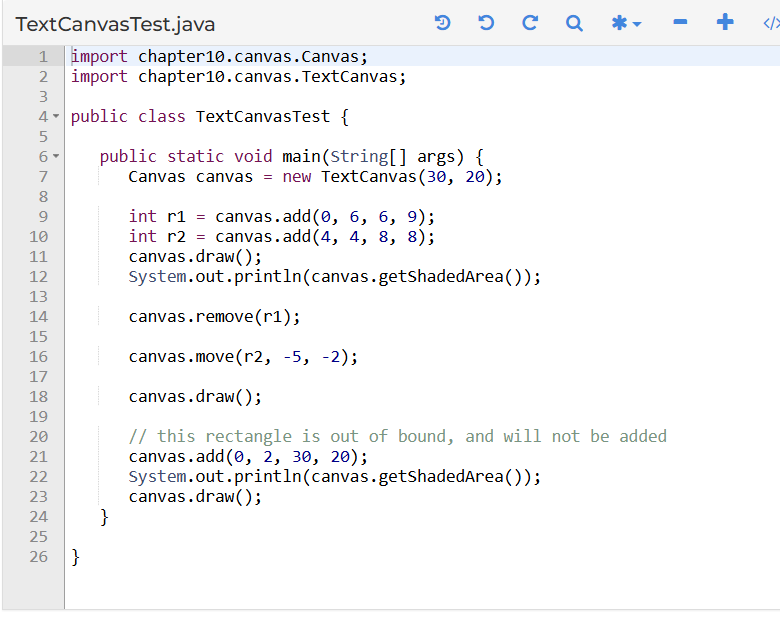
import chaptercanvas.Canvas;
import chaptercanvas.TextCanvas;
public class TextCanvasTest
public static void mainString args
Canvas canvas new TextCanvas;
int r canvas.add;
int r canvas.add;
canvas.draw;
System.out.printlncanvasgetShadedArea;
canvas.remover;
canvas.mover;
canvas.draw;
this rectangle is out of bound, and will not be added
canvas.add;
System.out.printlncanvasgetShadedArea;
canvas.draw;
Step by Step Solution
There are 3 Steps involved in it
1 Expert Approved Answer
Step: 1 Unlock

Question Has Been Solved by an Expert!
Get step-by-step solutions from verified subject matter experts
Step: 2 Unlock
Step: 3 Unlock
 Study Help