







Question: Please show what answer you did, and do it all 2. Using the GNU Debugger (gdb) To learn C/C- program debugging using the GNU Debuggerie.
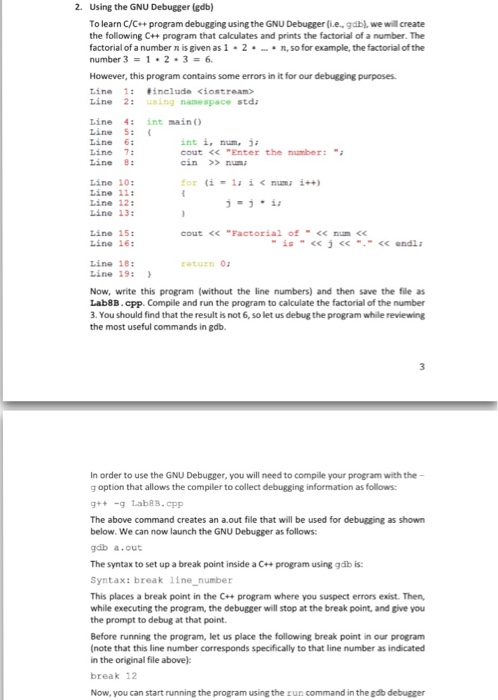
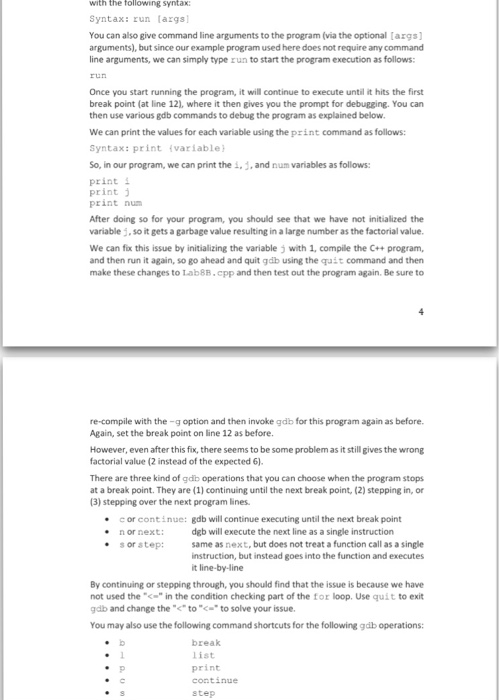

2. Using the GNU Debugger (gdb) To learn C/C- program debugging using the GNU Debuggerie. gdb, we will create the following C++ program that calculates and prints the factorial of a number. The factorial of a number n is given as 1 2. n, so for example, the factorial of the number 3 However, this program contains some errors in it for our debugging purposes. 1: fineluda kiostream ine 2: using namespace stda Line 4: int main Line 5: int i, num, ja Line 7: cout Enter the number: Line B: cin numa Line 10 (i la i numa i++) Line 11 Line 12 Line 13: Line 15: cout num Line 16: endl. Line 18 Line 19 Now, write this program (without the line numbers) and then save the file as Lab8B.cpp. Compile and run the program to calculate the factorial of the number 3. You should find that the result is not 6,so let us debug the program while reviewing the most useful commands in gdb. In order to use the GNU Debugger, you will need to compile your program with the g option that allows the compiler to collect debugging information as follows: g Lab88-cpp The above command creates an a out file that will be used for debugging as shown below. We can now launch the GNU Debugger as follows: gdb a.out The syntax to set up a break point inside a C++ program using gdb is: Syntax: break line number This places a break point in the C++ program where you suspect errors exist. Then, while executing the program, the debugger will stop at the break point, and give you the prompt to debug at that point. Before running the program, let us place the following break point in our program (note that this line number corresponds specificallyto that line number as indicated in the original file above): break 12 Now, you can start running the program using the run command in the gdb debugger
Step by Step Solution
There are 3 Steps involved in it

Get step-by-step solutions from verified subject matter experts
 Study Help