







Question: Please show your excel formulas/functions In cell H17 create a formula that you can copy down the column that will calculate hours worked for each
Please show your excel formulas/functions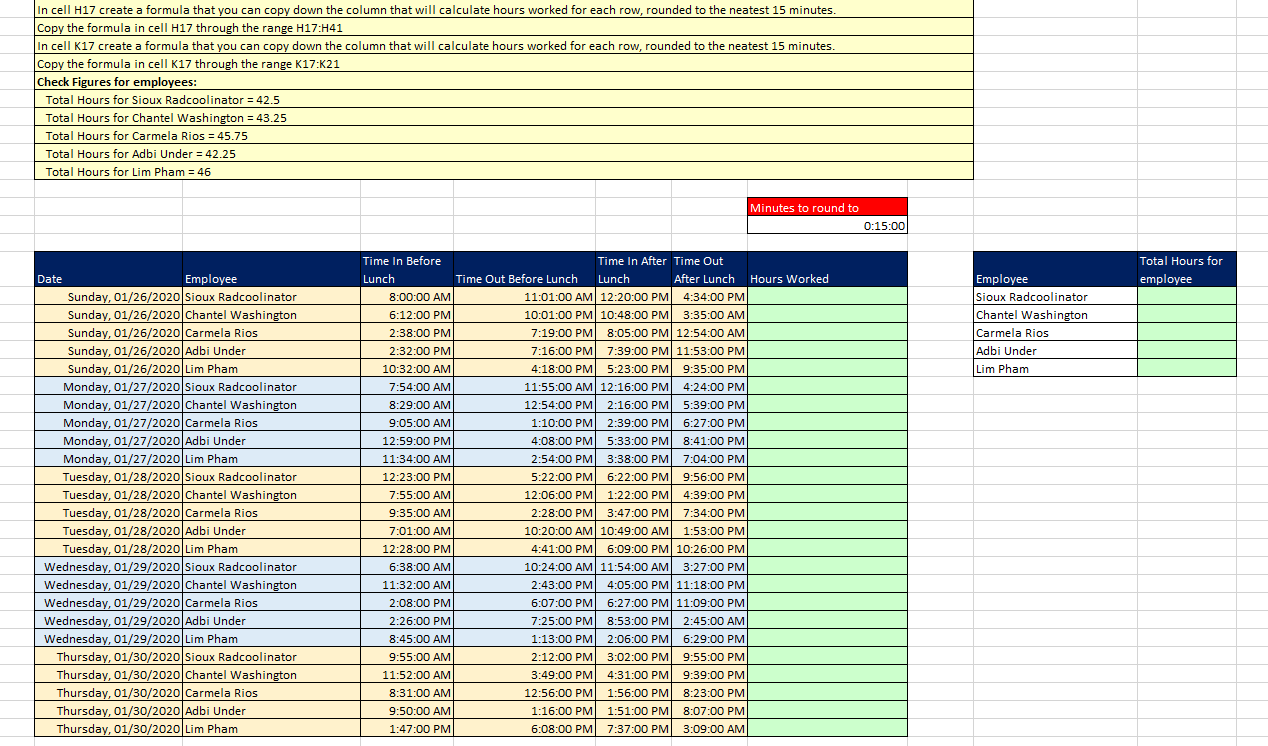
In cell H17 create a formula that you can copy down the column that will calculate hours worked for each row, rounded to the neatest 15 minutes. Copy the formula in cell H17 through the range H17:441 In cell K17 create a formula that you can copy down the column that will calculate hours worked for each row, rounded to the neatest 15 minutes. Copy the formula in cell K17 through the range K17:K21 Check Figures for employees: Total Hours for Sioux Radcoolinator = 42.5 Total Hours for Chantel Washington = 43.25 Total Hours for Carmela Rios = 45.75 Total Hours for Adbi Under = 42.25 Total Hours for Lim Pham = 46 Minutes to round to 0:15:00 Total Hours for employee Employee Sioux Radcoolinator Chantel Washington Carmela Rios Adbi Under Lim Pham Date Employee Sunday, 01/26/2020 Sioux Radcoolinator Sunday, 01/26/2020 Chantel Washington Sunday, 01/26/2020 Carmela Rios Sunday, 01/26/2020 Adbi Under Sunday, 01/26/2020|Lim Pham Monday, 01/27/2020 Sioux Radcoolinator Monday, 01/27/2020 Chantel Washington Monday, 01/27/2020 Carmela Rios Monday, 01/27/2020 Adbi Under Monday, 01/27/2020|Lim Pham Tuesday, 01/28/2020 Sioux Radcoolinator Tuesday, 01/28/2020 Chantel Washington Tuesday, 01/28/2020 Carmela Rios Tuesday, 01/28/2020 Adbi Under Tuesday, 01/28/2020|Lim Pham Wednesday, 01/29/2020 Sioux Radcoolinator Wednesday, 01/29/2020 Chantel Washington Wednesday, 01/29/2020 Carmela Rios Wednesday, 01/29/2020 Adbi Under | Wednesday, 01/29/2020|Lim Pham Thursday, 01/30/2020 Sioux Radcoolinator Thursday, 01/30/2020 Chantel Washington Thursday, 01/30/2020 Carmela Rios Thursday, 01/30/2020 Adbi Under Thursday, 01/30/2020|Lim Pham Time In Before Lunch 8:00:00 AM 6:12:00 PM 2:38:00 PM 2:32:00 PM 10:32:00 AM 7:54:00 AM 8:29:00 AM 9:05:00 AM 12:59:00 PM 11:34:00 AM 12:23:00 PM 7:55:00 AM 9:35:00 AM 7:01:00 AM 12:28:00 PM 6:38:00 AM 11:32:00 AM 2:08:00 PM Time In After Time Out Time Out Before Lunch Lunch After Lunch Hours Worked 11:01:00 AM 12:20:00 PM 4:34:00 PM 10:01:00 PM 10:48:00 PM 3:35:00 AM 7:19:00 PM 8:05:00 PM 12:54:00 AM 7:16:00 PM 7:39:00 PM 11:53:00 PM 4:18:00 PM 5:23:00 PM 9:35:00 PM 11:55:00 AM 12:16:00 PM 4:24:00 PM 12:54:00 PM 2:16:00 PM 5:39:00 PM 1:10:00 PM 2:39:00 PM 6:27:00 PM 4:08:00 PM 5:33:00 PM 8:41:00 PM 2:54:00 PM 3:38:00 PM 7:04:00 PM 5:22:00 PM 6:22:00 PM 9:56:00 PM 12:06:00 PM 1:22:00 PM 4:39:00 PM 2:28:00 PM 3:47:00 PM 7:34:00 PM 10:20:00 AM 10:49:00 AM 1:53:00 PM 4:41:00 PM 6:09:00 PM 10:26:00 PM 10:24:00 AM 11:54:00 AM 3:27:00 PM 2:43:00 PM 4:05:00 PM 11:18:00 PM 6:07:00 PM 6:27:00 PM 11:09:00 PM 7:25:00 PM 8:53:00 PM 2:45:00 AM 1:13:00 PM 2:06:00 PM 6:29:00 PM 2:12:00 PM 3:02:00 PM 9:55:00 PM 3:49:00 PM 4:31:00 PM 9:39:00 PM 12:56:00 PM 1:56:00 PM 8:23:00 PM 1:16:00 PM 1:51:00 PM 8:07:00 PM 6:08:00 PM 7:37:00 PM 3:09:00 AM 2:26:00 PM 8:45:00 AM 9:55:00 AM 11:52:00 AM 8:31:00 AM 9:50:00 AM 1:47:00 PM
Step by Step Solution
There are 3 Steps involved in it

Get step-by-step solutions from verified subject matter experts
 Study Help