







Question: please solve each part 1.Download the NB_Object_Grafix_Thing project /* * To change this license header, choose License Headers in Project Properties. * To change this
 please solve each part
1.Download the NB_Object_Grafix_Thing project
/* * To change this license header, choose License Headers in Project Properties. * To change this template file, choose Tools | Templates * and open the template in the editor. */ package nb_grafix_object_thing;
import java.awt.Graphics; import java.awt.event.ActionEvent; import java.awt.event.ActionListener; import java.util.ArrayList; import javax.swing.Timer;
/** * Blank form for creating graphical objects * * @author */ public class NB_Grafix_Object_Thing extends javax.swing.JFrame implements ActionListener { private ArrayList Stuff; // generic list of objects private Timer timer; private static final int DELAY = 3000; // 3 seconds
/** * Creates new form Thing_Form */ public NB_Grafix_Object_Thing() { initComponents(); // create the generic stuff ArrayList Stuff = new ArrayList(); // create a timer for this Form // with the given delay timer = new Timer(DELAY, this); // start the timer timer.start(); } // end constructor
/** * method is called each time the form is repainted * * @param graphics the Form's Graphics object */ @Override public void paint(Graphics graphics) { // draw the window title, menu, buttons super.paint(graphics); // get the Graphics context for the canvas Graphics canvas = canvasPanel.getGraphics(); /*** ADD CODE TO DRAW ON THE canvas AFTER THIS LINE ***/ } // end paint method /** * method is called each time mouse is clicked in the form * * add code that does something with the click, like make things... * * @param xCoord x-coordinate of the click * @param yCoord y-coordinate of the click */ public void mouseClickedAt(int xCoord, int yCoord) { /*** ADD CODE TO REACT TO USER MOUSE CLICK AFTER THIS LINE ***/ } // end mouseClickedAt method /*************************************************** * WARNING: DO NOT ADD ANY CODE BELOW THIS LINE!!! ***************************************************/
/** * This method is called from within the constructor to initialize the form. * WARNING: Do NOT modify this code. The content of this method is always * regenerated by the Form Editor. */ @SuppressWarnings("unchecked") // //GEN-BEGIN:initComponents private void initComponents() {
canvasPanel = new javax.swing.JPanel();
setDefaultCloseOperation(javax.swing.WindowConstants.EXIT_ON_CLOSE); setTitle("Graphical Objects");
canvasPanel.addMouseListener(new java.awt.event.MouseAdapter() { public void mouseClicked(java.awt.event.MouseEvent evt) { canvasPanelMouseClicked(evt); } });
javax.swing.GroupLayout canvasPanelLayout = new javax.swing.GroupLayout(canvasPanel); canvasPanel.setLayout(canvasPanelLayout); canvasPanelLayout.setHorizontalGroup( canvasPanelLayout.createParallelGroup(javax.swing.GroupLayout.Alignment.LEADING) .addGap(0, 999, Short.MAX_VALUE) ); canvasPanelLayout.setVerticalGroup( canvasPanelLayout.createParallelGroup(javax.swing.GroupLayout.Alignment.LEADING) .addGap(0, 737, Short.MAX_VALUE) );
getContentPane().add(canvasPanel, java.awt.BorderLayout.CENTER);
setSize(new java.awt.Dimension(1015, 775)); setLocationRelativeTo(null); }// //GEN-END:initComponents
private void canvasPanelMouseClicked(java.awt.event.MouseEvent evt) {//GEN-FIRST:event_canvasPanelMouseClicked mouseClickedAt(evt.getX(), evt.getY()); }//GEN-LAST:event_canvasPanelMouseClicked
/** * @param args the command line arguments */ public static void main(String args[]) { /* Set the Nimbus look and feel */ // /* If Nimbus (introduced in Java SE 6) is not available, stay with the default look and feel. * For details see http://download.oracle.com/javase/uiswing/lookandfeel/plaf.html */ try { for (javax.swing.UIManager.LookAndFeelInfo info : javax.swing.UIManager.getInstalledLookAndFeels()) { if ("Nimbus".equals(info.getName())) { javax.swing.UIManager.setLookAndFeel(info.getClassName()); break; } } } catch (ClassNotFoundException ex) { java.util.logging.Logger.getLogger(NB_Grafix_Object_Thing.class.getName()).log(java.util.logging.Level.SEVERE, null, ex); } catch (InstantiationException ex) { java.util.logging.Logger.getLogger(NB_Grafix_Object_Thing.class.getName()).log(java.util.logging.Level.SEVERE, null, ex); } catch (IllegalAccessException ex) { java.util.logging.Logger.getLogger(NB_Grafix_Object_Thing.class.getName()).log(java.util.logging.Level.SEVERE, null, ex); } catch (javax.swing.UnsupportedLookAndFeelException ex) { java.util.logging.Logger.getLogger(NB_Grafix_Object_Thing.class.getName()).log(java.util.logging.Level.SEVERE, null, ex); } // //
/* Create and display the form */ java.awt.EventQueue.invokeLater(new Runnable() { public void run() { new NB_Grafix_Object_Thing().setVisible(true); } }); }
// Variables declaration - do not modify//GEN-BEGIN:variables private javax.swing.JPanel canvasPanel; // End of variables declaration//GEN-END:variables
@Override public void actionPerformed(ActionEvent ae) { repaint(); } }
2.Unzip the project to a location like Documents\NetBeansProjects
Open the project in NetBeans:
launch NetBeans
open the project using File > Open Project... (Ctrl+Shift+O).
Lab 8.1: Defining the Graphical Box
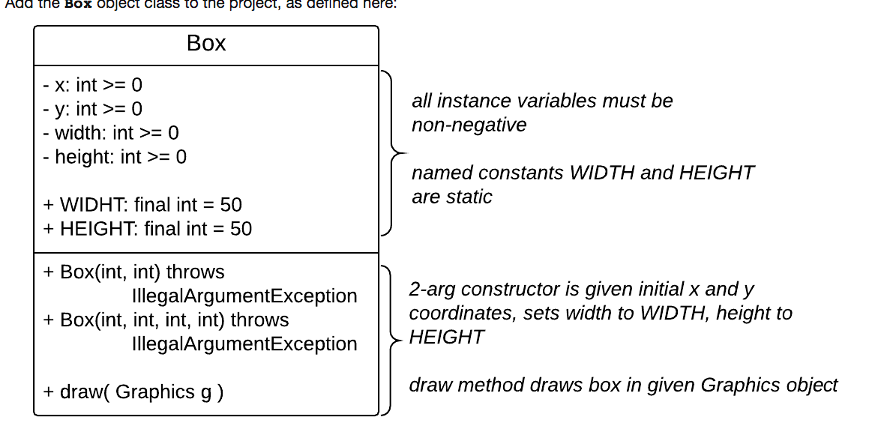
Add the Box object class to the project, as defined here:

Lab 8.2: Creating and Drawing Graphical Boxes
In NB_Grafix_Object_Thing.java:
1.Change the instance variable Stuff: private ArrayList Stuff; // generic list of objects so that it is an ArrayList of Boxes (instead of a generic ArrayList): private ArrayList Stuff; // list of Box objects
2.In the paint method, add code where indicated to draw each Box in the Stuff list
3.In the mouseClickedAt method, add code that adds a Box at the user click to the Stuff list
Compile and run the program. Click on the canvas to create boxes. If the boxes are too slow to draw, change the DELAY named constant's initial value to a smaller integer (this named constant's value is the number of milliseconds between repaints):
private static final int DELAY = 3000; // 3 seconds
Lab 8.3: Creating and Drawing Random Graphical Boxes
Modify the mouseClickedAt method code so that it adds a Box of random size:
a random width between 10 and the Box's WIDTH named constant, and
a random height between 10 and the Box's HEIGHT named constant
Re-compile and re-run the program. Click on the canvas to created boxes of random sizes.
Lab 8.4: (Optional yet Fun!) Creating and Drawing Random Graphical Boxes in Color
Modify your Box class so that it is drawn in a random color; i.e., it's created with a random color, then drawn in that color each time its draw method is called.
To generated a random color, you can either:
generate a random number from 1 to 13, then use an if...else if chain to select the corresponding named constant in the java.awt.Color object class:
| static Color | black The color black. |
| static Color | BLACK The color black. |
| static Color | blue The color blue. |
| static Color | BLUE The color blue. |
| static Color | cyan The color cyan. |
| static Color | CYAN The color cyan. |
| static Color | DARK_GRAY The color dark gray. |
| static Color | darkGray The color dark gray. |
| static Color | gray The color gray. |
| static Color | GRAY The color gray. |
| static Color | green The color green. |
| static Color | GREEN The color green. |
| static Color | LIGHT_GRAY The color light gray. |
| static Color | lightGray The color light gray. |
| static Color | magenta The color magenta. |
| static Color | MAGENTA The color magenta. |
| static Color | orange The color orange. |
| static Color | ORANGE The color orange. |
| static Color | pink The color pink. |
| static Color | PINK The color pink. |
| static Color | red The color red. |
| static Color | RED The color red. |
| static Color | white The color white. |
| static Color | WHITE The color white. |
| static Color | yellow The color yellow. |
| static Color | YELLOW The color yellow. |
(better) use the java.awt.Color's constructor with three random integers, each between 0 and 255: Color(int r, int g, int b)
Creates an opaque sRGB color with the specified red, green, and blue values in the range (0 - 255).
Re-compile and re-run the program. Click on the canvas to created boxes of random sizes in random colors.
Add the Box object class to the project, as derined nere Box x: int >= 0 y: int O width: int >= 0 all instance variables must be non-negative height: int >= 0 named constants WIDTH and HEIGHT are static + WIDHT: final int = 50 + HEIGHT: final int = 50 + Box(int, int) throws + Box(int, int, int, int) throws 2-arg constructor is given initial x and y coordinates, sets width to WIDTH, height to IllegalArgumentException legalArgumentException HEIGHT + draw( Graphics g) draw method draws box in given Graphics object
Step by Step Solution
There are 3 Steps involved in it

Get step-by-step solutions from verified subject matter experts
 Study Help