







Question: PLEASE SOLVE IN ASSEMBLY: PLEASE SOLVE IN ASSEMBLY: 2 . 4 Task 4 ( 1 0 pts ) : Mingle and Pringle! Last task is
PLEASE SOLVE IN ASSEMBLY: PLEASE SOLVE IN ASSEMBLY:
Task pts: Mingle and Pringle!
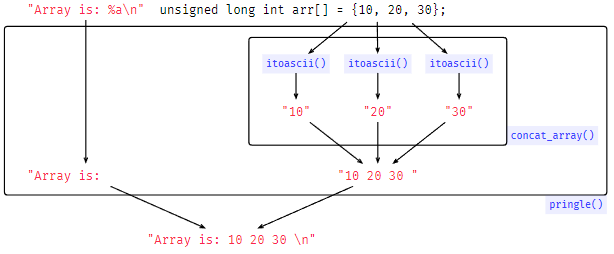
Last task is to complete pringle function. After completing the three tasks above, you'll see the algorithm is very simple:
Scan every character in the string;
a If there's a a:
i Fetch the corresponding array pointer and its length;
ii Call concatarray;
iii. Copy the return of concatarray into the destination string;
b Else copy the character from the pringle parameter to the destination string;
Return the number of characters printed excluding null terminator
We use the following flowchart to visualize the execution of pringle function.
Extra Credits pts
If it's not challenging enough for you, an obvious opportunity to earn extra credits is to remove the limit ofparameters we can pass to pringle function. We will grade this part manually. Please indicate if you want to be graded for EC at the top of pringle.s as a comment.
Testing
Another skill you will gain from this project is to link your C code with assembly code. From a practical aspect, for some functions the compiler cannot produce the most efficient assembly code, and that's where you, a radical and intelligent CS student, rise and shine! You can implement the function in assembly, and call the function from your C code directly.
Individual Tests
The first test file we provide is indietest.c From this file, you can see how we declare functions written in assembly, and how to call them. First of all, we declare those functions as extern, since they're only defined during the linking phase:
extern char itoasciiunsigned long int;
extern char concatarrayunsigned long int unsigned long int;
extern unsigned long int countspecschar;
extern unsigned long int pringlechar;
We then provide a mini main function where we test all four tasks:
Test for task
Output:
char s itoascii;
putss;
Test for task
Output:
unsigned long int arr;
char x concatarrayarr;
putsx;
Test for task
Output:
char str "Hello this is a test string for a and a and and a
;
unsigned long int c countspecsstr;
char count itoasciic;
putscount;
Test for task
Output: Hello this is a test string for and and and
unsigned long int arr;
unsigned long int arr;
unsigned long int arr;
unsigned long int ret pringlestr arr arr arr;
char newcount itoasciiret;
putsnewcount;
If you have finished task and want to test it only, you can comment out the code for task and and run the following commands to compile:
$ aarchlinuxgnugcc indietest.c itoascii.s g
and run aout:
$ qemuaarchL usraarchlinuxgnu aout
This file can be used as an example showing you how we call and test your functions in the tester, introduced below.
Tester
Ah the infamous tester again! We highly recommend you use indietest.c first to make sure it's working before using the tester. The usage of the tester is the same as in previous two homework. Put this tester file in the same directory as your assembly code, and go ahead and run the tester:
$ qemuaarchL usraarchlinuxgnu tester t
itoasciiconcatarraycountspecspringlelall
"Array is: a
unsigned long int arr; "Array is: a
unsigned long int arr;
Step by Step Solution
There are 3 Steps involved in it
1 Expert Approved Answer
Step: 1 Unlock

Question Has Been Solved by an Expert!
Get step-by-step solutions from verified subject matter experts
Step: 2 Unlock
Step: 3 Unlock
 Study Help