







Question: PLEASE SOLVE PYTHON CODE!! Class Definitions Create a Student class which should have the following instance attributes: name and grades, and the following class attribute:
PLEASE SOLVE PYTHON CODE!!
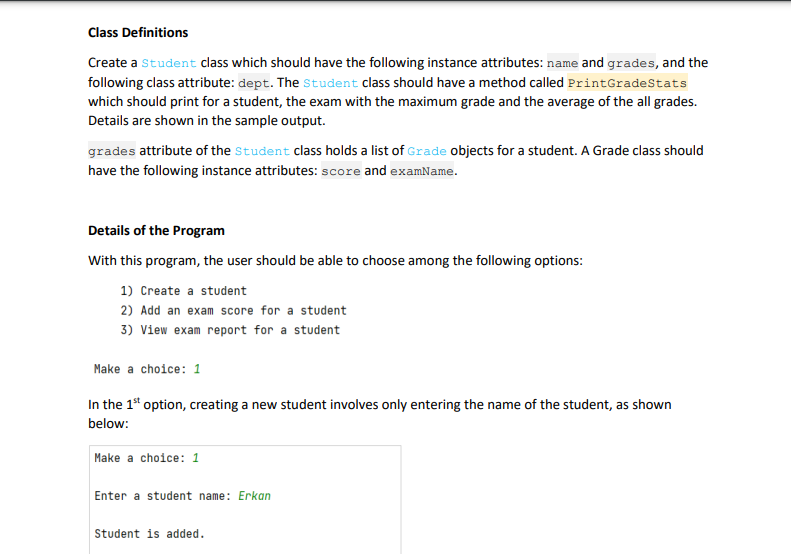
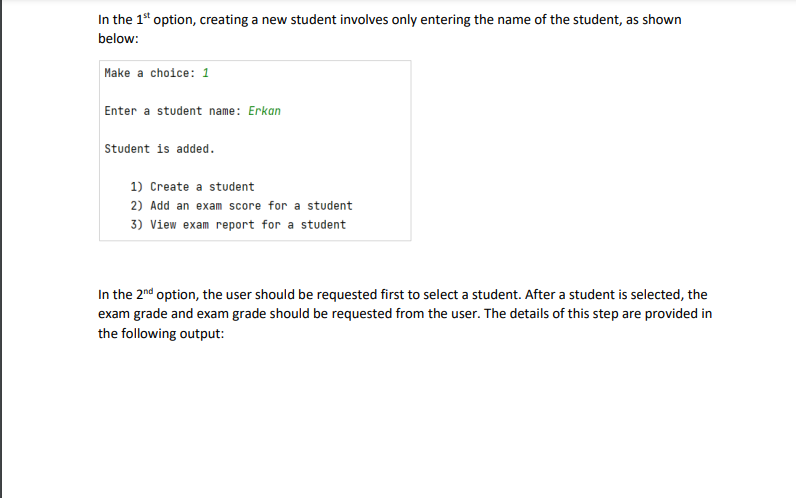
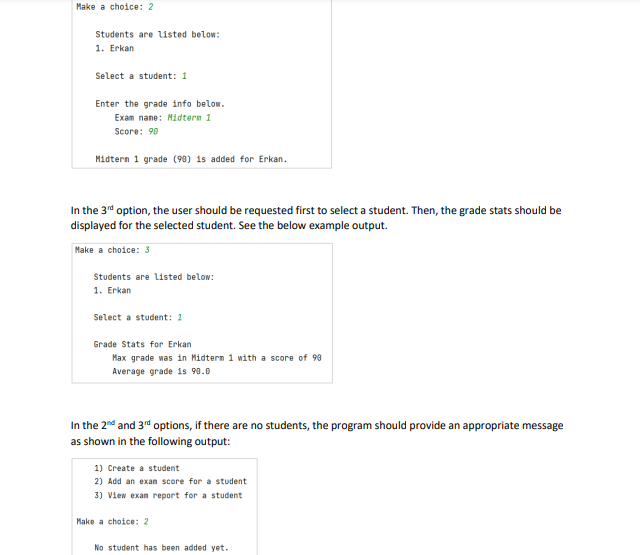
Class Definitions Create a Student class which should have the following instance attributes: name and grades, and the following class attribute: dept. The Student class should have a method called PrintGradestats which should print for a student, the exam with the maximum grade and the average of the all grades. Details are shown in the sample output. grades attribute of the Student class holds a list of Grade objects for a student. A Grade class should have the following instance attributes: score and examname. Details of the Program With this program, the user should be able to choose among the following options: 1) Create a student 2) Add an exam score for a student 3) View exam report for a student Make a choice: 1 In the 1st option, creating a new student involves only entering the name of the student, as shown below: Make a choice: 1 Enter a student name: Erkan Student is added. In the 1st option, creating a new student involves only entering the name of the student, as shown below: Make a choice: 1 Enter a student name: Erkan Student is added. 1) Create a student 2) Add an exam score for a student 3) View exam report for a student In the 2nd option, the user should be requested first to select a student. After a student is selected, the exam grade and exam grade should be requested from the user. The details of this step are provided in the following output: Make a choice: 2 Students are listed below: 1. Erkan Select a student: 1 Enter the grade info below. Exan nane: Midtern 1 Score: 90 Midtern 1 grade (90) 1s added for Erkan. In the 3rd option, the user should be requested first to select a student. Then, the grade stats should be displayed for the selected student. See the below example output. Make a choice: 3 Students are Listed below: 1. Erkan Select a student: 1 Grade Stats for Erkan Max grade was in Midtern 1 with a score of 99 Average grade is 90.0 In the 2nd and 3nd options, if there are no students, the program should provide an appropriate message as shown in the following output: 1) Create a student 2) Add an exan score for a student 3) View exan report for a student Make a choice: 2 No student has been added yet
Step by Step Solution
There are 3 Steps involved in it

Get step-by-step solutions from verified subject matter experts
 Study Help