







Question: Please solve the question in Ubuntu Exercises 1- Create the a time.txt file using vi editor and enter the following text: Time is slow when
Please solve the question in Ubuntu
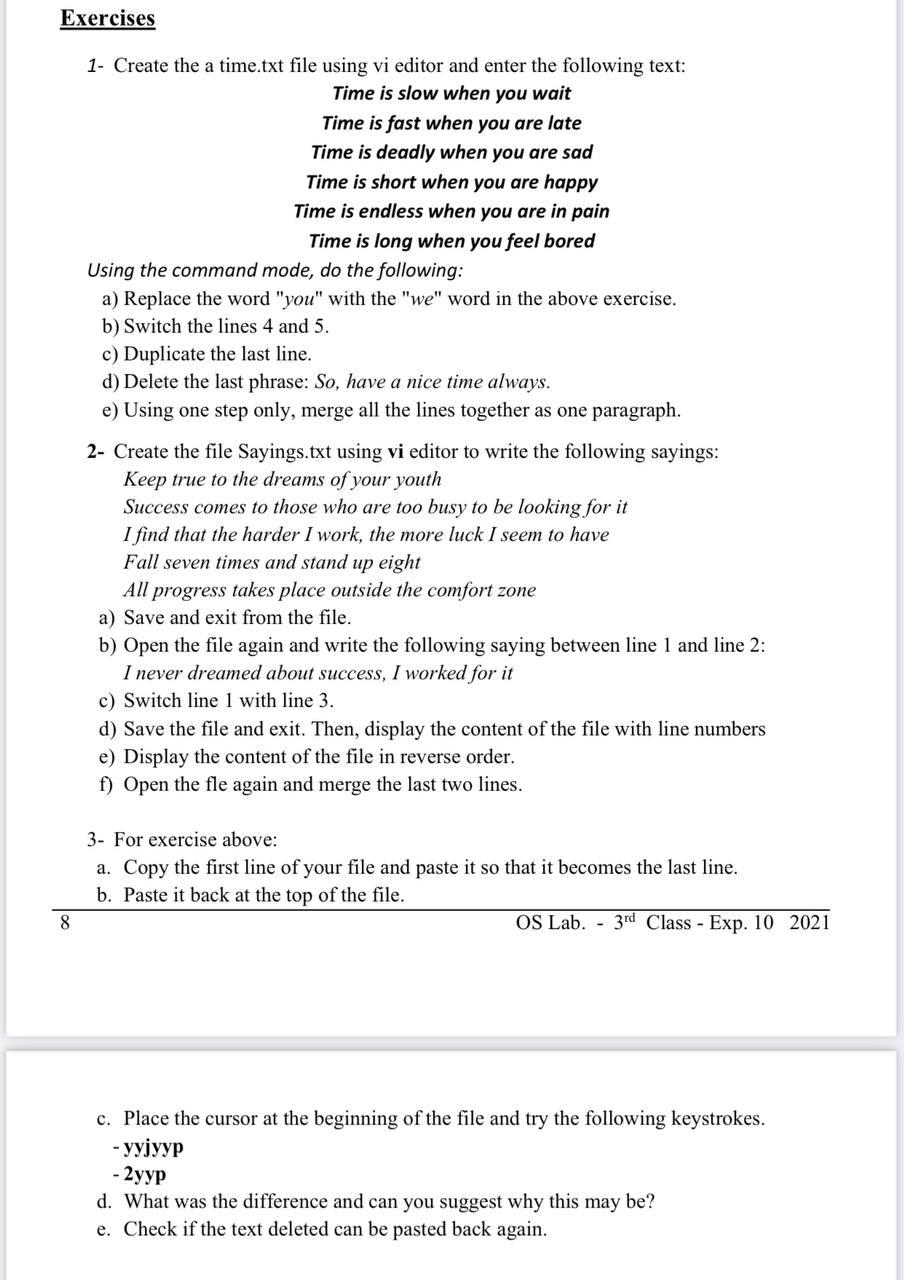
Exercises 1- Create the a time.txt file using vi editor and enter the following text: Time is slow when you wait Time is fast when you are late Time is deadly when you are sad Time is short when you are happy Time is endless when you are in pain Time is long when you feel bored Using the command mode, do the following: a) Replace the word "you" with the "we" word in the above exercise. b) Switch the lines 4 and 5. c) Duplicate the last line. d) Delete the last phrase: So, have a nice time always. e) Using one step only, merge all the lines together as one paragraph. 2- Create the file Sayings.txt using vi editor to write the following sayings: Keep true to the dreams of your youth Success comes to those who are too busy to be looking for it I find that the harder I work, the more luck I seem to have Fall seven times and stand up eight All progress takes place outside the comfort zone a) Save and exit from the file. b) Open the file again and write the following saying between line 1 and line 2: I never dreamed about success, I worked for it c) Switch line 1 with line 3. d) Save the file and exit. Then, display the content of the file with line numbers e) Display the content of the file in reverse order. f) Open the fle again and merge the last two lines. 3- For exercise above: a. Copy the first line of your file and paste it so that it becomes the last line. b. Paste it back at the top of the file. OS Lab. - 3rd Class - Exp. 10 2021 8 c. Place the cursor at the beginning of the file and try the following keystrokes. - yyjyyp - 2 d. What was the difference and can you suggest why this may be? e. Check if the text deleted can be pasted back again
Step by Step Solution
There are 3 Steps involved in it

Get step-by-step solutions from verified subject matter experts
 Study Help