







Question: please solve this in sql asap .thank you Tasks: Add SET AUTOCOMMIT ON; under the comment header and execute it. Consider the following table specifications:
please solve this in sql asap .thank you
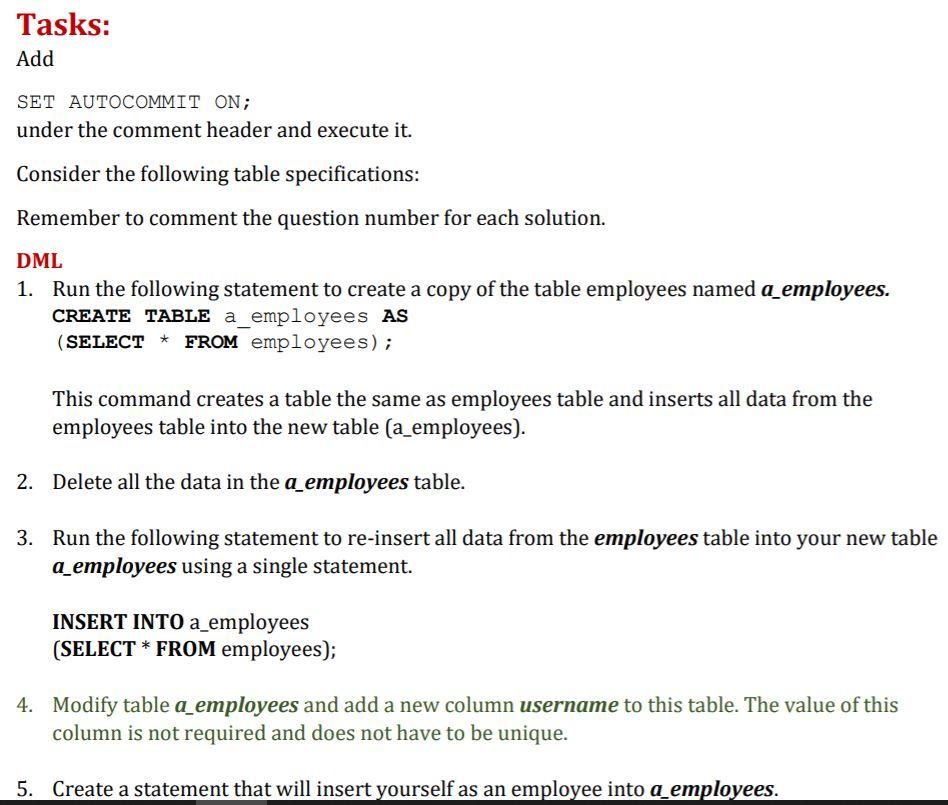
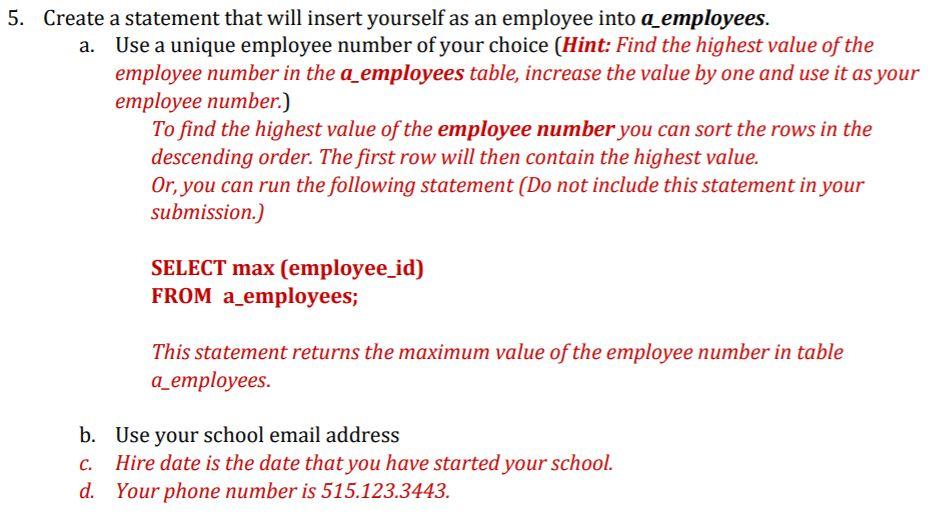
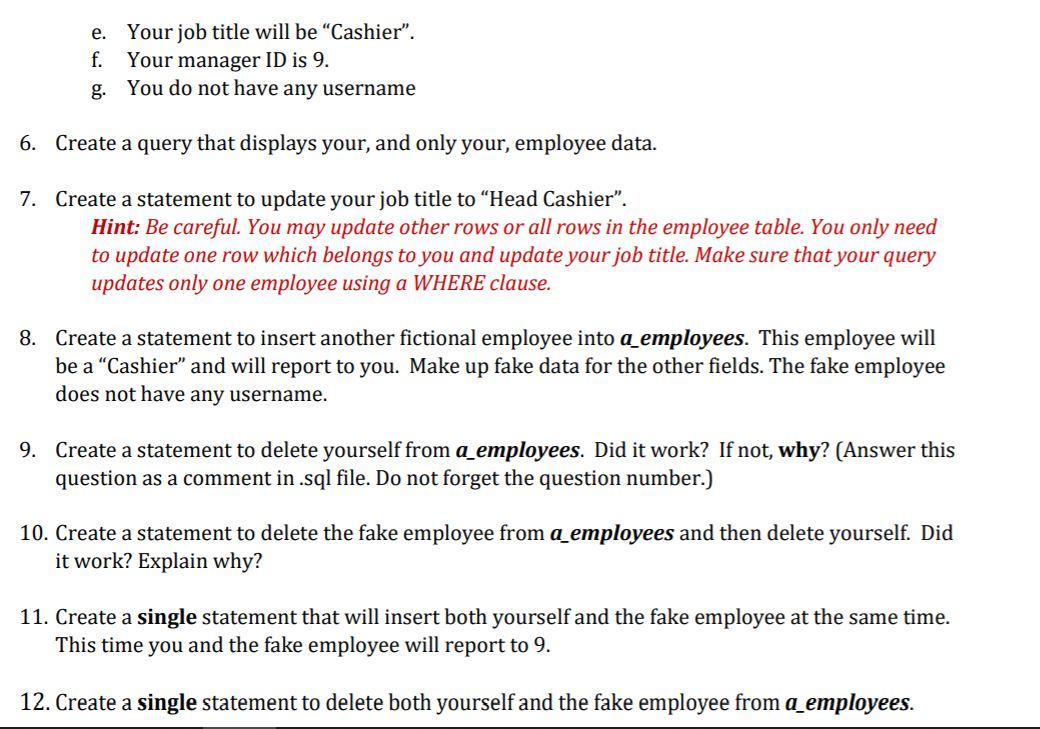
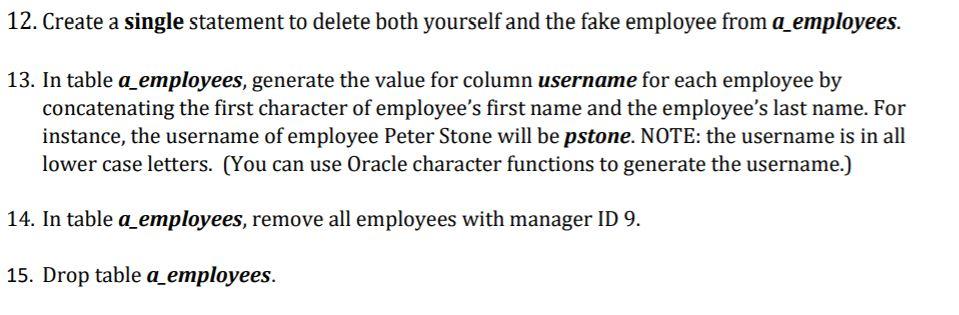
Tasks: Add SET AUTOCOMMIT ON; under the comment header and execute it. Consider the following table specifications: Remember to comment the question number for each solution. DML 1. Run the following statement to create a copy of the table employees named a_employees. CREATE TABLE a_employees AS (SELECT * FROM employees); This command creates a table the same as employees table and inserts all data from the employees table into the new table (a_employees). 2. Delete all the data in the a_employees table. 3. Run the following statement to re-insert all data from the employees table into your new table a_employees using a single statement. INSERT INTO a_employees (SELECT * FROM employees); 4. Modify table a_employees and add a new column username to this table. The value of this column is not required and does not have to be unique. 5. Create a statement that will insert yourself as an employee into a employees. 5. Create a statement that will insert yourself as an employee into a_employees. a. Use a unique employee number of your choice (Hint: Find the highest value of the employee number in the a_employees table, increase the value by one and use it as your employee number.) To find the highest value of the employee number you can sort the rows in the descending order. The first row will then contain the highest value. Or, you can run the following statement (Do not include this statement in your submission.) SELECT max (employee_id) FROM a_employees; This statement returns the maximum value of the employee number in table a_employees. b. Use your school email address Hire date is the date that you have started your school. d. Your phone number is 515.123.3443. C. e. Your job title will be "Cashier". f. Your manager ID is 9. g. You do not have any username 6. Create a query that displays your, and only your employee data. 7. Create a statement to update your job title to Head Cashier. Hint: Be careful. You may update other rows or all rows in the employee table. You only need to update one row which belongs to you and update your job title. Make sure that your query updates only one employee using a WHERE clause. 8. Create a statement to insert another fictional employee into a employees. This employee will be a "Cashier" and will report to you. Make up fake data for the other fields. The fake employee does not have any username. 9. Create a statement to delete yourself from a_employees. Did it work? If not, why? (Answer this question as a comment in.sql file. Do not forget the question number.) 10. Create a statement to delete the fake employee from a employees and then delete yourself. Did it work? Explain why? 11. Create a single statement that will insert both yourself and the fake employee at the same time. This time you and the fake employee will report to 9. 12. Create a single statement to delete both yourself and the fake employee from a_employees. 12. Create a single statement to delete both yourself and the fake employee from a_employees. 13. In table a_employees, generate the value for column username for each employee by concatenating the first character of employee's first name and the employee's last name. For instance, the username of employee Peter Stone will be pstone. NOTE: the username is in all lower case letters. (You can use Oracle character functions to generate the username.) 14. In table a_employees, remove all employees with manager ID 9. 15. Drop table a_employees
Step by Step Solution
There are 3 Steps involved in it

Get step-by-step solutions from verified subject matter experts
 Study Help