







Question: PLEASE TROUBLE I currently have the following code: def pwfun(x): if isinstance(x, list): res = [] for val in x: if val = -1 and
PLEASE TROUBLE
I currently have the following code:
def pwfun(x): if isinstance(x, list): res = [] for val in x: if val = -1 and val = -1 and x
BUT i am getting the following error. Please fix this error:
![list): res = [] for val in x: if val = -1](https://s3.amazonaws.com/si.experts.images/answers/2024/08/66cec3a8ef24a_53666cec3a891f83.jpg)
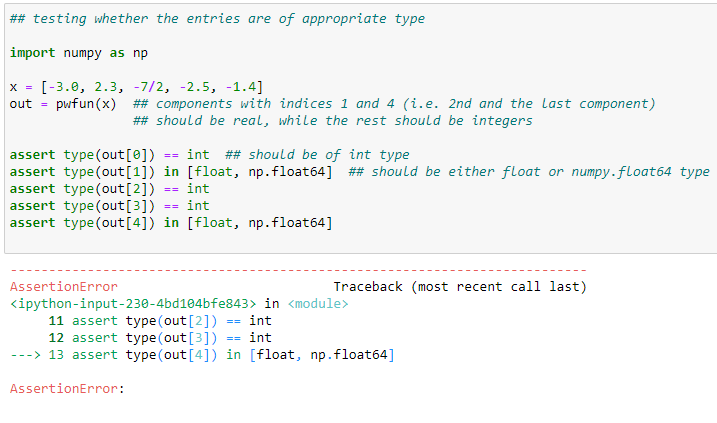
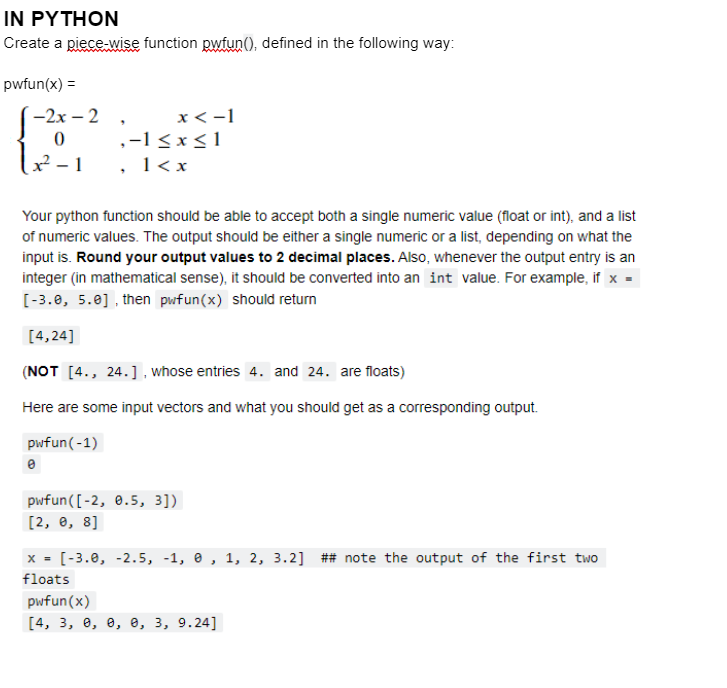
Create a piece-wise function pwfun(), defined in the following way: pwfun (x)= Your python function should be able to accept both a single numeric value (float or int), and a list of numeric values. The output should be either a single numeric or a list, depending on what the input is. Round your output values to 2 decimal places. Also, whenever the output entry is an integer (in mathematical sense), it should be converted into an value. For example, if then should return (NOT [4.,24.],whoseentriesandarefloats) Here are some input vectors and what you should get as a corresponding output. pwfun (-1) pwfun ([2,0.5,3]) [2,0,8] x=[3.0,2.5,1,0,1,2,3.2] \#\# note the output of the first two floats pwfun(x) [4,3,,,,3,9.24] \#\# testing whether the entries are of appropriate type import numpy as np x=[3.0,2.3,7/2,2.5,1.4] out = pufun(x) \#\# components with indices 1 and 4 (i.e. 2nd and the last component) \#\# should be real, while the rest should be integers assert type (out [])== int \#\# should be of int type assert type(out[1]) in [float, np.float64] \#\# should be either float or numpy.float64 type assert type ( out [2])== int assert type (out [3])== int assert type(out [4]) in [float, np.float64] AssertionError Traceback (most recent call last) ipython-input-230-4bd104bfe843> in module> 11 assert type ( out [2])== int 12 assert type ( out [3])== int 13 assert type(out [4]) in [float, np.float64] AssertionError
Step by Step Solution
There are 3 Steps involved in it

Get step-by-step solutions from verified subject matter experts
 Study Help