







Question: Please try Challenge 2 listed below in 4 steps using Python. Enclosed python program using Twitter JSON files. 1. Carefully review the data and think
Please try Challenge 2 listed below in 4 steps using Python. Enclosed python program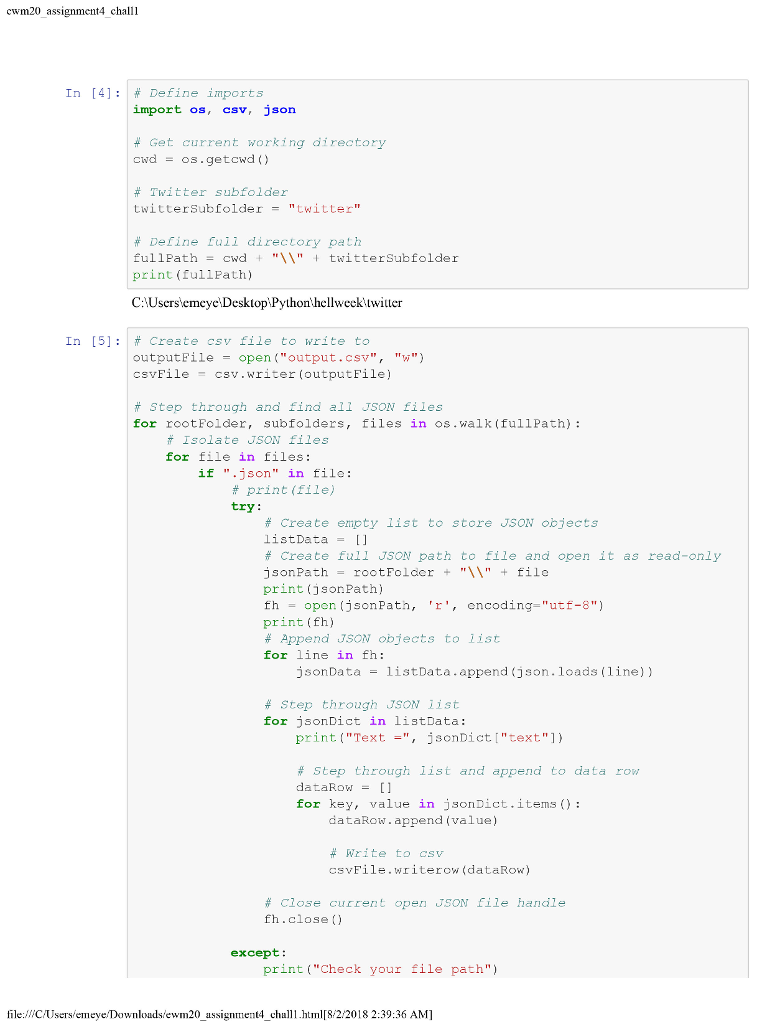 using Twitter JSON files. 1. Carefully review the data and think about what kinds of MEANINGFUL questions you can ask of the data and answer with the data. 2. Come up a meaningful question that you can answer with your data. Questions such as What is the average word count in tweet? will not count as meaningful for this assignment. 3. Make sure that your Python script comments contain: a. The question you are asking b. The reason you decided to ask that particular question c. Briefly describe (in plain English, not in Python) your algorithm for addressing your question d. What knowledge you will gain from answering your question 4. Implement a solution required for answering your question in the same script you created for Challenge 1
cwm20 assignment4 challl In [4] : # Define imports import os, csv, json # Get current working directory cwd os.getcwd () # Twitter subfolder twitterSubfolder"twitter" # Define full directory path fu 11 Path= cwd + "W" + twitterSub folder print (fullPath) C:lUsers'emeye Desktop Python'hellweektwiller In [5]: # Create csv file to write to outputFileopen ("output.csv", "w") csvF?le-csv.writer (outputFile) # step through and find all JSON files for rootFolder, subfolders, files in os.walk (fullPath) # Isolate JSON files for file in files: if ".json" in filo: # print (file) try # Create empty list to store JSON objects listData # Create full JSON path to file and open it as read-only print (jsonPath) thopen (jsonPath, 'r, ncoding-"utf-8") print fh) # Append JSON objects to list for line in fh: jsonData - listData.append (json.loads (line)) # Step through JSON ??st for jsonDict in listData: print ("Text =", jsonDict ["text"]} # step through list and append to data row dataRow[ for key, value in jsonDict.items): dataRow.append (value) # Write to csv CsvFile.writerow(dataRow) # C103e current open JSON file handle fh.close () except: print("Check your file path") file:CUss eeDownloadsiewm20 assignment4 challhtm8 2 2018 2:39:36 AM] cwm20 assignment4 challl In [4] : # Define imports import os, csv, json # Get current working directory cwd os.getcwd () # Twitter subfolder twitterSubfolder"twitter" # Define full directory path fu 11 Path= cwd + "W" + twitterSub folder print (fullPath) C:lUsers'emeye Desktop Python'hellweektwiller In [5]: # Create csv file to write to outputFileopen ("output.csv", "w") csvF?le-csv.writer (outputFile) # step through and find all JSON files for rootFolder, subfolders, files in os.walk (fullPath) # Isolate JSON files for file in files: if ".json" in filo: # print (file) try # Create empty list to store JSON objects listData # Create full JSON path to file and open it as read-only print (jsonPath) thopen (jsonPath, 'r, ncoding-"utf-8") print fh) # Append JSON objects to list for line in fh: jsonData - listData.append (json.loads (line)) # Step through JSON ??st for jsonDict in listData: print ("Text =", jsonDict ["text"]} # step through list and append to data row dataRow[ for key, value in jsonDict.items): dataRow.append (value) # Write to csv CsvFile.writerow(dataRow) # C103e current open JSON file handle fh.close () except: print("Check your file path") file:CUss eeDownloadsiewm20 assignment4 challhtm8 2 2018 2:39:36 AM]
Step by Step Solution
There are 3 Steps involved in it

Get step-by-step solutions from verified subject matter experts
 Study Help