







Question: Please try to use simple codes so I (a beginner) can understand them better. Also, avoid importing any modules. This program should be done in
Please try to use simple codes so I (a beginner) can understand them better. Also, avoid importing any modules. This program should be done in Python.
Here is the data from the text file:
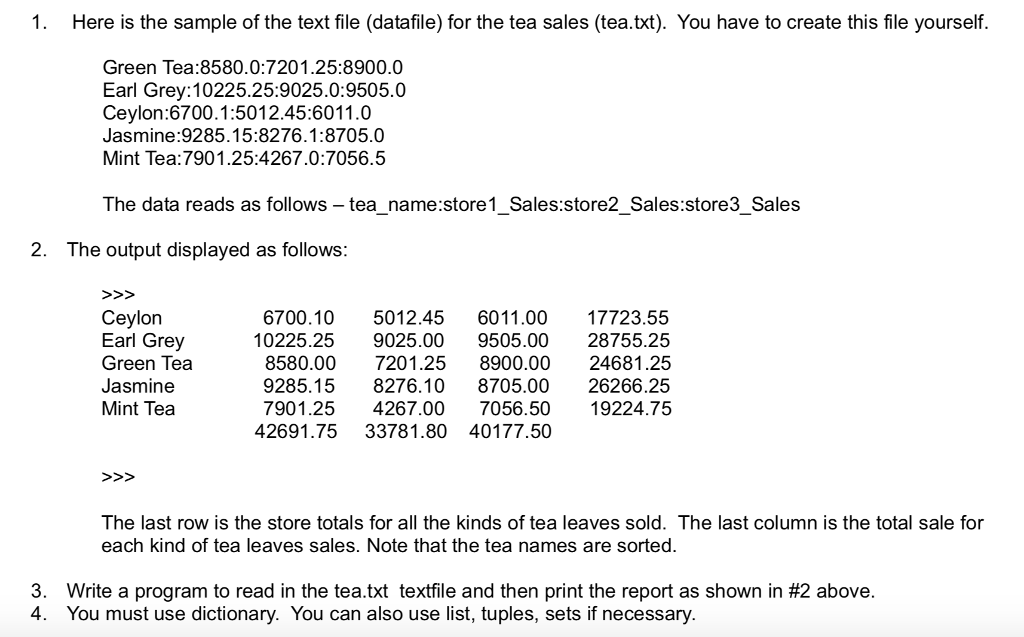
Green Tea:8580.0:7201.25:8900.0 Earl Grey:10225.25:9025.0:9505.0 Ceylon:6700.1:5012.45:6011.0 Jasmine:9285.15:8276.1:8705.0 Mint Tea:7901.25:4267.0:7056.5
1. Here is the sample of the text file (datafile) for the tea sales (tea.txt). You have to create this file yourself. Green Tea:8580.0:7201.25:8900.0 Earl Grey:10225.25:9025.0:9505.0 Ceylon:6700.1:5012.45:6011.0 Jasmine:9285.15:8276.1:8705.0 Mint Tea:7901.25:4267.0:7056.5 The data reads as follows - tea_name:store1_Sales:store2_Sales:store3_Sales 2. The output displayed as follows: Ceylon Earl Grey Green Tea Jasmine Mint Tea 6700.10 5012.45 6011.00 17723.55 10225.25 9025.00 9505.00 28755.25 8580.00 7201.25 8900.0024681.25 9285.158276.10 8705.0026266.25 7901.25 4267.00 7056.50 19224.75 42691.75 33781.80 40177.50 The last row is the store totals for all the kinds of tea leaves sold. The last column is the total sale for each kind of tea leaves sales. Note that the tea names are sorted. 3. 4. Write a program to read in the teatxt textfile and then print the report as shown in #2 above. You must use dictionary. You can also use list, tuples, sets if necessary
Step by Step Solution
There are 3 Steps involved in it

Get step-by-step solutions from verified subject matter experts
 Study Help