







Question: Please type the code and send Q1. Please review all three examples I have created in Functions.ipynb . Right click the link to save, then
Please type the code and send
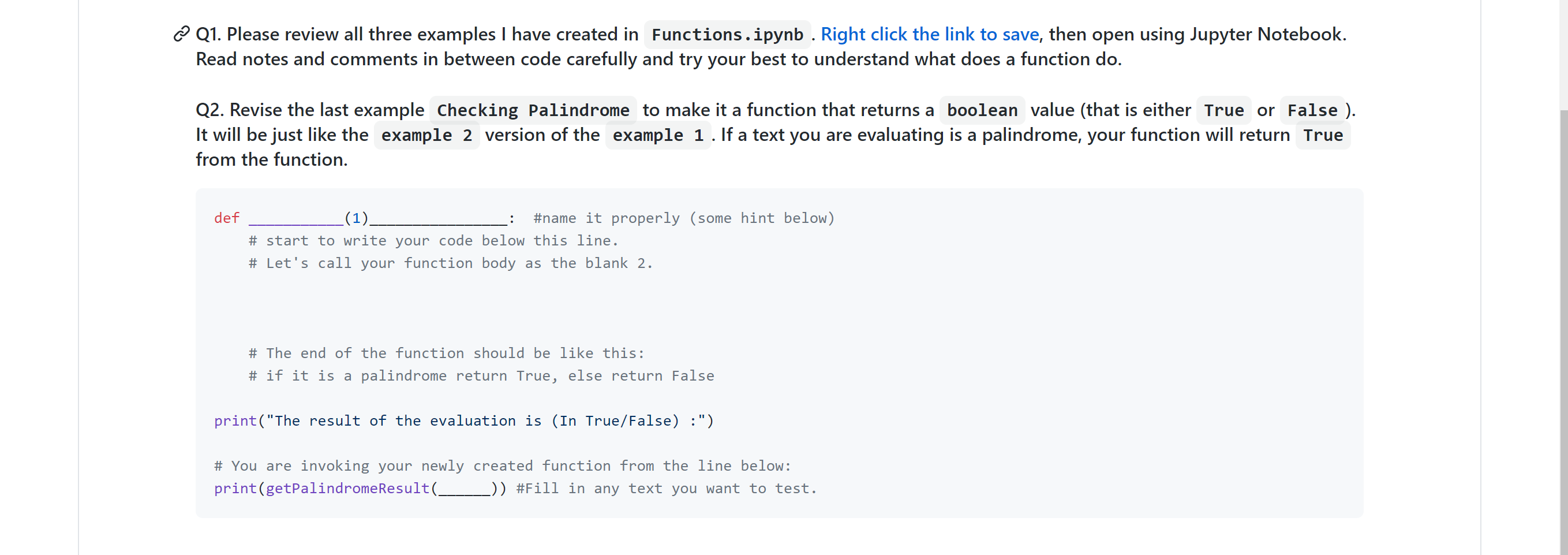
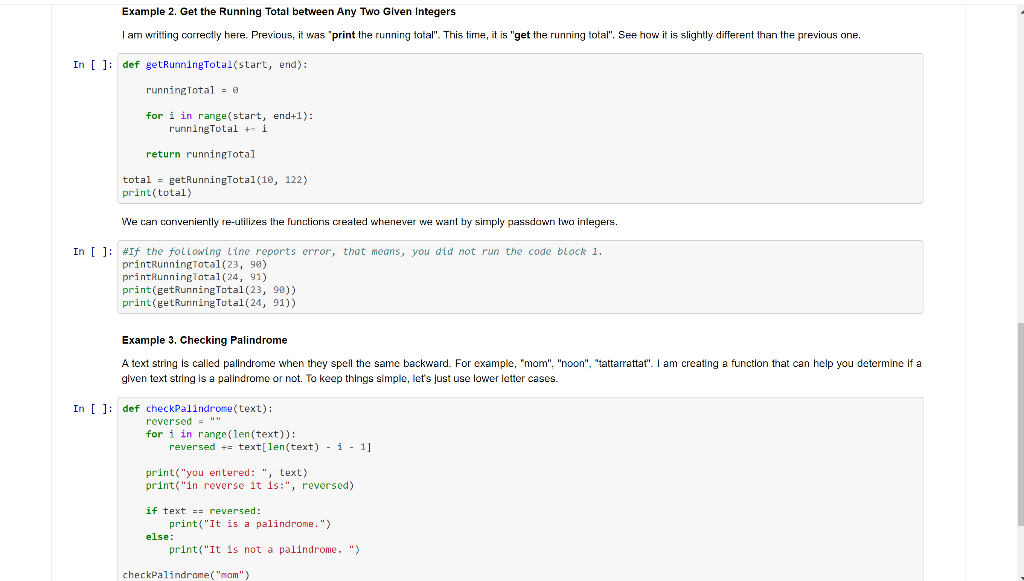
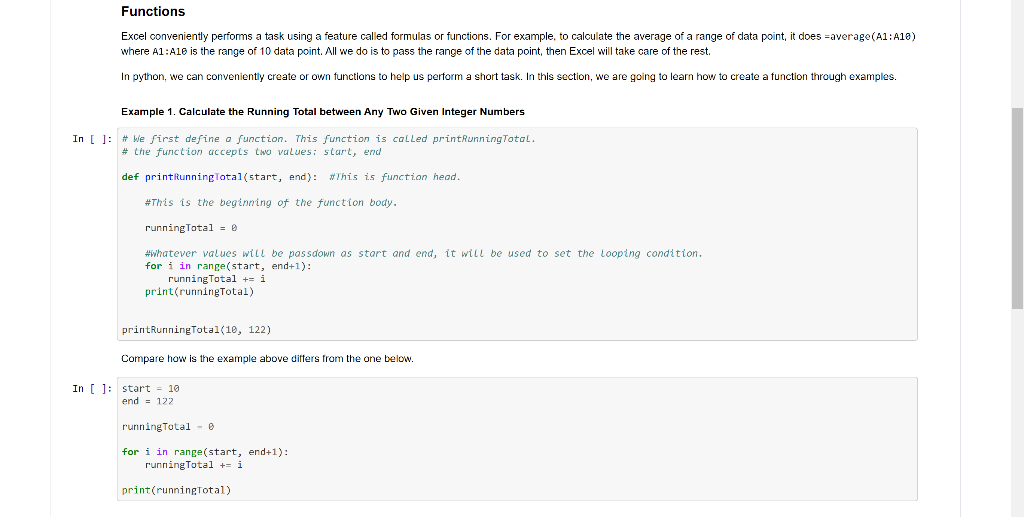
Q1. Please review all three examples I have created in Functions.ipynb . Right click the link to save, then open using Jupyter Notebook. Read notes and comments in between code carefully and try your best to understand what does a function do. Q2. Revise the last example Checking Palindrome to make it a function that returns a boolean value (that is either True or False ). It will be just like the example 2 version of the example 1. If a text you are evaluating is a palindrome, your function will return True from the function. : def (1). #name it properly (some hint below) # start to write your code below this line. # Let's call your function body as the blank 2. # The end of the function should be like this: # if it is a palindrome return True, else return false print("The result of the evaluation is (In True/False) :") # You are invoking your newly created function from the line below: print(getPalindromeResult(__ -)) #Fill in any text you want to test. Example 2. Get the Running Total between Any Two Given Integers I am writting correctly here. Previous, it was 'print the running total". This time, it is "get the running total". See how it is slightly different than the previous one, In [ ]: def getRunningTotal(start, end): runningTotal = @ for i in range (start, end+1): runningTotal + 1 return runningtotal total = getRunningTotal(10, 122) print(total) We can conveniently re-utilizes the functions created whenever we want by simply passdown two integers. In [ ]: #If the following Line reports error, that means, you did not run the code block 1. printRunningTotal(23, 90) printRunningTotal(24, 91) print(getRunning Total(23, 90)) print(getRunningTotal(24, 91)) Example 3. Checking Palindrome A text string is called palindrome when they spell the same backward. For example, "mom", "noon", "tattarrattat". I am creating a function that can help you determine if a given text string is a palindrome or not. To keep things simple, let's just lower letter cases. In [ ]: def checkPalindrome(text): reversed=" for i in range (len (text)): reversed += text[len (text) - i - 1] print("you entered: ", text) print("in reverse it is:", reversed) if text = reversed: print("It is a palindrome.") else: print("It is not a palindrome.") checkPalindrome("mom") Functions Excel conveniently performs a task using a feature called formulas or functions. For example, to calculate the average of a range of data point, it does =average(A1:A10) where A1:A10 is the range of 10 data point. All we do is pass the range of the data point, then Excel will take care of the rest. In python, we can conveniently create or own functions to help us perform a short task. In this section, we are going to learn how to create a function through examples. Example 1. Calculate the Running Total between Any Two Given Integer Numbers In [ ]: # We first define a function. This function is called printRunningTotal. # the function accepts two values: scart, end def printRunningTotal(start, end): This is function head. #This is the beginning of the function body. runningTotal = 0 #whatever values will be passdown as start and end, it will be used to set the Looping condition. for i in range (start, end+1): running Total += i print(runningTotal) printRunningTotal(10, 122) Compare how is the example above differs from the one below. In [ ]: start = 10 end - 122 runningTotal - for i in range(start, end+1): running Total +- i print (runningTotal)
Step by Step Solution
There are 3 Steps involved in it

Get step-by-step solutions from verified subject matter experts
 Study Help