







Question: please typeset code so it can be copied and pasted and please include comments in the code . thanks (e) Write the ASCII plot into
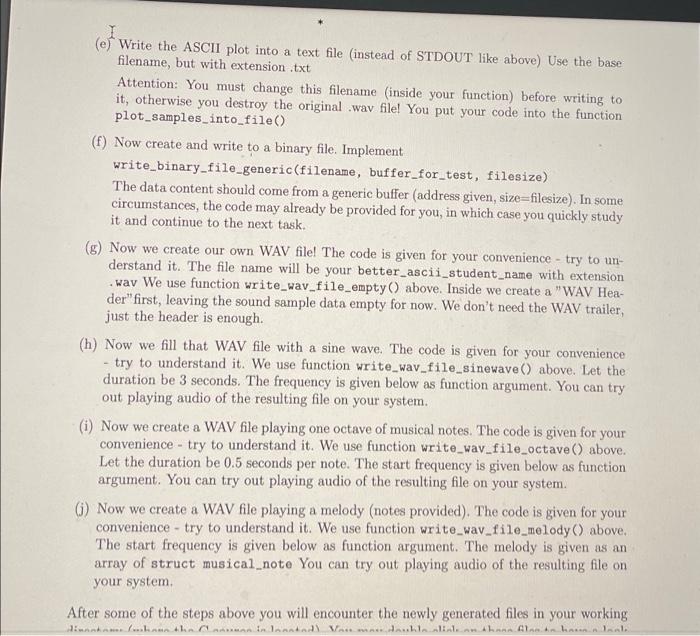
(e) Write the ASCII plot into a text file (instead of STDOUT like above) Use the base filename, but with extension.txt Attention: You must change this filename (inside your function) before writing to it, otherwise you destroy the original .wav file! You put your code into the function plot_samples_into_file() (f) Now create and write to a binary file. Implement write_binary_file_generic(filename, buffer_for_test, filesize) The data content should come from a generic buffer (address given, size=filesize). In some circumstances, the code may already be provided for you, in which case you quickly study it and continue to the next task. (g) Now we create our own WAV file! The code is given for your convenience - try to un derstand it. The file name will be your better_ascii_student_name with extension .wav We use function write_wav_file_empty() above. Inside we create a "WAV Hea- der"first, leaving the sound sample data empty for now. We don't need the WAV trailer, just the header is enough. (h) Now we fill that WAV file with a sine wave. The code is given for your convenience - try to understand it. We use function write_wav_file_sinewave () above. Let the duration be 3 seconds. The frequency is given below as function argument. You can try out playing audio of the resulting file on your system. (i) Now we create a WAV file playing one octave of musical notes. The code is given for your convenience - try to understand it. We use function write_wav_file_octave () above. Let the duration be 0.5 seconds per note. The start frequency is given below as function argument. You can try out playing audio of the resulting file on your system. 6) Now we create a WAV file playing a melody (notes provided). The code is given for your convenience - try to understand it. We use function write_wav_file_melody) above. The start frequency is given below as function argument. The melody is given as an array of struct musical_note You can try out playing audio of the resulting file on your system. After some of the steps above you will encounter the newly generated files in your working Hinnas. V...he hunniaande Varemedankinn hann lenhaal w
Step by Step Solution
There are 3 Steps involved in it

Get step-by-step solutions from verified subject matter experts
 Study Help