





Question: please use Java Store # name: String/example: James Electronics # address: String example: Beirut/Hamra # devices: ArrayList + toString(): String Device #name: String # price:
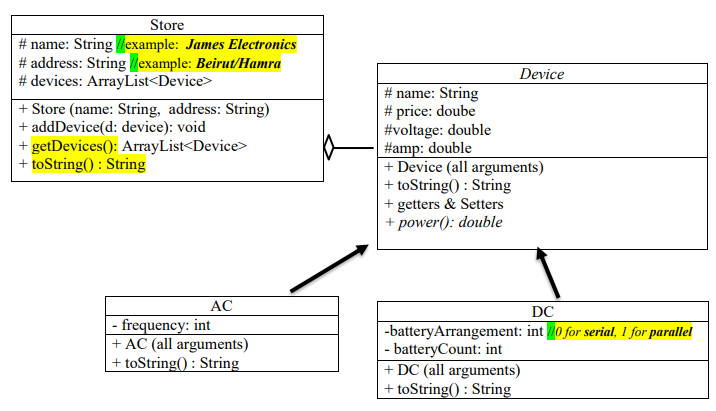
 please use Java Store # name: String/example: James Electronics # address:

String example: Beirut/Hamra # devices: ArrayList + toString(): String Device #name: String

please use Java

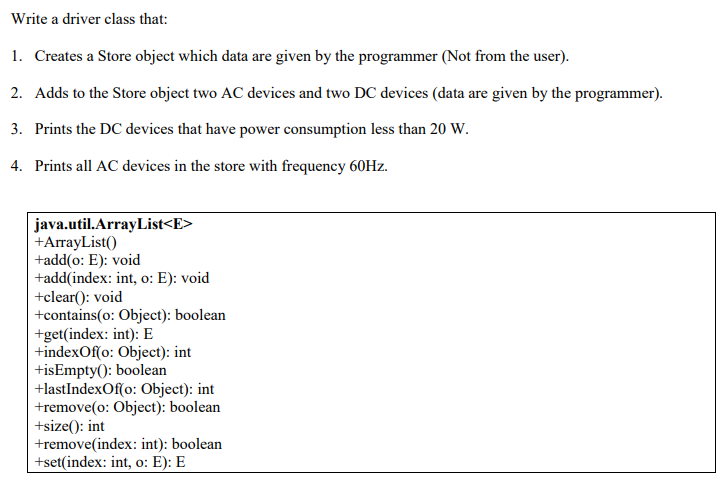
Store # name: String/example: James Electronics # address: String example: Beirut/Hamra # devices: ArrayList + toString(): String Device #name: String # price: doube #voltage: double #amp: double + Device (all arguments) + toString(): String + getters & Setters + power(): double AC - frequency: int + AC (all arguments) + toString(): String DC -battery Arrangement int / for serial, 1 for parallel - batteryCount: int +DC (all arguments) + toString(): String Write a driver class that: 1. Creates a Store object which data are given by the programmer (Not from the user). 2. Adds to the Store object two AC devices and two DC devices (data are given by the programmer). 3. Prints the DC devices that have power consumption less than 20 W. 4. Prints all AC devices in the store with frequency 60Hz. java.util.ArrayList +ArrayList tadd(o: E): void +add(index: int, o: E): void +clear(): void tcontains(o: Object): boolean +get(index: int): E +indexOf(o: Object): int +isEmpty(): boolean +lastIndexOf(o: Object): int +remove(o: Object): boolean +size(): int +remove(index: int): boolean tset(index: int, o: E): E

Step by Step Solution

There are 3 Steps involved in it

1 Expert Approved Answer
Step: 1 Unlock blur-text-image
Question Has Been Solved by an Expert!

Get step-by-step solutions from verified subject matter experts

Step: 2 Unlock
Step: 3 Unlock

Students Have Also Explored These Related Databases Questions!