







Question: Please use JAVAFX application for this problem and not Java Swing. Please write the code in one single class, create methods as needed. Write a
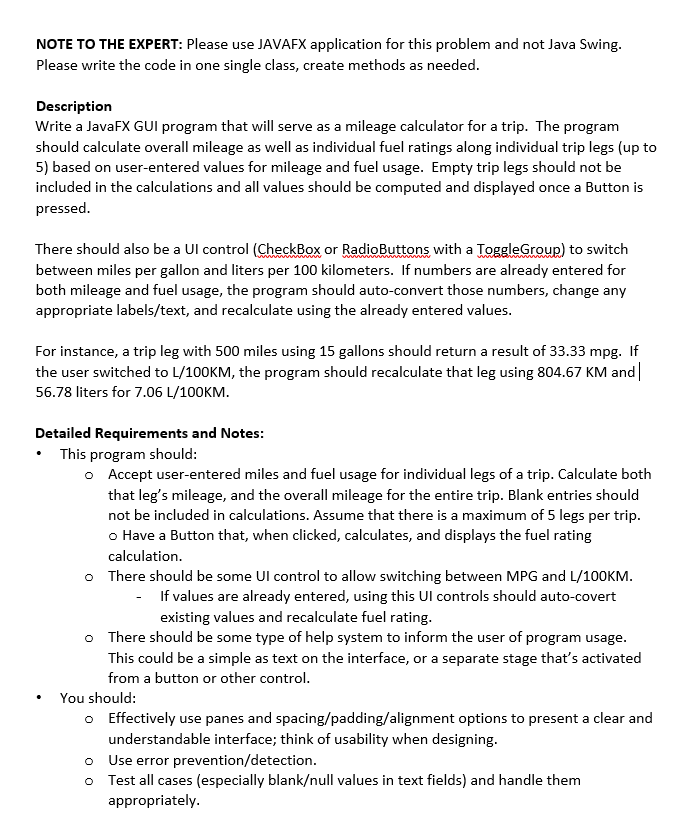
Please use JAVAFX application for this problem and not Java Swing. Please write the code in one single class, create methods as needed. Write a JavaFX GUI program that will serve as a mileage calculator for a trip. The program should calculate overall mileage as well as individual fuel ratings along individual trip legs (up to 5) based on user-entered values for mileage and fuel usage. Empty trip legs should not be included in the calculations and all values should be computed and displayed once a Button is pressed. There should also be a Ul control (CheckBox or RadioButtons with a ToggleGroup) to switch between miles per gallon and liters per 100 kilometers. If numbers are already entered for both mileage and fuel usage, the program should auto-convert those numbers, change any appropriate labels/text, and recalculate using the already entered values. For instance, a trip leg with 500 miles using 15 gallons should return a result of 33.33 mpg. If the user switched to L/100KM, the program should recalculate that leg using 804.67 KM and | 56.78 liters for 7.06 L/100KM. This program should: Accept user-entered miles and fuel usage for individual legs of a trip. Calculate both that leg's mileage, and the overall mileage for the entire trip. Blank entries should not be included in calculations. Assume that there is a maximum of 5 legs per trip. Have a Button that, when clicked, calculates, and displays the fuel rating calculation. There should be some UI control to allow switching between MPG and L/100KM. If values are already entered, using this UI controls should auto-covert existing values and recalculate fuel rating. There should be some type of help system to inform the user of program usage. This could be a simple as text on the interface, or a separate stage that's activated from a button or other control. You should: Effectively use panes and spacing/padding/alignment options to present a clear and understandable interface; think of usability when designing. Use error prevention/detection. Test all cases (especially blankull values in text fields) and handle them appropriately. Please use JAVAFX application for this problem and not Java Swing. Please write the code in one single class, create methods as needed. Write a JavaFX GUI program that will serve as a mileage calculator for a trip. The program should calculate overall mileage as well as individual fuel ratings along individual trip legs (up to 5) based on user-entered values for mileage and fuel usage. Empty trip legs should not be included in the calculations and all values should be computed and displayed once a Button is pressed. There should also be a Ul control (CheckBox or RadioButtons with a ToggleGroup) to switch between miles per gallon and liters per 100 kilometers. If numbers are already entered for both mileage and fuel usage, the program should auto-convert those numbers, change any appropriate labels/text, and recalculate using the already entered values. For instance, a trip leg with 500 miles using 15 gallons should return a result of 33.33 mpg. If the user switched to L/100KM, the program should recalculate that leg using 804.67 KM and | 56.78 liters for 7.06 L/100KM. This program should: Accept user-entered miles and fuel usage for individual legs of a trip. Calculate both that leg's mileage, and the overall mileage for the entire trip. Blank entries should not be included in calculations. Assume that there is a maximum of 5 legs per trip. Have a Button that, when clicked, calculates, and displays the fuel rating calculation. There should be some UI control to allow switching between MPG and L/100KM. If values are already entered, using this UI controls should auto-covert existing values and recalculate fuel rating. There should be some type of help system to inform the user of program usage. This could be a simple as text on the interface, or a separate stage that's activated from a button or other control. You should: Effectively use panes and spacing/padding/alignment options to present a clear and understandable interface; think of usability when designing. Use error prevention/detection. Test all cases (especially blankull values in text fields) and handle them appropriately
Step by Step Solution
There are 3 Steps involved in it

Get step-by-step solutions from verified subject matter experts
 Study Help