







Question: Please use MATLAB (add comments) Importing, Sorting, Fitting, and Exporting Data Write a program that loads a 1010 array of numbers from the data file
Please use MATLAB (add comments)
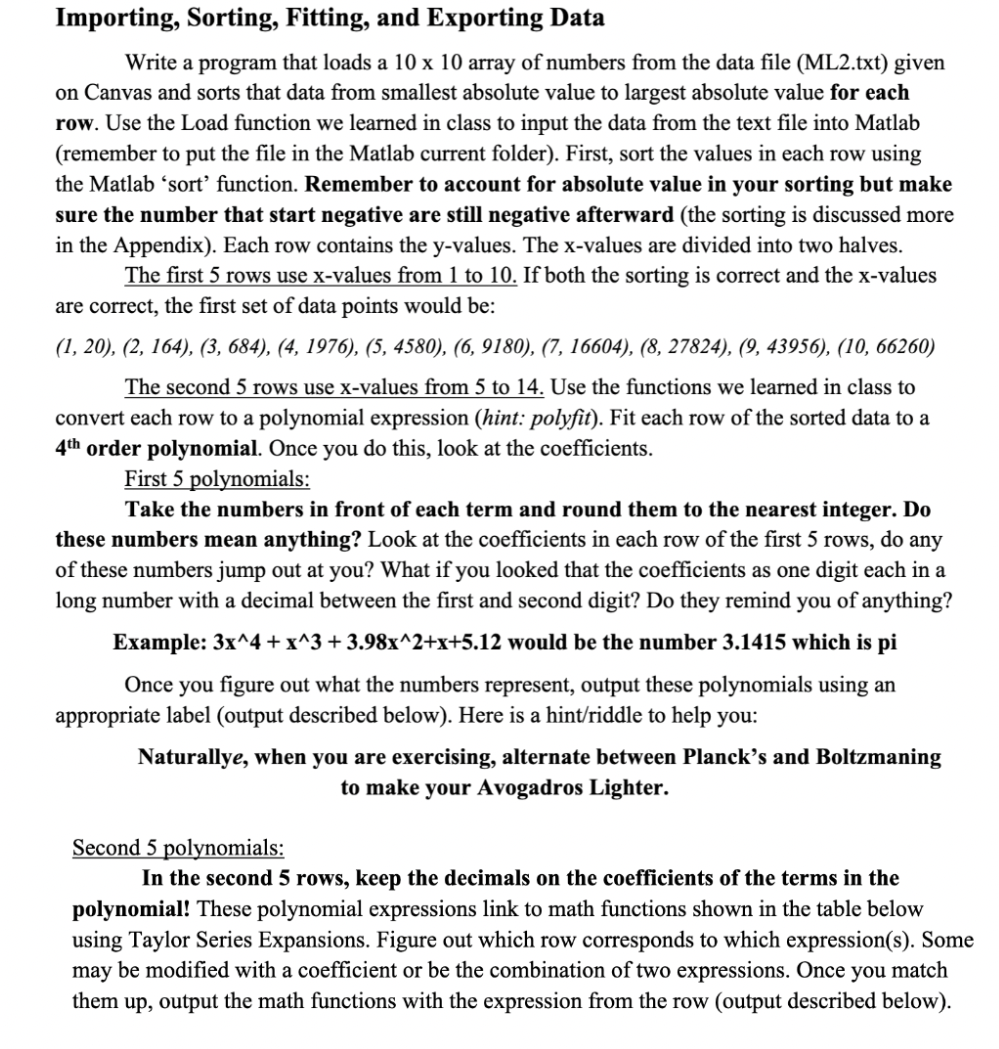
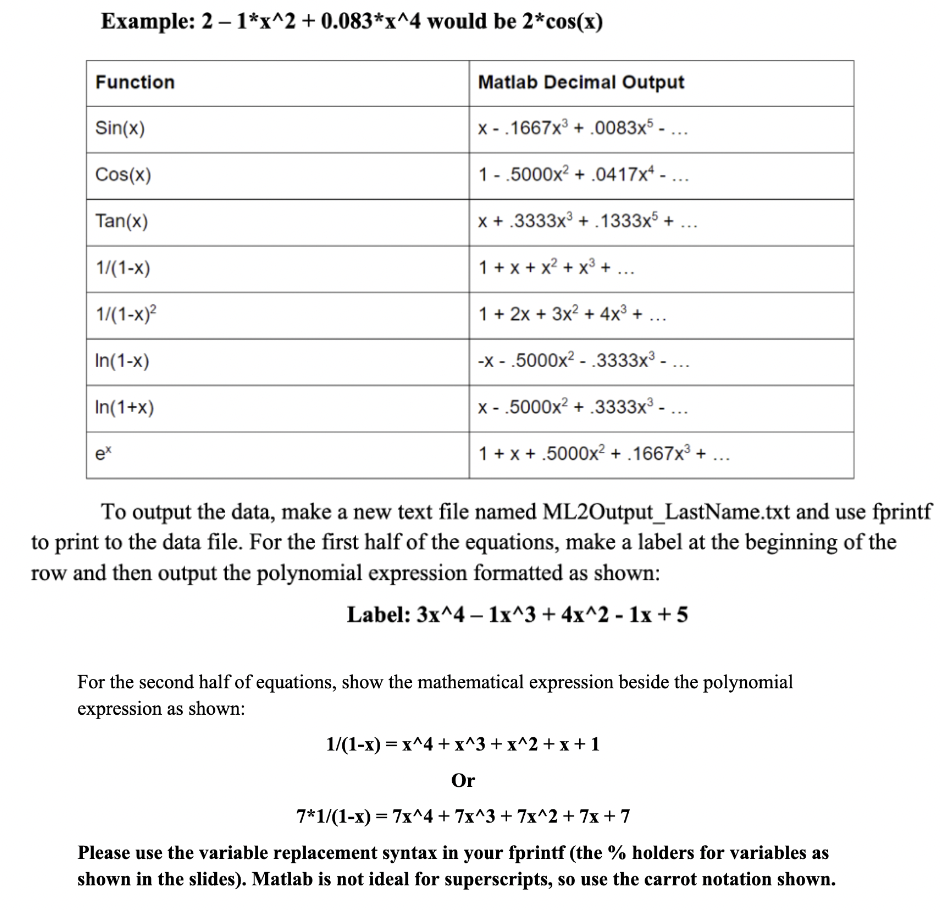
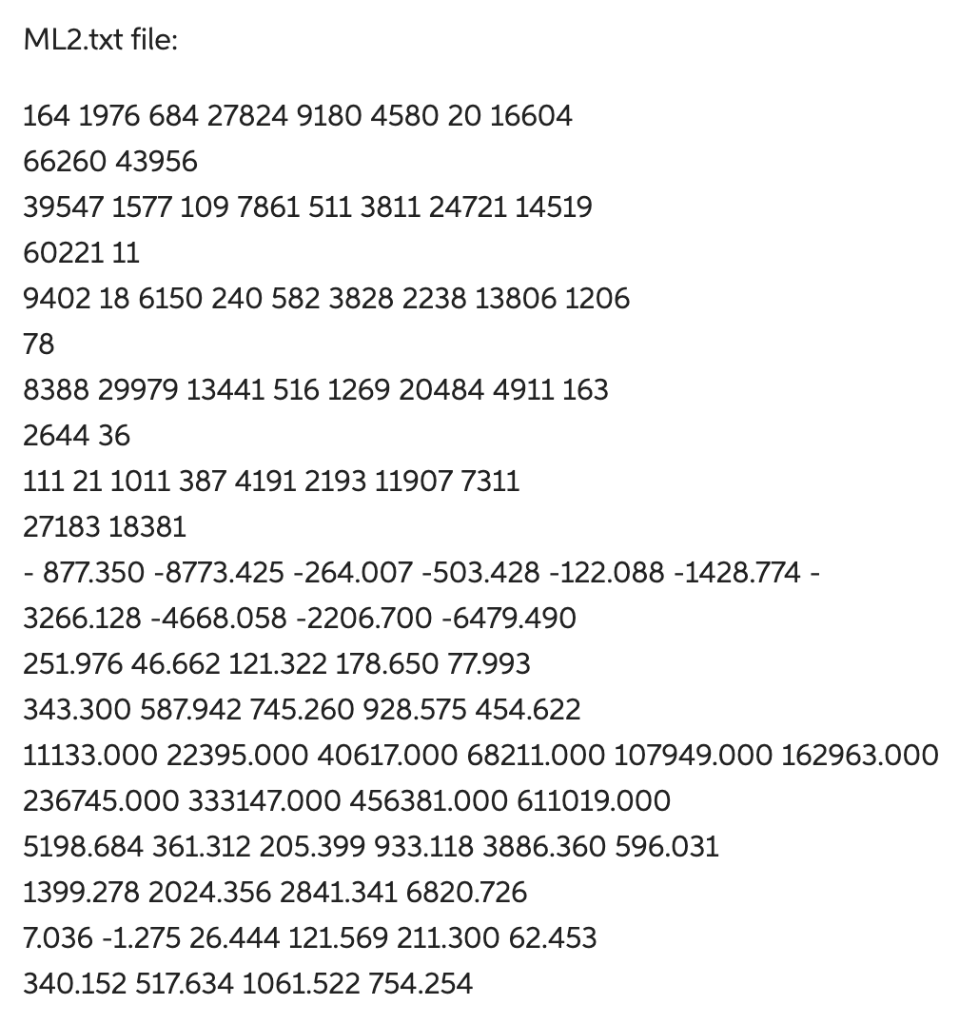
Importing, Sorting, Fitting, and Exporting Data Write a program that loads a 1010 array of numbers from the data file (ML2.txt) given on Canvas and sorts that data from smallest absolute value to largest absolute value for each row. Use the Load function we learned in class to input the data from the text file into Matlab (remember to put the file in the Matlab current folder). First, sort the values in each row using the Matlab 'sort' function. Remember to account for absolute value in your sorting but make sure the number that start negative are still negative afterward (the sorting is discussed more in the Appendix). Each row contains the y-values. The x-values are divided into two halves. The first 5 rows use x-values from 1 to 10 . If both the sorting is correct and the x-values are correct, the first set of data points would be: (1, 20), (2,164),(3,684),(4,1976),(5,4580),(6,9180),(7,16604),(8,27824),(9,43956),(10,66260) The second 5 rows use x-values from 5 to 14 . Use the functions we learned in class to convert each row to a polynomial expression (hint: polyfit). Fit each row of the sorted data to a 4th order polynomial. Once you do this, look at the coefficients. First 5 polynomials: Take the numbers in front of each term and round them to the nearest integer. Do these numbers mean anything? Look at the coefficients in each row of the first 5 rows, do any of these numbers jump out at you? What if you looked that the coefficients as one digit each in a long number with a decimal between the first and second digit? Do they remind you of anything? Example: 3x4+x3+3.98x2+x+5.12 would be the number 3.1415 which is pi Once you figure out what the numbers represent, output these polynomials using an appropriate label (output described below). Here is a hint/riddle to help you: Naturallye, when you are exercising, alternate between Planck's and Boltzmaning to make your Avogadros Lighter. Second 5 polynomials: In the second 5 rows, keep the decimals on the coefficients of the terms in the polynomial! These polynomial expressions link to math functions shown in the table below using Taylor Series Expansions. Figure out which row corresponds to which expression(s). Some may be modified with a coefficient or be the combination of two expressions. Once you match them up, output the math functions with the expression from the row (output described below). Example: 21x2+0.083x4 would be 2cos(x) To output the data, make a new text file named ML2Output_LastName.txt and use fprintf o print to the data file. For the first half of the equations, make a label at the beginning of the ow and then output the polynomial expression formatted as shown: Label: 3x41x3+4x21x+5 For the second half of equations, show the mathematical expression beside the polynomial expression as shown: 1/(1x)=x4+x3+x2+x+1Or71/(1x)=7x4+7x3+7x2+7x+7 Please use the variable replacement syntax in your fprintf (the \% holders for variables as shown in the slides). Matlab is not ideal for superscripts, so use the carrot notation shown. ML2.txt file: 1641976684278249180458020166046626043956395471577109786151138112472114519602211194021861502405823828223813806120678838829979134415161269204844911163264436111211011387419121931190773112718318381877.3508773.425264.007503.428122.0881428.7743266.1284668.0582206.7006479.490251.97646.662121.322178.65077.993343.300587.942745.260928.575454.62211133.00022395.00040617.00068211.000107949.000162963.000236745.000333147.000456381.000611019.0005198.684361.312205.399933.1183886.360596.0311399.2782024.3562841.3416820.7267.0361.27526.444121.569211.30062.453340.152517.6341061.522754.254
Step by Step Solution
There are 3 Steps involved in it

Get step-by-step solutions from verified subject matter experts
 Study Help