



Question: Please use MS Project. 1. Create the structure of your schedule in MS Project using the WBS provided. 2. Add the duration estimates for each
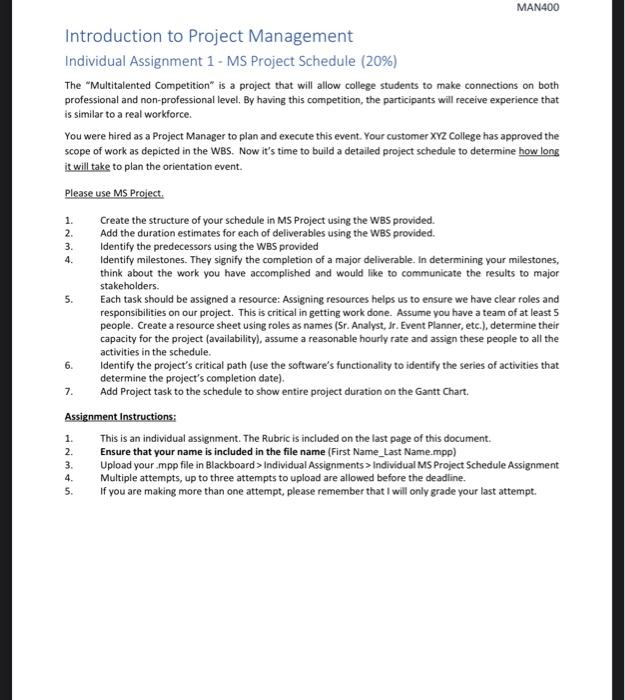
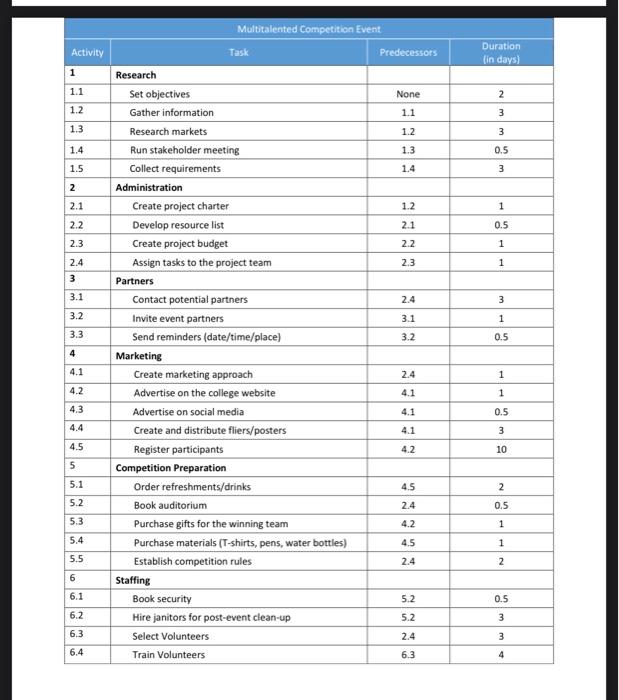
Please use MS Project. 1. Create the structure of your schedule in MS Project using the WBS provided. 2. Add the duration estimates for each of deliverables using the WBS provided. 3. Identify the predecessors using the WBS provided 4. Identify milestones. They signify the completion of a major deliverable. In determining your milestones, think about the work you have accomplished and would like to communicate the results to major stakeholders. 5. Each task should be assigned a resource: Assigning resources helps us to ensure we have clear roles and responsibilities on our project. This is critical in getting work done. Assume you have a team of at least 5 people. Create a resource sheet using roles as names ( Sr. Analyst, Jr. Event Planner, etc.), determine their capacity for the project (availability), assume a reasonable hourly rate and assign these people to all the activities in the schedule. 6. Identify the project's critical path (use the software's functionality to identify the series of activities that determine the project's completion date). 7. Add Project task to the schedule to show entire project duration on the Gantt Chart. Assignment Instructions: 1. This is an individual assignment. The Rubric is included on the last page of this document. 2. Ensure that your name is included in the file name (First Name_Last Name.mpp) 3. Upload your .mpp file in Blackboard > Individual Assignments > Individual MS Project Schedule Assignment 4. Multiple attempts, up to three attempts to upload are allowed before the deadline. 5. If you are making more than one attempt, please remember that I will only grade your last attempt. \begin{tabular}{|c|c|c|c|} \hline \multicolumn{4}{|c|}{ Multitalented Competition Event } \\ \hline Activity & Task & Predecessors & \begin{tabular}{l} Duration \\ (in days) \end{tabular} \\ \hline 1 & Research & & \\ \hline 1.1 & Set objectives & None & 2 \\ \hline 1.2 & Gather information & 1.1 & 3 \\ \hline 1.3 & Research markets & 1.2 & 3 \\ \hline 1.4 & Run stakeholder meeting & 1.3 & 0.5 \\ \hline 1.5 & Collect requirements & 1.4 & 3 \\ \hline 2 & Administration & & \\ \hline 2.1 & Create project charter & 1.2 & 1 \\ \hline 2.2 & Develop resource list & 2.1 & 0.5 \\ \hline 2.3 & Create project budget & 2.2 & 1 \\ \hline 2.4 & Assign tasks to the project team & 2.3 & 1 \\ \hline 3 & Partners & & \\ \hline 3.1 & Contact potential partners & 2.4 & 3 \\ \hline 3.2 & Invite event partners & 3.1 & 1 \\ \hline 3.3 & Send reminders (date/time/place) & 3.2 & 0.5 \\ \hline 4 & Marketing & & \\ \hline 4.1 & Create marketing approach & 2.4 & 1 \\ \hline 4.2 & Advertise on the college website & 4.1 & 1 \\ \hline 4.3 & Advertise on social media & 4.1 & 0.5 \\ \hline 4.4 & Create and distribute fliers/posters & 4.1 & 3 \\ \hline 4.5 & Register participants & 4.2 & 10 \\ \hline 5 & Competition Preparation & & \\ \hline 5.1 & Order refreshments/drinks & 4.5 & 2 \\ \hline 5.2 & Book auditorium & 2.4 & 0.5 \\ \hline 5.3 & Purchase gifts for the winning team & 4.2 & 1 \\ \hline 5.4 & Purchase materials (T-shirts, pens, water bottles) & 4.5 & 1 \\ \hline 5.5 & Establish competition rules & 2.4 & 2 \\ \hline 6 & Staffing & & \\ \hline 6.1 & Book security & 5.2 & 0.5 \\ \hline 6.2 & Hire janitors for post-event clean-up & 5.2 & 3 \\ \hline 6.3 & Select Volunteers & 2.4 & 3 \\ \hline 6.4 & Train Volunteers & 6.3 & 4 \\ \hline \end{tabular}
Step by Step Solution
There are 3 Steps involved in it

Get step-by-step solutions from verified subject matter experts