







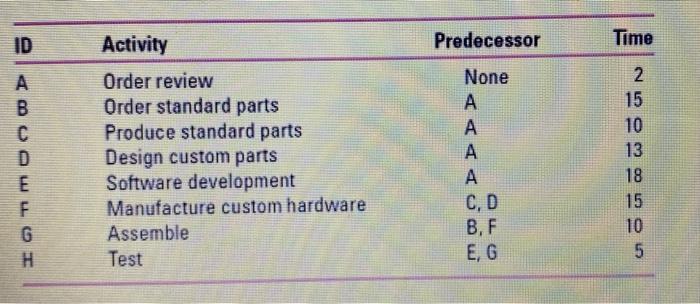
Question: please use MS project ID Predecessor Time D E F G H Activity Order review Order standard parts Produce standard parts Design custom parts Software
please use MS project
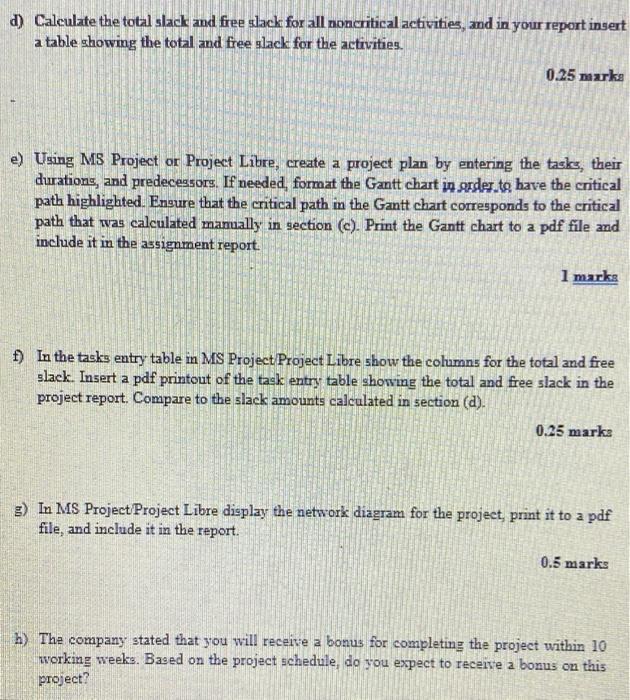
ID Predecessor Time D E F G H Activity Order review Order standard parts Produce standard parts Design custom parts Software development Manufacture custom hardware Assemble Test None A A A A C D B, F E, G 2 15 10 13 18 15 10 5 d) Calculate the total slack and free slack for all noncritical activities, and in your report insert a table showing the total and free slack for the activities. 0.25 marks e) Using MS Project or Project Libre, create a project plan by entering the tasks, their durations, and predecessors. If needed, format the Gantt chart in order to have the critical path highlighted. Ensure that the critical path in the Gantt chart corresponds to the critical path that was calculated manually in section (c). Print the Gantt chart to a pdf file and include it in the assignment report. 1 marks f) In the tasks entry table in MS Project Project Libre show the columns for the total and free slack. Insert a pdf printout of the task entry table showing the total and free slack in the project report. Compare to the slack amounts calculated in section (d). 0.25 marks g) In MS Project Project Libre display the network diagram for the project, print it to a pdf file, and include it in the report. 0.5 marks h) The company stated that you will receive a bonus for completing the project within 10 working weeks. Based on the project schedule, do you expect to receive a bonus on this project Step by Step Solution
There are 3 Steps involved in it
1 Expert Approved Answer
Step: 1 Unlock

Question Has Been Solved by an Expert!
Get step-by-step solutions from verified subject matter experts
Step: 2 Unlock
Step: 3 Unlock
 Study Help