







Question: PLEASE USE OBJECT ORIENTED PROGRAMMING IN C# USING MICROSOFT VISUAL. *****PLEASE USE C#(C SHARP)***** thanks it's really appreciated. //CLASS invoice public class Invoice { //
PLEASE USE OBJECT ORIENTED PROGRAMMING IN C# USING MICROSOFT VISUAL.
*****PLEASE USE C#(C SHARP)*****
thanks it's really appreciated.
//CLASS invoice
public class Invoice { // declare variables for Invoice object private int quantityValue; private decimal priceValue;
// auto-implemented property PartNumber public int PartNumber { get; set; }
// auto-implemented property PartDescription public string PartDescription { get; set; }
// four-argument constructor public Invoice( int part, string description, int count, decimal pricePerItem ) { PartNumber = part; PartDescription = description; Quantity = count; Price = pricePerItem; }
// property for quantityValue; ensures value is positive public int Quantity { get { return quantityValue; } set { if (value > 0) // determine whether quantity is positive { quantityValue = value; // valid quantity assigned } } }
// property for pricePerItemValue; ensures value is positive public decimal Price { get { return priceValue; } set { if (value >= 0M) // determine whether price is non-negative { priceValue = value; // valid price assigned } } }
// return string containing the fields in the Invoice in a nice format; // left justify each field, and give large enough spaces so // all the columns line up public override string ToString() => $"{PartNumber,-5} {PartDescription,-20} {Quantity,-5} {Price,6:C}"; } }
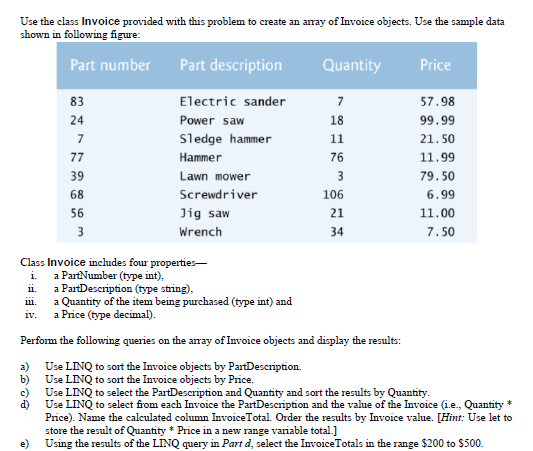
Use the class Invoice provided with this problem to create an aray of Invoice objects. Use the sample data shown in following figure Part number Part description Quantity Price 83 24 Electric sander Power saw S1edge hammer Hammer Lawn mower Screwdriver Jig saw Wrench 57.98 99.99 21.50 11.99 79.50 6.99 11.00 7.50 18 76 39 68 56 106 21 34 Class Invoice includes four properties_ i. a PartNumber (type int). ii. a PartDescription (type sting), iii. a Quantity of the item being purchased (type int) and iv. a Price (type decimal) Perform the following queries on the aray of Invoice objects and display the results: a) Use LINQ to sort the Invoice objects by PartDescription. b) Use LINQ to sort the Invoice objects by Price. c) Use LINQ to select the PartDescription and Quantity and sort the results by Quantity. d) Use LINQ to select from each Invoice the PartDescription and the value of theInvoice (i.e., Quantity Price). Name the calculated column InvoiceTotal. Order the results by Invoice value. [Hint: Use let to store the result of Quantity*Price in a new range variable total.] e) Using the results of the LINQ query in Part d, select the IvoiceTotals in the range $200 to S500
Step by Step Solution
There are 3 Steps involved in it

Get step-by-step solutions from verified subject matter experts
 Study Help